
Add-ons › Widgets › Search tools

Search Organizer
Reorder your Opera search engines any way you like.
Description
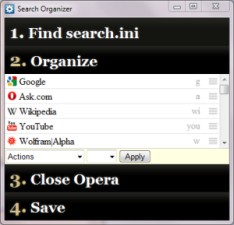
Have you ever wished you could reorder your custom search engines? This utility lets you do just that! Just follow the instructions and Search Organizer will display your search engines in a list that you can organize however you see fit.
Updates:
Fixed incorrect favicons for some default search engines.
Deleted default search engines are now hidden and are shown with a red background when unhidden.
Fixed drag-and-drop thanks to
SpShut
Known issues:
Search Organizer cannot change the order of unedited default searches because they are defined in another file. To make them appear in Search Organizer, open
Preferences
in Opera to the
Search
tab, find the search that isn't appearing, change its name or keyword, then close the Preferences window with OK. After this, you can undo your changes and the search should still appear in Search Organizer.
Screenshots
Comments (14 on the original page, latest shown)
Download
Works with Opera 9 to Opera 12.
About this widget
| Downloads | 3,060 |
|---|---|
| Category | Search tools |
| Version | 1.2 |
| Size | 61KB |
| Last update | October 6, 2010 |
| Devices | desktop |
| Original page | Internet Archive |
Could you add the option "Show/Hide embedded search engines"?!
Nice picture! Unforunately, Opera doesn't seem to place the default search engines in its search.ini unless you change them in some way in Opera. For instance, Bing doesn't show up in my search.ini. Looking at the ini file, I'm not sure how to tell what is a custom search and what is a modified default search though. Why do you want to hide the default searches though? To keep them at the top?
Originally posted by spadija: Why do you want to hide the default searches though? I do not use built-in search engines and they interfere in the general list
By not using them, do you mean you've removed them from inside Opera? There is a "Deleted" key for every search engine in the search.ini file, but I wasn't sure what it's for, since when I deleted a custom search engine, the corresponding section was removed from search.ini. If you've deleted a search engine, but it's still showing up in Search Organizer, could you check your search.ini to see if the search engine is still there, perhaps with a "Deleted" value of 1? Unedited default search engines should not show up in Search Organizer, since those are defined in the search.ini in the installation directory. Also, there doesn't seem to be any reliable way of telling what is or isn't an edited default search just by looking at search.ini.
Yes, exactly - i remove the built-in search engines Yes, they are present in both search.ini marked as Deleted = 1 It is better not to remove them from the file itself as they recover from the locale folder, and again have to be removed through GUI P.S. If you are unsure, then please add a drop down menu "Show all" "Show active (Deleted = 0)" "Show deleted (Deleted = 1)"
Okay, I figured out how it works a bit better now. I'm working on an update to fix some incorrect favicons, so I'll also fix it to hide entries with Deleted = 1 by default and add a show/hide toggle. Edit: Update has been uploaded, so it should appear on the site in a day or so.
Even better!
Finally someone got around to fix this native omission, thanks!..... begs the question why hasn't Opera made this functionality native?
No idea.
nice!
Great! But default search engines - Bing, Amazon, Yahoo, Wikipedia - are shown at first even though I changed their keywords and they are reordered in search.ini. I'm using Opera 11.
Now that you mention it, the same thing is happening here. It may be that the order of the default search engines always overrides the order in your profile's search.ini, in which case, the only way to reorder them is to set the default searches as deleted and make duplicates of them. I'll try to fix that and the weird bug with everything jumping up ≈20px every time you click a button when I get a little more time.
Very nice and usefull... Could you add support for deleting search engines?