
Add-ons › Widgets › Time and Date

Simple SVG Clock
Description
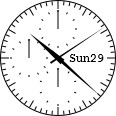
A simple SVG clock with a stop watch.
Just click the clock face to show or hide the second hand.
Click the line around the dial to show or hide.
Click the weekday or day to show or hide.
Hover the 10 millisecond or second or minute face to show.
Click the 10 millisecond or second or minute face to start
or stop or reset the stop watch.
It works only with Opera 10.5x or later.
Never forget it is an SVG format, it can be zoomed in or out as you like it.
If you want to embed this widget into your website, add the
following HTML code:
Only Firefox, Chrome, Safari, and Opera are compatible.
For more information, visit
my blog
.
Changelog:
1.1
Click the line around the dial to show or hide.
Click the weekday or day to show or hide.
Use setTimeout instead of setInterval in the clock function.
1.2
Change the font into Courier New.
Fixed the bug that the second hand does not show at launch.
Now all the lines around the dial can be hidden.
Add the pointer cursor to the elements that can be hidden.
2.0
Add borders.
The stop watch faces are auto-hidden now.
There are only 4 configurations of the lines around the dial (more natural).
2.1
Add icon.
Use CSS.
2.2
Change the font into bold.
Separate the functions to update the hour and minute hands.
Screenshots
Comments (1 on the original page, latest shown)
Download
This file has not been recovered yet. Do you have a copy? Tell us.
About this widget
| Downloads | 5,323 |
|---|---|
| Category | Time and Date |
| Version | 2.2 |
| Size | 3KB |
| Last update | August 29, 2010 |
| Devices | desktop |
| Original page | Internet Archive |
This better than the other one... for me at least