
Add-ons › Widgets › Time and Date

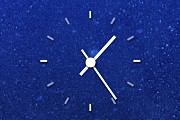
Simplest Clock
A simple clock that goes with anything!
Description
A simple clock based on the original Analog Clock. It doesn't display seconds, and updates less often; meaning it uses next to zero CPU.
New in this version:
Made it a tad smaller
Now includes a black version
And a smaller version
Slightly cleaner code
Click to cycle through the schemes. If you want a smaller version of the black one, just tap "-" five times.
Screenshots
Comments (20 on the original page, latest shown)
Download
This file has not been recovered yet. Do you have a copy? Tell us.
About this widget
| Downloads | 81,010 |
|---|---|
| Category | Time and Date |
| Version | 2.0 |
| Size | 59KB |
| Last update | January 7, 2008 |
| Devices | desktop |
| Original page | Internet Archive |
Very Nice and Useful ! Please let us know if there is a way to change the color. Thanks.
love it...5 stars
what to say.... the simplest is the best!
I keep trying clock widgets and I keep removing them because they just are way too much "in your face". It's a tossup between this and the Opera logo clock, just cause that one has the logo... but this is the one I keep coming back to. Unobtrusive and extremely "clean". 5 stars.
Gave you what you needed with next to zero system resource. Thumb up
i would like a version that changes color, i gets lose in tyhe background but looks nice
Would be nice if it was a tad smaller.
this is BAD! the old one was much better, because of its size. if I increase the size of this version, the graphics quality is greatly reduced. I have to give this one a minus, at least until my "bug" eventually might be fixed.
Gasp! Pleasing the crowd is not easy it seems. The simple way would be to add more states, I'll wait a bit and see what I can do.
One of my favorite widgets is Simplest Clock. It's very nice and doesn't "annoy" the Desktop. I can see, that the new size is smaller than earlier. But can I adjust the size in JS or other place? (Because I prefer the earlier bigger size vs. this small size).
Love this Clock Id Love it even more if it had more Sizes to it Especially a Really Big Size like 1280x1024 ive got Dual monitors and I could have it on the one I use less often
it's easy, i like it/
BLACK VERSION IS REAL GOOD
This is incredible because it's almost transparent. And there are 3 different skins, and 2 different sizes.
Please, add the size adjust possibility.
wicked cool widget ! truly does go with any wallpaper you may have ! just what I was looking for ! How do I change it from the white version to the black version please ? thank you !! :-)
I tried to tap - five times and it did not change,,,,,, please let me know ? thanks !
ok got it !!
one more question,,,,,,how can I set/program this widget to open with windows? other than pinning it to the taskbar, I cannot figure out how to do. thanks !
To make it open with Windows, just copy the shortcut under Start=>All Programs to Start=>All Programs=>Startup Unfortunately, there is an old Windows bug with always on top items, sometimes they lose the always on top status. To remedy that, hide all windows (Win+D) and then restore any one of them.