
Add-ons › Widgets › Miscellaneous

Stock Monitor
Fetches stock prices from Yahoo! Finance.
Description
Finally a widget to help you keep track of stock prices, options, indexes and everything Yahoo! Finance has to offer!
You enter a list of stock/options/indexes symbols you want to track and the widget will fetch the information from Yahoo Finance for you. Yahoo! Finance provides information on stock markets from a big number of countries, so this widget is useful to people all around the world.
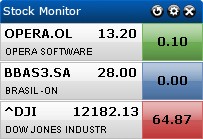
This widget shows the symbol, company name, last trade price and the price change. You can also select how the price change is shown: absolute value or percentage. If you want more detailed information simply click the symbol and you'll be redirected to Yahoo! Finance.
Comments, suggestions and bug reports are welcome.
I hope you like the widget!
Updated:
Fixed: symbol links not working in Opera 9.5
Added: blue background when the change (value or %) is equal to 0 or the symbol is invalid
Note:
if you don't know or can't remember a symbol, use the
Symbol Lookup
in Yahoo! Finance.
Note:
all the information the widget shows is delayed 15 minutes. This is a standard practice in finance websites. If you're an investor you can have access to realtime prices in your broker's website.
Screenshots
Comments (17 on the original page, latest shown)
Download
This file has not been recovered yet. Do you have a copy? Tell us.
About this widget
| Downloads | 26,956 |
|---|---|
| Category | Miscellaneous |
| Version | 1.2 |
| Size | 25KB |
| Last update | February 10, 2008 |
| Devices | desktop |
| Original page | Internet Archive |
Love this widget
1. Thanks. 2. For "S&P 500 INDEX,RTH (SNP:^GSPC)" there is showed price change only as value. Instead of last price there is showed "RTH". 3. Maybe could you add also simplified interface (as option?), without symbols, with company name, last trade price and price change in this same row, in order to widget takes fewer place?
I ran into the problem described below with "S&P 500 INDEX,RTH (SNP:^GSPC)" as well. Here's what I changed to fix it: var data = lines[j].split(","); got changed to: var data = /^"([^"]+)","([^"]+)",(.+),(.+),"([^"]+)" .exec(lines[j]); and all indexes into data had to be bumped by 1. ( data[1] -> data[2] )
Does anyone know how to get "TTWO" to show up?
Excellent widget! I have been using it for a while, and it rocks!
By the way, Yahoo has recently started giving real-time stock prices. Is there any way these prices would show up in the widget, instead of delayed quotes?
I like your tool. ^gspc shows points instead of %. Would be nice to have some kind of alert/sound if a stock hits predifined levels.
Love it! Wanna have: 1"stay on top" as an option. 2 if long list, split over two colums 3 choose layout as "row" or "column"- Keep up the great work!
Excellent widget. Previous comment requests "stay on top" option: it's available -- right-click anywhere on the widget or click "Widgets / Manage widgets ... / Properties" from the task bar. re: "Show change as:" You're using two lines for each entry. The right column displays symbol and price on the first line, name on the second. In the left column, is it possible to display both value and percentage change on the two available lines rather than a choice of value or percentage? Last, navigation with a list longer than the screen is sub-optimal. Is it possible for the widget to respond to "Page Up / Page Down" clicks?
hello this is a good widget but i have a problem i am able to see only one stock despite of typing right codes for 3 or 4 stock quotes, can anyone tell me whats the problem i have given space between different stock names, so i have to open different widgets for different stock, i cant see the second stock in the same window/widgets pls help
This is an amazing widget! However, I have a suggestion to make. Stock Monitor is a very useful widget, however can it be localized? I live in the UK and would like to access the stock prices / values on the LSE / FTSE 100, etc. Can the widget's functionality be extended to look up stock values via Yahoo! Finance (UK) site (http://uk.finance.yahoo.com/)? Perhaps the widget should somehow detect the locale of the opera browser when it is first installed and then default to using that country's stock values?
Hi, could you please put some "size" settings ? Because I have a 26" lcd screen and this wonderful widget is very small in 1900x1200 screen resolution... Regards
re: "Previous comment requests "stay on top" option: it's available -- right-click anywhere on the widget or click "Widgets / Manage widgets ... / Properties" from the task bar. re: "Show change as:"" OK, I sure can't find this "Show change as: " option. When I look at the properties of the widget, the only option is to manage the position.
Great Applet, but is there any updated coming up where I can enter my own buying prices and not only the daily change? Also the possibility of having stop/loss marks would be nice to have. btw: I managed to enter currencies as well by typing EURUSD=X as a symbol. (ttok some time ;-))
This is one of my favorites I'd like to be able to change the colors around a bit though.. The blue top bar doesn't always match my desktop.. That's however a minor detail, I love it!
pretty cool hopefully some changes for opera 10.5 !
Stock WTI does not display correctly. The price is missing and instead of showing the percentage change, it displays the price change. Perhaps the ampersand in the stock's name confuses the widget.