
Add-ons › Widgets › Search tools

Switchboard Directory
Search Switchboard.com for phone numbers, addresses and maps.
Description
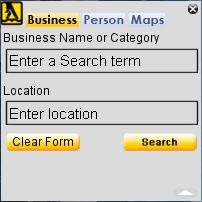
Just click on one of the three buttons on top, enter your data then click on "search."
On the Person form the Rev. Phone Lookup field is actually a separate
form by itself. You can just press Enter on the Phone field to look up the phone number. The Phone field
is ignored
when you press Search
if
there is data entered in the Name fields, City field or if a state is selected.
On the Maps form, you can just press Enter in the Location field instead of clicking on the Get Map button.
To erase an individual field in any of the forms except the Maps form just double-click in the field.
When the widget is minimized, clicking on the logo will expand the widget.
Screenshots
Download
Works with Opera 9 to Opera 12.
About this widget
| Downloads | 2,527 |
|---|---|
| Category | Search tools |
| Version | 1.1 |
| Size | 37KB |
| Last update | February 23, 2008 |
| Devices | desktop |
| Original page | Internet Archive |