
Add-ons › Widgets › Time and Date

Task time counter
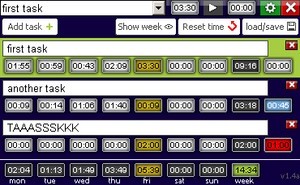
Now you can check how much time you spend on each task.
Description
Add multiple tasks and count time for each task per day.
SAVE OPTIONS
Widget will save your time automatically every minute or when some changes are made by you.
For manual save/load, you can use the save/load button. Once you click the button, you will have three sets of slots to save your data in, marked by buttons: Load/Save, L1/S1 and L2/S2.
The main widget data repository is stored in load/save slot. The other two slots are for your use
. Though you can store any text in the given text box, it is better to store the time records instead.
So what happens when you press each button? Read on:
load: load all actual data from the widget to the text box
save: use the data in the text box, and add to the widget (creates new tasks and add times) and store it in preferences
L1: load data from slot 1 (if some data has been previously stored in that slot)
S1: save data from the text box to this slot
L1: load data from slot 2 (if some data has been previously stored in that slot)
S1: save data from the text box to this slot
Using L1/S1, L2/S2 has no effect on your task list.
So if you want to save previous week data, use the button combo:
load
S1
This will first load the data into the text box, and then save it in slot 1.
Then you can press reset time button and start your new week of tasks. Your previous week is stored in slot 1, which you can check by pressing L1.
Saved (import/export) data format:
task_name|X|X|X|X|X|X|X|time_limit_for_task|||task_name2|X|X|X|X|X|X|X|time_limit_for_task2|||
where X is time for each week day in minutes
Screenshots
Comments (6 on the original page, latest shown)
Download
Works with Opera 9 to Opera 12.
About this widget
| Downloads | 9,865 |
|---|---|
| Category | Time and Date |
| Version | 1.1 |
| Size | 35KB |
| Last update | June 8, 2010 |
| Devices | desktop |
| Original page | Internet Archive |
Superb! I have been waiting for one of these for a while (I had one that only worked with one internal system...) couple of odd things I see though - will leave notes on them.
thanks for adding this ^-^
Would be good if there was some animated indication that time was running; maybe just as simple as blinking the colon.
This is excellent - I'm a bit confused about the save/load functions though Edit: I figured it out! I changed the text on the buttons on my installation - see here if anyone wants to see what I did .
I'm looking for something like this, but I'm confused about a lot more than the save/load functions. How do I use it?
It' what i was looking for! But it would be great if program could count time spent for each task not only during week but month or even year (there are some task which demand more time then a week to carry out)