
Add-ons › Widgets › Search tools

TheSage Dictionary
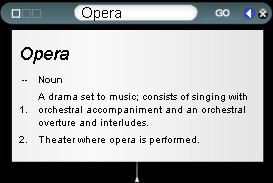
This widget searches Sequence Publishing.com and displays the result inside the widget.
Description
Just type a word in the search box and then click on the Go button or just press Enter.
If you get a "Did you mean?" response then choose one of the radio buttons and click on the Look Up Word button. The word is then displayed in the search box and so is its definition in the drop down box.
Clicking on the white arrow next to the Close button minimizes the widget.
To close the drop down box just click the circle hanging below the box.
To go to the Sequence Publishing web site click on the three squares on the left.
Screenshots
Comments (2 on the original page, latest shown)
Download
Works with Opera 9 to Opera 12.
About this widget
| Downloads | 4,036 |
|---|---|
| Category | Search tools |
| Version | 2.4 |
| Size | 32KB |
| Last update | February 12, 2008 |
| Devices | desktop |
| Original page | Internet Archive |
This is the best Dictionary widget i've found. Please keep developing it!
indeed great and useful widget!