
Add-ons › Widgets › Search tools

ThumbMark
Description
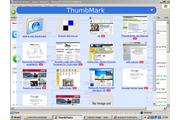
This is a bookmark that shows a thumbnail from the sites.
You can import your del.icio.us bookmark to it.
Screenshots
Comments (20 on the original page, latest shown)
Download
Works with Opera 9 to Opera 12.
About this widget
| Downloads | 74,444 |
|---|---|
| Category | Search tools |
| Version | 1.1 |
| Size | 53KB |
| Last update | September 11, 2006 |
| Devices | desktop |
| Original page | Internet Archive |
quite good but it isn't very useful and by plaicng the arrow on the favorites we have the same effetcs we can't see very well and it's too big so we can't surf
Cool
Cool, really needs to be able to use the users existing bookmarks though rather than having to re-add everything (if you don't use del.icio.us). Like Revan76 says though. it needs to be resizable somehow as it's so big you can't surf with the widget in view.
I imported my bookmarks to Del.icio.us but now all marked "not share" without click each (I have 180+) bookmark and select share how can I turn on share for all bookmarks? Or I think you also add password so widget can show all not shared bookmarks maybe?
I have imported my few bookmarks from delicious and now it says no images yet, I tried several times but it doesnt change. Any solution?
começa a adicioanr sombras em volta do seus widgets, só esta faltando uma preocupação com a aparencia deles eu acho...
Tirou essa idéia da miniatura que o Opera mostra, né?! ;D
How to add a screenshot of the page to ThumbMark ? I've the message "No Image yet" ??? Also i've tried to add an off-line html file like this : file://localhost/Users/yvon/bin/trash_rep/man.trash.1.html failed to link to Opera's brrowser ???
No Image Yet is when the website that give the shots didn´t have this site shot (like yours offline sites)
gr8 job done............ can you make a widget by which mouseover event would genrate the ip address, location and the coordinates of the hyperlink.......... this is actually present in firefox as an add-on. code for ur help:- function hostipfox_enable() { } function hostipfox_disable() { } function hostipfox_init() { if('__hostipfox__FillInHTMLTooltip' in window) return; const prefs = Components.classes['.org/preferences-service;1'].getService(Components.interfaces.nsIPrefService).getBranch(null); var originalFillInHTMLTooltip = window.FillInHTMLTooltip; window.__hostipfox__FillInHTMLTooltip = originalFillInHTMLTooltip; const dnsService = Components.classes['.org/network/dns-service;1'].getService(Components.interfaces.nsIDNSService) const nsISupportsString = ('nsISupportsWString' in Components.interfaces) ? Components.interfaces.nsISupportsWString : Components.interfaces.nsISupportsString; window.FillInHTMLTooltip = function(elem) { var retval = false; if (!elem || elem.namespaceURI == 'http://www.mozilla.org/keymaster/gatekeeper/there.is.only.xul') return false; try { if (elem) { while (elem && (elem.nodeType != Node.ELEMENT_NODE || !elem.attributes.length)) elem = elem.parentNode; if (!elem) return false; var attrlist = null; try { attrlist = prefs.getBoolPref('browser.chrome.tooltips.use_attrlist') ? prefs.getComplexValue('browser.chrome.tooltips.attrlist', nsISupportsString).data : null ; } catch(ex) { } if (attrlist) { attrlist = attrlist.split('|'); for (var i in attrlist) { if (attrlist && elem.getAttribute(attrlist )) alttooltiptext.push('['+attrlist +']: '+elem.getAttribute(attrlist )); } } else if ( !elem.ownerDocument.contentType.match(/^text/html//) && ( ('href' in elem && elem.href) || ('src' in elem && elem.src) ) ) { // We have a valid link (with href in it) var url = elem.href; // ... or we have a src tag (img) if(!url) { url = elem.src; } if(url) { if(url.length > 40) { url = url.substring(0, 37) + '...'; } if(url.substring(0, 4) == 'http') { var original = elem.label ? elem.label : elem.alt; var hostname = elem.hostname ? elem.hostname : Components.classes[".org/network/io-service;1"].getService(Components.interfaces.nsIIOService).newURI(url, null, null).host; var ipaddr = dnsService.resolve(hostname, false).getNextAddrAsString(); var tooltip = new hostipfox_Tooltip(original, url, hostname, ipaddr, 'loading...'); retval = tooltip.update(); tooltip.getLocation(ipaddr); } } } } } catch(e) { } if(!retval) return originalFillInHTMLTooltip(elem); else return true; }; } reach me at yahoo, with bap_g.com take care
Hey I just downloaded it? Whats it about? It just shows a blue transparent screen... plz help
Thanks man! Really good work!
About the size comments, all widgets are resizeable. Just press + and - and the widget will be zoomed by like any other page in Opera.
Nice, now i have the default opera bookmarks, opera speed dial, and thumbmark. Never enought for bookmarks tools. Thanks
vlw, ajuda bastante heheh tnx
Is there any chance of a feature like "drag and drop"? Thx
...It doesn't do anything when I click on the links...
It's horrible.
And the close button doesn't work. Seriously, put more work into a Widget before posting it.
Just downloaded, will check it out later.