
Add-ons › Widgets › Miscellaneous

Timetable
Application to coordinate school or university lessons.
Description
The widgets allows you to
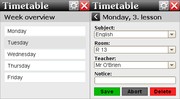
manage lessons, rooms, teachers and time slots
.
In minimized mode the widget shows the present lesson and the next one including room and start time, what is very helpful on mobile devices.
Furthermore you can synchronize via the Internet. So you can use and edit the same timetable on two timetable widgets. That makes it possible to enter your timetable on the desktop widget and synchronize with your mobile phone afterwards.
Timetable is multilingual (English, German).
If you want to see how a full timetable looks like just synchronize with
Username: demo
Password: demo
Navigate by clicking or using the keys 1-9 and * (to go back).
Use the "Edit time slots" in the config menu to show the present and the next lesson.
For more information see the help inside (config menu -> ?) or
watch the
tutorial video
on YouTube.
Screenshots
Comments (3 on the original page, latest shown)
Download
Works with Opera 9 to Opera 12.
About this widget
| Downloads | 4,483 |
|---|---|
| Category | Miscellaneous |
| Version | 1.0 |
| Size | 45KB |
| Last update | July 28, 2009 |
| Devices | desktop, mobile |
| Original page | Internet Archive |
great widget, but it would be good to have a multiple weeks option. at my school we have a 2 week timetable with different lessons on different weeks. thanks
Thanks for your comment. But at the moment you are the only one who wants that feature. So perhaps you could just use two of the widgets. One for the first week, one for the second.
No obvious way to add time of classes gets a solid downvote. Cool idea but not there yet.