
Add-ons › Widgets › Web Developer

Unicode Charts :: Tools
Description
A small tool to display unicode charts
Screenshots
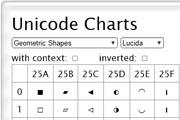
Comments (18 on the original page, latest shown)
Download
This file has not been recovered yet. Do you have a copy? Tell us.
About this widget
| Downloads | 47,657 |
|---|---|
| Category | Web Developer |
| Version | 1.1 |
| Size | 29KB |
| Last update | May 22, 2006 |
| Devices | desktop |
| Original page | Internet Archive |
It's huge!
I agree it is far too big, I assume on 800x600 that it drops off the page. Of course it can be scaled using ctrl+mousewheel however this should not be necessary. Also, when the table is very narrow such as on "number forms" there is a transparent gap in the widget. Also there is no way to select or copy the characters. It is a good idea but needs improvement before I can start using it.
I like big fonts, but ok, i have added the possibility to scale the fontsize. Also the characters are now selectable. I can not see here what you mean with that transparent cap.
it doesn't save the "inverted" setting but maybe it is a bug of this beta build. anyway it is useful and a good idea!
I don't know if it's from the beta build (8414) or from the widget itself, but when you select the "Currency symbols"(the bottom), "Control Pictures", "Block Elements", etc. charts, which are smaller then the widget's interface, you'll see that everything between the table and the edge of the widget is transparent. Why do I think it should be opaque or at least semi-transparent as with the inverted theme? Or perhaps if the interface is adjusted so there isn't any extra space to make transparent? Both of theese would look great, but not the current situation.
Ah, thank you. It's fixed now.
It's a very limited set of charts: is it possible to get more in there? This is somewhat more usable than the Windows character map, but much less featured. Default font size should be a little smaller.
Hi moo if you are used to work with html then it's very easy to add other charts. Just download the widget (with right click and 'save target as ...'. Then you open the html with a text editor. The markup for the greek charts looks e.g. like this: Greek Greek Extended You can add in the same way your groups and charts! But if i find some time then i will add the feature to add own charts dynamically.
I seem to have a lot of unrendered characters (square boxes). Is this how it's supposed to be? UnicodeCharts.png Otherwise, useful widget. ╭ ╮ ╰ ╯ BTW, is there a way to display alt+number combinations for the characters? It's a pain right now to use the characters: switch to UniCharts, select with mouse, ctrl-c, switch to textbox, ctrl-v Is it normal that double-click can only bring up a "copy" popup menu on some character sets?
Agreed on the default font-size, why not 100% of the browser default, and/or less cell padding. Font-size pref is thankfully stored, but no other settings?
I can't see anything. It doesn't work on Linux.
If you are using MS Windows, this Wikipedia article may be of your interest: http://en.wikipedia.org/wiki/Windows_Alt_keycodes For example, you want the character "Ů", then you can type its hex (016e) normally, then highlight the whole number, press Alt+X. That's exactly how I got the char in here. Thanks to aleto, now I've got a handy table to look up the hex numbers. Kudos
Hi aleto, could you give me a guide on how to add more fonts to the chart? like Tahoma or Arial Unicode MS. And in your experience, which font has the most characters on Windows and Linux?
Hi Rooy at the top of the html add a new line for your font, like: #output .char {font-family:"My Font"} the id in the style tag can be any given name. Then add an other option at the bottom: My Font The value has to match the id from the style element. That should work
Make it small andor resizable and it will win the game
I had this, but I downloaded a later version of Opera, and now it won't download.
Very useful.
Very limited fonts.