
Add-ons › Widgets › Web Developer

VisComPic
Creates a translucent window with the selected image & more...
Description
For copy pixel color or ruler, just press
Control+C
[Added] Ruler.
[Added] Relative ruler.
[Added] Percentage sizes.
[Added] Saving fragment.
[Added] Convert selection to DataURL.
[Improved] Before text for Color Pippet
[FIX] Open small pictures
Tutorial for VisComPic (Visual Compare Pictures)
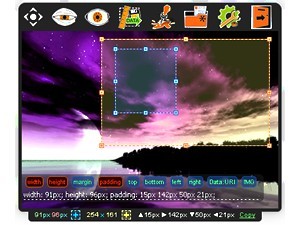
1. For image preservation, allocate it with "a blue framework" and click it twice.
2. For use of a relative ruler, use "a yellow framework" as borders.
2.1. For removal of "a yellow framework" click it twice.
3. For setting, copyings through "Control + C", press Copy.
4. For use of percent as the sizes and spaces, simply press indicators.
5. For text before use in "Color Pippet", come into options.
[Описание]
Это инструмент для попиксельной вёрстки в Opera и не только, так как виджет может свободно располагаться где угодно как отдельное окно вашей Операционной системы.
Это инструмент для создания и наложения куда угодно полупрозрачного изображения, выбранного вами.
Так же это программа для конвертации изображения, выделенного фрагмента в dataURL (base64) для вставки в HTML или CSS, еще она может определять цвет пикселя в макете, и имеет очень хорошую линейку, как простую так и относительною и даже в процентах.
К тому же этот инструмент может, вырезать выделенный фрагмент изображения в отдельный файл.
Screenshots
Comments (2 on the original page, latest shown)
Download
Works with Opera 9 to Opera 12.
About this widget
| Downloads | 134,753 |
|---|---|
| Category | Web Developer |
| Version | 3.1 |
| Size | 280KB |
| Last update | May 29, 2010 |
| Devices | desktop |
| Original page | Internet Archive |
loding a poblem
SUPER!