
Add-ons › Widgets › Web Developer

Widgex
Regular expression tester.
Description
About Widgex
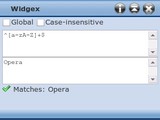
Widgex is a JavaScript
regular expression
(regex) tester.
In the upper text box enter a regular expression pattern without surrounding slashes or flags (e.g. ^[a-zA-Z]+). In the lower box enter the text within which you wish to search. Matches, if they exist, are displayed as you type. A popular source of ready-made patterns is
RegExLib.com
.
Daniel Davis
Basic Regex Reference
Escape or unescape the following character.
^
Match the beginning of the text.
dollar sign
Match the end of the text.
*
Find zero or more occurrences of the preceeding item.
+
Find one or more occurrences of the preceeding item.
?
Find zero or one occurrence of the preceeding item.
. (dot)
Match any character except newline characters.
|
Match the preceeding or following item.
Visit
W3Schools
for a much more comprehensive guide to regular expressions and their usage in JavaScript.
Screenshots
Download
This file has not been recovered yet. Do you have a copy? Tell us.
About this widget
| Downloads | 5,897 |
|---|---|
| Category | Web Developer |
| Version | 1.0 |
| Size | 31KB |
| Last update | September 16, 2008 |
| Devices | desktop |
| Original page | Internet Archive |