
Add-ons › Widgets › Movies and TV

YouTube Player
YouTube video player with playlist and search
Description
Works in Opera 10.50 and later.
Please vote if you like the player
Features
(
Changelog
)
Playlist
Search to add videos
Drag&Drop to reorder videos in the playlist
Loop
Shuffle
Settable player quality
Mini mode (hidden playlist) makes player free resizeable
Download videos (by clicking a link)
Language support
English
German
Portuguese (by
Bean
)
Russian (by Regis)
If you want to translate the widget into your language, have a look at the
translating page
or the
forum
.
Instruction - First Start
Follow the instruction on first start! You have to add
widget://
to the
trustfull pages
of your Flash Player, otherwise the widget won't work.
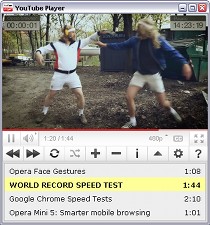
Screenshots
Comments (20 on the original page, latest shown)
Download
Works with Opera 9 to Opera 12.
About this widget
| Downloads | 158,391 |
|---|---|
| Category | Movies and TV |
| Version | 1.4 |
| Size | 92KB |
| Last update | October 7, 2010 |
| Devices | desktop |
| Original page | Internet Archive |
Just tried the widget in Win7 Prof, Opera 10.63. Everything worked fine. Please specify your problem.
the problem is not windows - it just DOES NOT work,,,, if it works in someones computer is only the person who made this widget or Opera who can chose "your or mine play list" but not you and me !... plus there is missing "Button Back"
it works just fine on my w7 x64 powered by Opera 11 Alpha
YouTube player is everywhere
Hi and thanks for this great widget. It would be nice if you could ad an option for the player to stay on top, so it would be easier to use other programs while watching youtube videos. Edit: 15 minutes after I posted I learned that the widgets already had the option to stay on top and I`m a bit embarrassed for not figuring it out before now
I'm not too sure but the widget isn't working all that well it'll only play the start up vid but when i add a new vid or a few nothing happens. It will play sound but doesn't play any videos within the play list on the bottom. Anything i;m missing? BTW the opera version i have is 10.63 latest version.
Follow these instructions when you have a problem with this widget: 1. Did you follow the instructions on first start? 2. Do you use a proxy to connect to the internet? You have to set the address in the widget too: Right mouse click on the widget (but not on the video player in the widget) -> Settings -> Proxy 3. Is your Opera version 10.50 or higher? No? -> Update your browser! If the widget does not work: 4. Right mouse click on the widget (but not on the video player in the widget) -> Developer tools -> Reload Still not working? 5. Reinstall the widget 6. Update your flash player If you did step 1 - 6 and the YouTube Player still does not work please send me a description of the problem and do NOT write a message like "it just does not work" (does the widget start? do you see the bar with the buttons? Do you see the YouTube video player? which Opera version are you using?) => what exactly does not work?
works without flaw
Great widget! I was afraid I wouldn't know how to set it up at the start, but it was easy. Nice job.
@ Rathlon You have to double-click on the video in the playlist in order to get it to play.
@ mmlili & minibags Quit posting spam on forums! This is for people commenting on widgets and / or looking for help with widgets ... NOT for people looking to advertise other sites or products! >
This is a really nice widget, it's very easy to use and works just fine! I'm using Windows 7 Home Premium, 64-bit on an eMachines AMD Athalon II X2 250u Processor 1.60, with 4 Gb RAM (3.75 Gb free), and quite a lot of programs loaded at startup (I have a bittorrent program running uploads and downloads).
To add a video, click the plus sign and paste or type the URL into the url box, then click the magnify symbol beside the url box. It has a pause, after clicking play, you'll see the pause where the play button was. The playback is the '<<' or use the two arrows circle. If the widget doesn't work for you, you may have gotten a corrupted download ... try re-downloading the widget and re-installing it. If that doesn't work, try rebooting your computer and try using the widget again. If that does not work, try saving the download (remember where it was downloaded to) and use the file manager (in Windows it is Windows Explorer) and right click on the filename. Highlight and click 'Run as Administrator' and when a confirmation box appears, click 'OK'. To add a shortcut to your desktop, click on the start button on your taskbar, then click on 'All Programs. The shortcut SHOULD be located in the top area of the program list; if not, use your file manager to locate where it was installed and right-click on it, as above (Run as Administrator).
Hi if I have a list of news video on youtube .. lets say i want to watch video a1 ~ a10 in sequence. now I have to manually add the list one by one 10 times. Is there an advance search method or something I can do so I can add the whole 10 video in 2~3 steps?
I've found with Opera 11, the time column in the playlist will overlap the video. It appears as just a white box, no text, and as you resize playlist you see it slide over the video. It appears to only happen after adding a video with +. I also have to F5 when I first open the widget to get the video area to display (otherwise it just displays as white space).
Nice 5 out of 5.
Any plan for WebM instead of Flash (if it available)?
Why are some videos which are viewable on Youtube but blocked by SME via the player? i.e. http://www.youtube.com/watch?v=ywhutgpZLVk&feature=player_embedded My location is Ireland. Thanks!
It`s not good...
What proxy server? Where? Whith proxy? what adress?