
Acceptance process in the extensions catalog
It takes some time between the moment when you submit your extension in the catalog and when it gets published. This is what happens in that time:
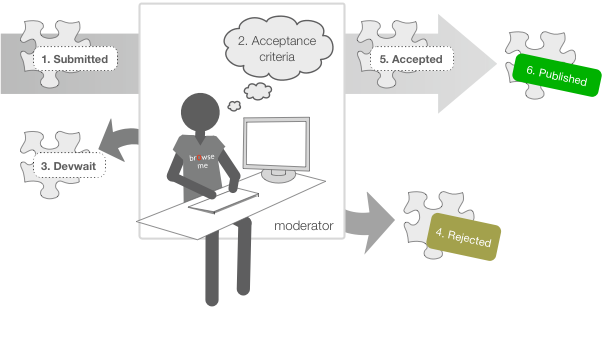
- Submitted: As soon as you finish uploading a new version of your extension, the process begins.
-
Acceptance criteria: A moderator starts reviewing the extension to check if it complies with some of the below check points. So keep the following in mind with respect to the extension you submit -
- It must perform as described.
- There should not be any obvious bugs.
- Icons of all sizes should be similar in style.
- The icons, screenshots and graphic design must be of acceptable quality. Anti-aliasing PNGs with transparent backgrounds are preferred. Note that Interlaced PNG-files are currently not supported, due to a limitation of the image library we're using. Avoid this effect in your screenshots.
- If defined, the support webpage must be relevant to the extension.
- It must not collect private information without authorization from the user.
- It must not send private data to an external store, for example by Ajax.
- It must not unlawfully incorporate third party information, code or graphics.
- It must not include 'Opera' in the title or any other Opera branding that can indicate the extension was created by Opera Software.
- It must comply with the Terms of Service.
- No external JavaScript. All JavaScript code must be contained in the extension. External API's are ok.
- Values in config.xml must be sound and valid.
- We must be able to review the code in a reasonable manner. Code shouldn't be obfuscated. Binary code is not ok.
- The summary must answer the question: what does your extension do? It must be composed of grammatically correct and complete sentences.
- The description must answer: 1) How do you use the extension? 2) What does the extension look like?
- Devwait (waiting for developer): If the extension has problems that can be fixed by the moderator, he will propose a solution, set it in a Devwait state and add a question to your status wall.
- Rejected: An extension that does not satisfy the criteria or fails the testing.
- Approved: Your extension is approved by the moderator and is ready for publishing.
- Published: Your extension gets a final quick review by an editor, and it gets published.
Readers' comments 1
Left under the original article, as archived.
About this article
| Published in | Add-ons blog |
|---|---|
| Date | December 7, 2010 |
| Author | Yenny Otero |
| Tags | moderation, stickman, catalog |
| Original | Internet Archive |
d4rkn1ghtTuesday, December 7, 2010 9:31:41 PM