
Extensions icons vs high resolution displays
For many years, manufacturers around the world have been working on improving the resolution of the screens they produce, so as to make the content look sharp and crispy. This is of course a continuous process of improvement, and there are a couple of interesting examples on the market recently that leave the competition behind with their new high resolution screens.
If you had a chance to play with Apple's new Retina Display for example, you can easily see the difference between a regular display and a display with a high pixel density. The fonts are super sharp and graphics have much more details.
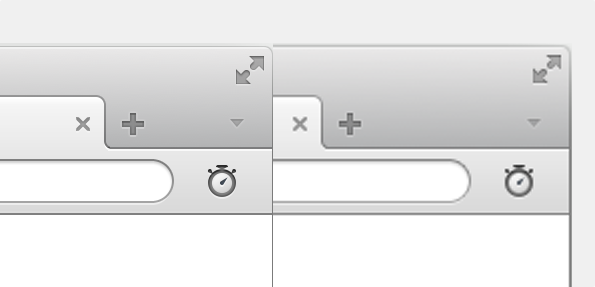
Left image: high density display, Right image: regular density display
The secret behind the scene is that pixels on these screens are quadrupled.
In other words, we get four times more pixels on screen for each point, than is the case for regular screens.
More pixels means more details, and means a better experience for the end user.
That's the good news ... but it comes at a cost.
If you had a chance to play with Apple's new Retina Display for example, you can easily see the difference between a regular display and a display with a high pixel density. The fonts are super sharp and graphics have much more details.
Left image: high density display, Right image: regular density display
The secret behind the scene is that pixels on these screens are quadrupled.
In other words, we get four times more pixels on screen for each point, than is the case for regular screens.
More pixels means more details, and means a better experience for the end user.
That's the good news ... but it comes at a cost.
All non-native graphics in the application have to be adjusted for high density displays by providing high resolution versions of those graphics.
This of course requires changes to the Opera browser itself and all the extension icons shown in the browser UI.
There are two extension icons that require adjustments from extension developers for high resolution displays support:
- toolbar button extension icon (read more about it here)
Standard resolution icon:
- size: 18px
- name: <icon_name>.png
High resolution icon:
- size: 36px
- name: <icon_name>@2x.png (notice the icon name pattern with @2x) - extension icon in the Extension Manager (read more about it here)
Standard resolution icon:
- size: 64px
- name: doesn't matter
High resolution icon:
- size: 128px
- name: doesn't matter
When both icon resolutions are provided, Opera will choose the best icon based on the display it is shown on.
Our upcoming Opera 12.1 release will bring support for high resolution displays on board, but you can test it already with our special Opera 12.10 snapshot available on Desktop Team blog, which has added support for such displays.
That's it!
Now ... take your extension, add high resolution icons, test on our build, upload to our addons portal and voilà!

Readers' comments 11
Left under the original article, as archived.
About this article
| Published in | Add-ons blog |
|---|---|
| Date | October 24, 2012 |
| Author | Remigiusz Bondarowicz |
| Tags | Opera 12.1, extensions, HiDPI, high resolution display |
| Original | Internet Archive |
mubaidrWednesday, October 24, 2012 12:36:47 PM
Mağruf ÇolakoğluWednesday, October 24, 2012 1:09:13 PM
Manuel Andreas KuhnWednesday, October 24, 2012 2:13:53 PM
Thanks
d4rkn1ghtWednesday, October 24, 2012 3:46:40 PM
JanGenWednesday, October 24, 2012 10:34:35 PM
That's the way icons are designed: scalable. Ready by default for Ultra HD, NG Retina, SuperDPI or whatever they name, invent or progress to?
If they're slow, cache them, or optimize rendering.
QuHnoThursday, October 25, 2012 4:12:05 AM
Originally posted by JanGen:
+1
... but I think that is because SVG editors suck when it comes to producing minimal code, especially Inkscape and because of anti aliasing effects on non-(2*n)-scaling.
(I still wonder why the UI icons are 18px and the big icon is 64px. Touch on 18px icons is cumbesome)
JanGenThursday, October 25, 2012 10:29:07 AM
Originally posted by QuHno:
Size?, save as compressed plain SVG in Inkscape, files are smaller then 18/32px pngs, most icons aren't that complex.
AA problems, do you mean different settings for rendering like optimizeSpeed | optimizeLegibility | geometricPrecision
or do you have an example of bad AA effects?
And that's why I mentioned caching, (even on the fly converting to png), or isn't this something that the awaited hardware acceleration should be able to solve.
QuHnoThursday, October 25, 2012 12:12:45 PM
Originally posted by JanGen:
No, just too much unnecessary code. Hand cleaned SVG and then as SVGZ is even smaller.
Originally posted by JanGen:
No.
Create an SVG in Inkscape with a document size of 32px*32px.
Add a grid so that you can work exactly relative to the pixel dimensions.
Draw black rectangles, starting every 2nd grid line and ending at the next grid line and save it.
Open it and scale it down to e.g. 50% or 60% - voilá! Nasty AA effects just because the lines do not fit to the display's pixel grid. (a black line every 0.5px
Conclusion:
With SVG you have to work for the smallest image size and then scale up. Very small images need detail reduction anyway, so the benefits are not as great as assumed.
btw: I think I will use a custom font inside my extension. The 8 images I need for the settings page take up just 4k as woff and scale up nicely.
Łukasz KrysiewiczThursday, October 25, 2012 5:09:03 PM
Not easy to do due to not being able to see the result. ;)
I agree that having multiple sizes isn't the way. Vectors when possible. Not working as should now? Work on it guys, push it towards. That is what we expect from you.
JanGenFriday, October 26, 2012 10:22:42 AM
Originally posted by QuHno:
OK, that's also why the pixelsnap extension is made. I agree with your conclusion.
Unfortunately: svgs won't render as buttons, fonts neither, even a SVG won't render in the extension overview.
So it's Opera's graphical library that needs an update. Why not allow dataurl's?
ChristophThursday, November 8, 2012 9:45:51 AM
It should be sth. like
instead!
Don't blame the guys who are spending their spare time developing for you!
http://my.opera.com/christoph142/blog/2012/11/08/is-there-gonna-be-a-next