
Outstanding Extensions!
Whether you use Opera for work, play, development, socializing or shopping - there's an addon for everyone. Following the release of Opera 12.10, there are some new amazing extensions to be discovered in our catalog!
Everybody uses the web in a different way. One size does not fit all - but with addons, you can tailor the Opera browser to fit the way you want to experience the web.
A unique feature of the Opera browser is Speed Dial extensions. Opera was the first browser to introduce the Speed Dial - a 'start page' that shows each time you open a new tab - and continued to innovate by introducing extensions to this page. These extensions are more than just links: they offer the user a unique browsing experience, by adding live content dynamically to the Speed Dial panel. They are available only on Opera through our addons catalog.
Take a look below at some of the outstanding extensions Opera offers!
 Speed Dial for Facebook
With 850 million users worldwide, it's more than likely that Facebook is one of your regular stopping points on the web. If you're the kind of person who just has to check your Facebook feed one last time before starting work, you'll love Speed Dial for Facebook.
This extension will display your notifications in the speed dial panel, as well as a classy slideshow of recent photos posting by your friends and favorite pages. So you'll never miss out on what's happening - and you'll know when it's time to take a break from work and check your notifications!
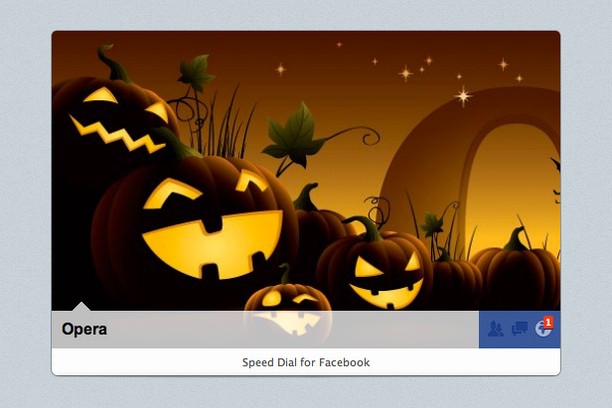
Follow this link to add Facebook to your speed dial now - and while you're there, why not become one of the 2 million+ people to like our Facebook page?
 Readability
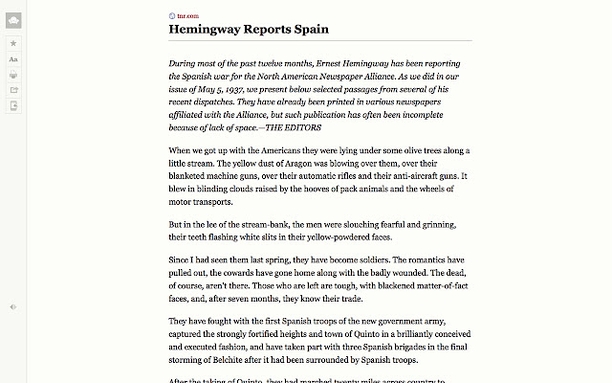
We all love browsing the web - but does it ever get too much? Too many banner ads, strange fonts or clashing colors? The Readability extension will save you from the very worst that web designers can throw at you - and offer you a calm, comfortable and clean way to experience content on the web.
Not only does the Readability extension turn any web page into a a beautiful reading experience but it also lets you save, share and send content any way you like. Over 35,000 users have installed this addon - check out some of the features they are enjoying:
Get it here to enjoy a great way to read on the web.
 AdBlock
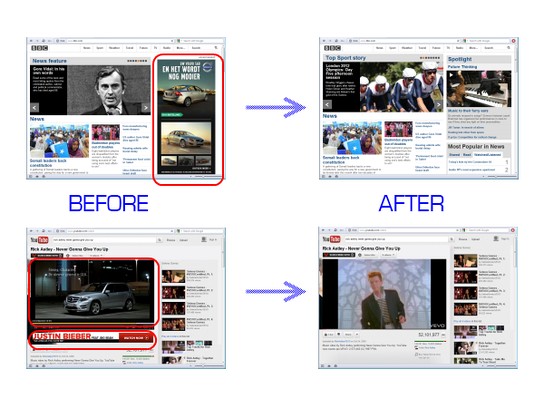
One of the most popular extensions in our addon catalog, AdBlock for Opera automatically blocks all ads on web pages for you, with no configuration necessary. As soon as you install it, you can open a tab to any site, and there will be no ads on the page. This extension even blocks those annoying video and popup ads!
After installation, AdBlock will take care of the rest for you - and if you're a more advanced user, you can easily customize the way it behaves. Just click on the AdBlock icon in your toolbar to configure it - you can pause it, stop it from running on a chosen site, create filters and more.
You can become one of the 260,000+ users who enjoy using AdBlock by getting it here.
 Twitter Notifications
Social sites have changed the web forever, and no social site is as dynamic and fluid as Twitter. The ultimate up-to-the minute micro blogging site, people use Twitter in many different ways - keeping in touch with friends, keeping up to date with current affairs, celebrity gossip, or as a way for businesses to reach out and engage with customers. Whichever way you use Twitter, the Twitter Notifications extension will alert you to what's happening on your Twitter feed.
First, follow the steps to authorize the extension to fetch your Tweets. Once you've authorized it, the extension does all the rest!
If you're a social animal, you may have several Twitter accounts - personal, business, an account for your blog, or even an account to tell people what's for lunch at work. No problem - you can install the extension several times, and sign in each with a different username!
Around 50,000 users have added it to their speed dial panel - why don't you join them? Download it here, and don't forget to follow us at @Opera too!
Do you have a favorite extension you'd like to tell us about? Or do you have an idea for an extension that you'd love to see in our addons catalog? Then let us know! Or if you're a developer and feel inspired, you can also create your own extensions using our APIs.
Everybody uses the web in a different way. One size does not fit all - but with addons, you can tailor the Opera browser to fit the way you want to experience the web.
A unique feature of the Opera browser is Speed Dial extensions. Opera was the first browser to introduce the Speed Dial - a 'start page' that shows each time you open a new tab - and continued to innovate by introducing extensions to this page. These extensions are more than just links: they offer the user a unique browsing experience, by adding live content dynamically to the Speed Dial panel. They are available only on Opera through our addons catalog.
Take a look below at some of the outstanding extensions Opera offers!
Speed Dial for FacebookWith 850 million users worldwide, it's more than likely that Facebook is one of your regular stopping points on the web. If you're the kind of person who just has to check your Facebook feed one last time before starting work, you'll love Speed Dial for Facebook.
This extension will display your notifications in the speed dial panel, as well as a classy slideshow of recent photos posting by your friends and favorite pages. So you'll never miss out on what's happening - and you'll know when it's time to take a break from work and check your notifications!
Follow this link to add Facebook to your speed dial now - and while you're there, why not become one of the 2 million+ people to like our Facebook page?
ReadabilityWe all love browsing the web - but does it ever get too much? Too many banner ads, strange fonts or clashing colors? The Readability extension will save you from the very worst that web designers can throw at you - and offer you a calm, comfortable and clean way to experience content on the web.
Not only does the Readability extension turn any web page into a a beautiful reading experience but it also lets you save, share and send content any way you like. Over 35,000 users have installed this addon - check out some of the features they are enjoying:
- "Read Now" to turn off webpage noise and clutter
- "Read Later" (with subscription) to save content to your personal reading list
- "Send to Kindle" to send any web page to your Kindle in a comfortable reading view
- "Kindle Digest" (with subscription) automatically syncs your reading list to your Kindle every day
- Stitch together multi-page articles into a single page
- Share through email, Facebook, and Twitter
- Configurable content appearance: font color and size, width, convert links to footnotes, hide images
- Favorites and archiving
- Offline usage
Get it here to enjoy a great way to read on the web.
AdBlockOne of the most popular extensions in our addon catalog, AdBlock for Opera automatically blocks all ads on web pages for you, with no configuration necessary. As soon as you install it, you can open a tab to any site, and there will be no ads on the page. This extension even blocks those annoying video and popup ads!
After installation, AdBlock will take care of the rest for you - and if you're a more advanced user, you can easily customize the way it behaves. Just click on the AdBlock icon in your toolbar to configure it - you can pause it, stop it from running on a chosen site, create filters and more.
You can become one of the 260,000+ users who enjoy using AdBlock by getting it here.
Twitter NotificationsSocial sites have changed the web forever, and no social site is as dynamic and fluid as Twitter. The ultimate up-to-the minute micro blogging site, people use Twitter in many different ways - keeping in touch with friends, keeping up to date with current affairs, celebrity gossip, or as a way for businesses to reach out and engage with customers. Whichever way you use Twitter, the Twitter Notifications extension will alert you to what's happening on your Twitter feed.
First, follow the steps to authorize the extension to fetch your Tweets. Once you've authorized it, the extension does all the rest!
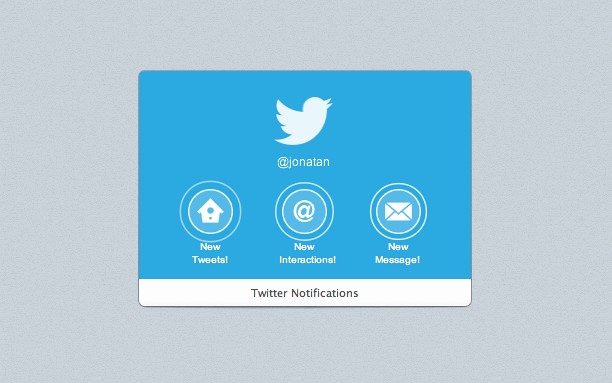
- The 'home' icon alerts you to new Tweets by users you follow on your timeline
- The 'connect' icon tells you when you have new followers, @mentions or if somebody has retweeted you
- And the 'message' icon notifies you when you have a new Direct Message
If you're a social animal, you may have several Twitter accounts - personal, business, an account for your blog, or even an account to tell people what's for lunch at work. No problem - you can install the extension several times, and sign in each with a different username!
Around 50,000 users have added it to their speed dial panel - why don't you join them? Download it here, and don't forget to follow us at @Opera too!
Do you have a favorite extension you'd like to tell us about? Or do you have an idea for an extension that you'd love to see in our addons catalog? Then let us know! Or if you're a developer and feel inspired, you can also create your own extensions using our APIs.
Readers' comments 12
Left under the original article, as archived.
About this article
| Published in | Add-ons blog |
|---|---|
| Date | November 9, 2012 |
| Author | Michael Clelland |
| Tags | extensions, facebook, readability, adblock, twitter, addons |
| Original | Internet Archive |
Ronit KumarFriday, November 9, 2012 5:46:35 PM
QuHnoFriday, November 9, 2012 5:59:50 PM
You asked and here is my answer:
Because I am already a proud member of my.opera and facebook doesn't respect my privacy, no matter what settings I use? (verified)
tcubeFriday, November 9, 2012 6:17:31 PM
UnrealmirakulixFriday, November 9, 2012 8:02:23 PM
Originally posted by tcubed:
+1. tried out both. cleanPages works much better
Martin KadlecFriday, November 9, 2012 9:41:45 PM
NimeshSaturday, November 10, 2012 12:30:28 AM
Rafael LuikSaturday, November 10, 2012 1:27:57 PM
After nearly 2 years you finally gave extensions access to context menus... But it's far from what extensions should be able to do...
A panel of their own, like an app of their own, and pop-up notifications like the ones used for downloads, together with the APIs required, are the features that could make extensions truly powerful. I'm able to see a chat running that way (if able to be kept running in Opera's background even if panel closed), a Twitter client, a download manager, etc...
They'll need to go deeper into Opera and less into popping a simple page from a button in the address bar that when you close it, it looses all the cookies.
Speed Dial extensions are like Windows Phone live tiles, but more eye-candy than useful. (Can't get this out of my mind: it's just not possible to imagine myself keep staring at the Speed Dial screen while I can have Facebook/Twitter website themselves opened on tabs - because I'll have to visit them to get to know what the notifications are about anyway -, or online on Trillian, or a desktop Twitter client).
This Twitter and Facebook Speed Dial extensions could be much better if they weren't Speed Dial items. If they'd show notifications near the system tray when a new reply or message arrives, *show that tweet* and give the option to reply to that tweet right in, and show a button with a counter so you can check if you missed anything it could be perfect. Then imagine could check your home timeline from a panel and send a message or start a chat with a friend from there, among others...
The integration extensions could deliver isn't provided by Opera at the moment and won't be replacing desktop apps, killing their own purpose.
ChirpieTuesday, November 13, 2012 12:07:45 PM
Originally posted by rafaelluik:
Who are YOU to decide what extensions are supposed to do? They are NOT supposed to be separate apps. They are supposed to extend the browser!Originally posted by rafaelluik:
What an inane, nonsensical comment. They would be better if they were something they aren't supposed to be? Laughable.Originally posted by rafaelluik:
They aren't supposed to replace desktop apps. They are supposed to extend the browser.By your logic you don't even need Speed Dial!
Geez, take your silly outburst and shove it. Just because YOU don't like Speed Dial extensions doesn't mean that no one else does.
Sorry, I fed the troll...
Rafael LuikTuesday, November 13, 2012 3:11:25 PM
Originally posted by Chirpie:
A customer...Originally posted by Chirpie:
Maybe it's time to change what they're supposed to do then, because currently they serve no purpose for me.Originally posted by Chirpie:
Hm, it's a list of pages I can easily assign keyboard shortcuts to (though I really only use from Ctrl+0 to 9), I also use it to temporarily add pages I need to remember to check later (it's easy to add and remove, and it's a visual indicator). But maybe you're right, I could have these pages in a ugly list of links in white background taking my whole screen and it'd make no difference... LOLIn the other hand Speed Dial offers a visual customization factor. A website like My Opera forums is interesting to have set to "reload every a given time", but this is because there's no way of getting better notifications of new subscribed threads (other than the e-mail notifications provided by the site).
The truth is RSS or a news feed (social network/Twitter) itself is more useful... vs. a Speed Dial item which you'll need to click to get to the site and then go to the content you want to see, instead of just getting the content. And for example the extensions that show recent headlines for news sites, changing the one being displayed every few seconds, require you to wait there to look at it, and probably wait it to loop to click on what you saw and has faded, instead of simply accessing it.
In all that cases visiting the website is the best thing to do, or using a client which will be able to give you the notification and the content instead of the notification only.
ChirpieWednesday, November 14, 2012 8:43:22 AM
Originally posted by rafaelluik:
No you aren't.Originally posted by rafaelluik:
The world does not revolve around you. If you don't want Speed Dial or Speed Dial extensions, just don't use them. There's no reason to troll and demand that everyone else adapt to your weird way of using Opera.It's just trolling to demand that Opera remove or ignore stuff you personally don't use.
Rafael LuikWednesday, November 21, 2012 8:30:19 PM
Rafael LuikSunday, November 25, 2012 7:33:54 PM
Originally posted by Chirpie:
Yes I am. I got search engines, bookmarks and Speed Dial items Opera earns money from the partners because I account into the number of users these partners find valuable. They also get a lot of info from me (bug reports, and retroactively, suggestions and feedback also [which is what I'm doing here]).Originally posted by Chirpie:
As I said before I'm not trolling, I'm a customer suggesting a way to improve the product with the best of intentions. I wish more people would be interested in using Opera and discovering its great features and rendering engines, that's the main goal of my posts here. I hope they think my opinions are valuable, I wouldn't be losing so much time in my life making this effort writing here if it was for only "trolling".