
200 bugs and one Dragonfly
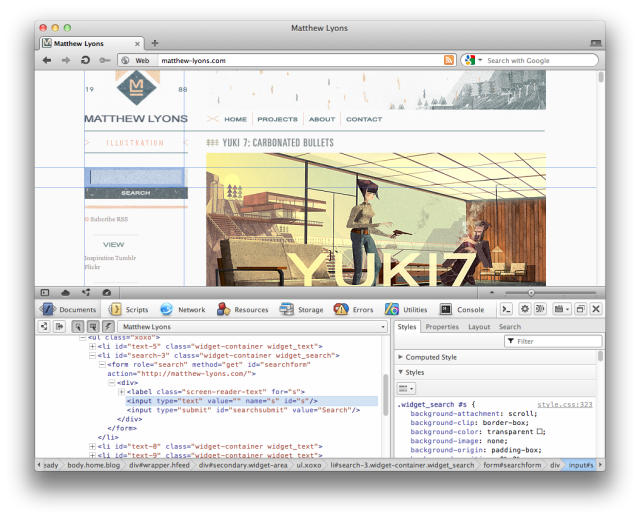
Developers rejoice! At the break of dawn Opera Dragonfly 1.1 was released from its cage. To celebrate, the team killed more than 200 bugs! Dragonfly also got several new features, and updates. First of all, we have a brand new Inspector Gadget (Ok, it might have a different name, but we think Inspector Gadget sounds awesome). It's now possible to search with the DOM inspector and get more information with the new Network Inspector. 
No need to download though, Opera Dragonfly 1.1 will be loaded the next time you inspect any page! Check out the Dragonfly blog for more info. And if you love developer stuff drop by the Opera Developer Network!
Readers' comments 13
Left under the original article, as archived.
About this article
| Published in | Choose Opera |
|---|---|
| Date | September 1, 2011 |
| Author | Aleksander Aas |
| Tags | release, developer, Dragonfly |
| Original | Internet Archive |
Andrei Daniel TicleanThursday, September 1, 2011 2:43:50 PM
RichardThursday, September 1, 2011 3:01:11 PM
Nahuel SanchezThursday, September 1, 2011 3:01:22 PM
bue.. some time I need run local, with out Internet, and that is the bad point of DragonFly
Can you please, think to the furute, and make a version for run off-line? because some time I do not have Internet in some Intranets
Thanks (and good job!)
Haunted GhostThursday, September 1, 2011 3:07:15 PM
I really love it; specially the search panel. It has always helped me in XPaths.
And now the stable version! Long live Opera and DragonFly!
CoyoteeThursday, September 1, 2011 3:17:34 PM
Charles SchlossThursday, September 1, 2011 3:26:16 PM
widowildThursday, September 1, 2011 4:02:32 PM
d4rkn1ghtThursday, September 1, 2011 4:36:52 PM
ouzowtfThursday, September 1, 2011 8:16:37 PM
Cutting SpoonTuesday, September 6, 2011 11:29:08 AM
Originally posted by profyeow:
If you have loaded the inspector at least once, it should also be available offline. Dragonfly uses Application Cache infrastructure, so it stays on your computer even when offline.
Nahuel SanchezWednesday, September 7, 2011 6:09:12 PM
Originally posted by hellspork:
Yes, but some time I on a PC with out Internet and I install Opera but can not use because do not have Internet Access. I Need opera for a medium intranet with software working per php/java servers but... well... Internet access is blocked and when need an inspector I can't now use Dragon Fly :'(
Cutting SpoonWednesday, September 7, 2011 10:50:40 PM
I can sympathize with your unusual circumstance of debugging HTML designs inside a closed network, it makes my fist clench just to think of all the tools that only work online...
But a portable profile should work; just make sure nobody will freak out if you bring in a memory stick.
JulianSunday, September 11, 2011 6:59:20 PM
Let's debugging
Ctrl+Shift+I