
Edit Photos on iPhone in Opera Mini
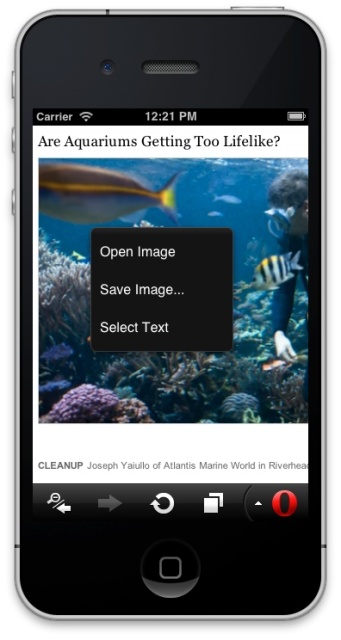
Did you know you can use Opera Mini to upload, download and edit photos on the iPhone?
There are a couple of reasons why this is useful:
- You'll save on data by using Opera Mini instead of opening an app. (You can make even more of this feature if you use online photo resizing services, for example.)
- On iOS, you can only download or upload files to the web that come from your camera roll. So if you want to do something with an image, it needs to be saved in your photos first.
How does it work?
If you're in a web page that allows you to upload a file, you can choose one from your camera roll using the dialog box in the browser. (Make sure you're using Opera Mini - this doesn't work in Safari at present.) Then carry on processing the image from there.
You can also reverse the process, by the way - if you're on a page with an image you'd like to save to your camera roll, touch your finger to the screen until the context menu comes up. From there you can just select Save image, and when the download is complete, you'll find the image with the rest of your photos.
Let us know if you have any other tips on using Opera Mini with iOS!
Readers' comments 11
Left under the original article, as archived.
About this article
| Published in | Choose Opera |
|---|---|
| Date | August 13, 2012 |
| Author | Anna Rohleder |
| Tags | opera mini, ios, photo uploading, Opera Tips |
| Original | Internet Archive |
marv1993Monday, August 13, 2012 10:53:28 AM
CoyoteeMonday, August 13, 2012 1:52:31 PM
Originally posted by annametro:
No, Anna I didn't know that!Anna RohlederMonday, August 13, 2012 2:19:40 PM
Originally posted by Coyotee:
Charles SchlossMonday, August 13, 2012 2:28:02 PM
jacobyeboahTuesday, August 14, 2012 9:22:51 PM
Kr0pr0XWednesday, August 15, 2012 1:51:56 AM
Jack TaoWednesday, August 15, 2012 6:40:57 AM
okonogbuFriday, August 17, 2012 8:28:20 PM
LouisounetSunday, August 19, 2012 5:54:06 PM
mahesaTuesday, August 28, 2012 7:10:16 AM
JAMES BASSEYFriday, October 5, 2012 9:57:07 AM