
Opera Launcher
Opera Launcher is a launcher for Opera with additional options. It can
- disable crash startup dialog.
- delete quick find search histories automatically.
- empty Temporary Download Directory automatically (not Cache Directory).
- create daily backup of bookmarks, notes & sessions with date stamp. Bookmarks & notes backups will be created in profile\backups directory.
Download (size: 204 KB), unzip, place OperaLauncher.exe inside Opera installation directory (C:\Program Files\Opera\) and run it to launch Opera. You will see the following settings dialog when you run Opera Launcher first time.
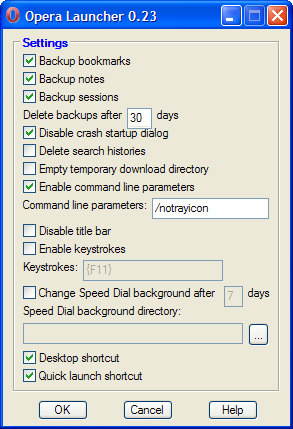
Opera Launcher settings dialog
To restore previous version of bookmarks/notes, close Opera, move a version of opera6*.adr/notes*.adr from profile\backups directory to profile directory and rename it to opera6.adr/notes.adr.
Readers' comments 21
Left under the original article, as archived.
About this article
| Published in | Choose Opera |
|---|---|
| Date | December 21, 2008 |
| Author | Tamil |
| Tags | Windows, opera, Backup, Software, article, beta, browser, campus crew, choose, choose opera, chooseopera, community |
| Original | Internet Archive |
Xerscroll21. December 2008, 19:45
Misty Blue22. December 2008, 02:26
Dexter M22. December 2008, 04:11
And Opera Link already does bookmarks and notes, so it'll be more useful if you implemented a wand and cookies backup.
Tamil22. December 2008, 04:30
Originally posted by _deXter_:
It will be useful when system shutdowns improperly or Opera crashes randomly.Originally posted by _deXter_:
Originally posted by _deXter_:
Already several programs are available to backup all settings. See Softwares to enhance Opera.Micheál Seosamh22. December 2008, 12:08
Tamil22. December 2008, 12:35
Originally posted by Mickeyjoe_irl:
Mladen Pejaković22. December 2008, 16:48
Tamil22. December 2008, 16:53
Micheál Seosamh23. December 2008, 00:52
FataL23. December 2008, 21:12
Backups FTW!
eko25. December 2008, 04:02
Gordon Griswold25. December 2008, 16:05
henky25. December 2008, 16:29
Tamil25. December 2008, 23:43
Originally posted by opera-amonamous:
See line starting with download.
andreazz27. December 2008, 02:54
Tamil27. December 2008, 02:59
Originally posted by andreazz:
Yes.Ankur28. December 2008, 03:08
Does it default to - restart session?
Tamil28. December 2008, 03:11
Originally posted by yadavankur:
It will default to your preference in startup.Alexis6. January 2009, 03:57
itcpeter8. February 2009, 07:56
I just have one comment/request...
In command line, when you invoke the original 'opera.exe', you can pass an url as parameter so the browser will open that page by default.
e.g.
>opera.exe www.mypage.com
will open mypage
Now, when I try
>OperaLauncher www.mypage.com
My default page is opened. Is there a way to read that url parameter using the launcher?
Thanks
Tamil8. February 2009, 15:27