
Opera Mini Web page layouts on iProducts
If you are new to Opera Mini, you may be wondering why some Web pages look strangely off, such as this prime example:
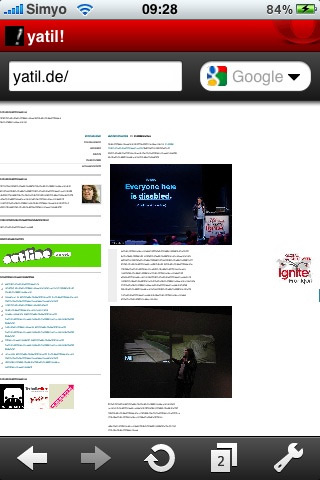
This has to do with Opera Mini's current 2-step zoom (either zoomed out or zoomed in, no in-between steps). To make sure text columns are fit in the zoomed-in display, Opera Mini (and Opera Mobile) force columns to not be wider than the physical width of the device (in the case of the iPhone, 320 pixels). This feature can be disabled, but you'll have to modify the power-user settings (browse to "opera:config" or just "config:"):
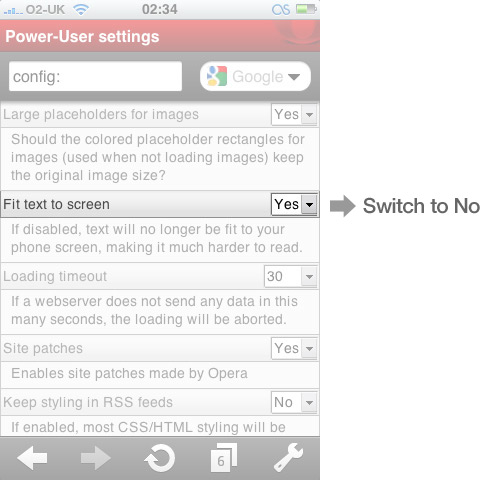
Via @patrick_h_lauke.
Readers' comments 19
Left under the original article, as archived.
About this article
| Published in | Choose Opera |
|---|---|
| Date | April 13, 2010 |
| Author | Espen André Øverdahl |
| Tags | tips and tricks, opera mini, iphone, apple |
| Original | Internet Archive |
TamilTuesday, April 13, 2010 9:19:33 AM
HyaeneLeipzigTuesday, April 13, 2010 9:28:54 AM
victorTuesday, April 13, 2010 9:31:48 AM
Aleksander AasTuesday, April 13, 2010 9:35:25 AM
Originally posted by decimal:
In fact this is the default behavior of Opera Mini on all devices. "config:" is available in all Opera Mini versions afaik. On most devices setting this to Yes (or not touching it as it's the default) will improve the browsing experience. However on the iPhone and some high-end Android phones with a high resolution you might want to change it.
Chris WardTuesday, April 13, 2010 9:36:29 AM
julbenTuesday, April 13, 2010 10:00:02 AM
PhaniTuesday, April 13, 2010 10:04:50 AM
OttoTuesday, April 13, 2010 11:22:49 AM
Although it would perhaps be worth adding the option under settings for easier access, rather than having to go via the "config:" method?
Charles SchlossTuesday, April 13, 2010 12:40:28 PM
AndreasTuesday, April 13, 2010 12:43:00 PM
anglerTuesday, April 13, 2010 2:59:56 PM
d4rkn1ghtTuesday, April 13, 2010 6:54:48 PM
Paul GeorgeTuesday, April 13, 2010 8:29:47 PM
I was having issues with load times and sometimes the page wouldn't load at all, I would just get the spinner in the top left hand corner. I noticed that in my advanced settings I had the "Protocol" set as Socket rather than HTTP straight from vanilla install, is this normal and supposed to be on as default?
Changing it to HTTP has worked and I am not having issues with page loads anymore.
digitalinksmudgeTuesday, April 13, 2010 10:07:56 PM
Originally posted by Paul George:
What are the differences in the Protocol Settings: "Socket" & "HTTP"?
Is either better for 2G, 3G, WiFI settings?
Is one faster, or more stable?
** Opera Link does not sync bookmarks for me. **
Ive not found an Opera Mini iPhone FAQ yet...
Cheers!
Viktor ShaldybinWednesday, April 14, 2010 9:22:30 AM
Viktor ShaldybinWednesday, April 14, 2010 10:43:35 AM
timWednesday, April 14, 2010 10:11:45 PM
Rafael LuikFriday, April 16, 2010 6:57:38 PM
Originally posted by digitalinksmudge:
Originally posted by bigtimmy78:
Here's the info you want:
http://www.opera.com/mobile/help/faq/?list#http-socket
If anyone acuse me of being heartless it because u have it.Friday, June 18, 2010 6:15:02 AM