
Opera Tips & Tricks: Mouse Gestures

Mouse Gestures is one of the coolest features in Opera. Spend a few minutes getting used to them, and your life is changed forever. Sometimes we forget that it's an exclusive feature for Opera users. Lucky for us practicalecommerce.com wrote an article reminding us how awesome Mouse Gestures are.
The article itself is pretty extensive and has loads of pictures to show you how it works. If for some reason you are not using Mouse Gestures already it's about time! 
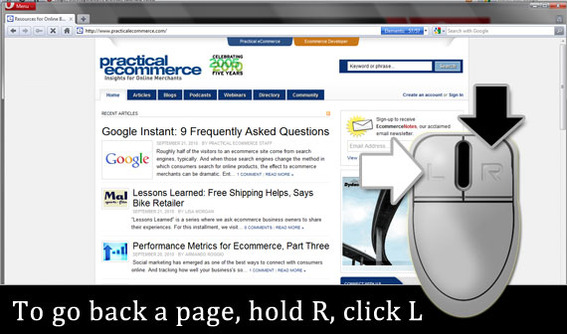
If you want more information about Mouse Gestures there is a full list of mouse gestures available on Opera.com!
Readers' comments 30
Left under the original article, as archived.
About this article
| Published in | Choose Opera |
|---|---|
| Date | October 1, 2010 |
| Author | Aleksander Aas |
| Tags | mouse gestures, Opera Tips |
| Original | Internet Archive |
TamilFriday, October 1, 2010 2:44:40 PM
Obese MauriceFriday, October 1, 2010 2:58:08 PM
But!
You took away go to homepage mouse gesture some time ago and it's still missing ... I miss that a lot.
Artur „Jurgi” JurgawkaFriday, October 1, 2010 3:30:19 PM
A. DudaFriday, October 1, 2010 3:49:07 PM
Originally posted by Jurgi:
me too
TamilFriday, October 1, 2010 3:58:52 PM
Originally posted by Jurgi:
Use StrokeIt. You have to add Opera in StrokeIt exclude list.LeNaFriday, October 1, 2010 4:01:44 PM
TamilFriday, October 1, 2010 4:11:13 PM
Originally posted by cocojerry:
Ctrl+Tab.Press 1 to go to previous tab and 2 to go to next tab.
LeNaFriday, October 1, 2010 4:26:36 PM
Ali RazaFriday, October 1, 2010 4:27:39 PM
Johnny GameFriday, October 1, 2010 5:05:18 PM
d4rkn1ghtFriday, October 1, 2010 7:29:49 PM
Walter de ValkFriday, October 1, 2010 7:36:13 PM
Many times I accidentally use mouse gestures in my operating system to go back one folder for example and than I realize I am not browsing the web
Walter de ValkFriday, October 1, 2010 7:38:41 PM
Originally posted by ADuda:
Sorry, after my reply I see I'm not the only one
MarvinIsm13Friday, October 1, 2010 8:35:27 PM
Originally posted by Jurgi:
Same here hehehe.I think we're all having the same problem
TamilFriday, October 1, 2010 10:15:13 PM
Originally posted by cocojerry:
http://files.myopera.com/Tamil/Smilies/Drool.gif -Charles SchlossSaturday, October 2, 2010 12:44:19 AM
Obese MauriceSaturday, October 2, 2010 1:12:55 AM
Originally posted by cocojerry:
Nice one.
AngelikiSaturday, October 2, 2010 2:29:34 AM
Björn DubberkeSaturday, October 2, 2010 9:31:52 AM
ronnie yee jrSaturday, October 2, 2010 12:20:29 PM
Cutting SpoonSaturday, October 2, 2010 6:08:56 PM
Goblin36Sunday, October 3, 2010 2:17:24 AM
DanituSunday, October 3, 2010 6:24:14 AM
wazzup105Sunday, October 3, 2010 2:53:21 PM
PURESON .C. ISHIEKAMonday, October 4, 2010 1:56:02 PM
PURESON .C. ISHIEKAMonday, October 4, 2010 2:10:02 PM
marc meierMonday, October 4, 2010 11:16:37 PM
the Great Bill GatesTuesday, October 5, 2010 12:29:58 AM
HaavardTuesday, October 5, 2010 11:34:38 AM
Originally posted by WFC-Killer:
Spaces are not allowed anymore. However, this is off-topic. Please try to stay on-topic when posting comments.gregzengThursday, November 18, 2010 6:20:20 AM
1) To MARK a whole line: LEFT-CLICK any part of the text in the line, 3, 4 or 5 times. Double left-click just highlights the word under the cursor.
2) RELOAD, BACK & FORWARD are easily reached in the menu shown by RIGHT-CLICK on the page.
3) Click on a URL address with the middle button (wheel button) will open the URL in a new background tab.
BTW: practicalecommerce.com site mentioned above will only let you leave a message if you tell Opera to pretend to be Internet Explorer.
Retired (medical) IT Consultant
Australian Capital Territory