
Opera Tips & Tricks: Search

In this new installment, we want to show you how to pull of the time-saving and awesome tricks that make an Opera "power user".
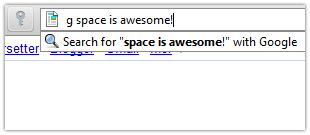
Let's start off with searching by using the address bar. Did you know that by typing in "g [keyword]" in your address bar, you search for that keyword in Google? We call this type of search a "G-Space" search. Just pretend your address bar is the Google search box, and you are good to go. Any search phrase like "site:www.opera.com [keyword]" is supported, so play around with it. 
This tip should save you valuable time, each and every time you do a search!
Use other search engines? Opera has several built-in searches, but you can also create your own. Use this snappy guide, and make your personal custom search!
- Find a search box like the one on www.google.com. Right-click inside the search field, and select "Create Search".
- Type in your keyword for this new search. For example this would be where "g" is the keyword for Google searches.
- Click "OK" and you are done!
Readers' comments 23
Left under the original article, as archived.
About this article
| Published in | Choose Opera |
|---|---|
| Date | December 9, 2009 |
| Author | Aleksander Aas |
| Tags | Opera Tips, Search |
| Original | Internet Archive |
ZimakWednesday, December 9, 2009 3:12:23 PM
time you realized it
j-p-jWednesday, December 9, 2009 3:18:12 PM
PhaniWednesday, December 9, 2009 3:41:03 PM
KaskaMatejWednesday, December 9, 2009 3:55:31 PM
aint fastest, but it is
Charles SchlossWednesday, December 9, 2009 4:49:20 PM
An Opera trick that I found:
http://my.opera.com/Chas4/blog/2008/12/12/an-opera-trick
Martin RauscherWednesday, December 9, 2009 5:12:55 PM
Originally posted by lwiczek:
And HOW exactly would you then access localhost? I don't want to write "http://localhost"...
And you only have to hit ARROW-UP after your word and you get to the default search, so it isn't that overhead...
techlawsamWednesday, December 9, 2009 5:28:21 PM
but again yes I love this feature saves superb amount of time!
АндрійWednesday, December 9, 2009 8:03:43 PM
Daniel HendrycksWednesday, December 9, 2009 9:53:30 PM
Originally posted by samMD:
Sam, please. They do not make money off of it. Why would they advertise a site that blocks them too? (Maps)
Please request such things when (if) they make money off it it.
This is one of the things that I wanted to say for a while.
Charles SchlossWednesday, December 9, 2009 10:05:04 PM
Taufiq AhmedThursday, December 10, 2009 11:26:05 AM
Opera is really a powerUser browser choice.
there are tons of other speedy tricks too in Opera.
RobertThursday, December 10, 2009 2:14:08 PM
If you go into preferences on the Search tab, you'll find the different letters that call for different searches.
...just another reason I love Opera and have for years.
Sometimes with everything else that's just plain and simply wonderful about Opera, it just takes someone to remind us of what's already there.
Thanks again, mate.
Joshua FanThursday, December 10, 2009 2:43:59 PM
Crysta T. LaceyThursday, December 10, 2009 11:18:40 PM
Thanks for the G tip. .... Crysta
nahtanoj999Friday, December 11, 2009 12:41:56 AM
YongShunSunday, December 13, 2009 1:44:33 PM
Nicolas ChevallierMonday, December 14, 2009 4:25:12 PM
PurdiMonday, December 14, 2009 6:45:05 PM
Originally posted by Zimak:
Are you crazy? Just because it's posted now doesn't mean that they just found out about it! Quit trolling
Obinna luckyMonday, December 14, 2009 8:43:03 PM
Игорь КомышевTuesday, December 15, 2009 2:47:13 PM
vipin kumarSunday, October 24, 2010 2:10:10 AM
1.Translate Pages directly from address bar
2.Convert youtube videos to mp3
3.Shorten URL's!!
Custom search is just great!!
BirdthunderSaturday, January 22, 2011 6:43:40 PM
P.J. FrayneThursday, October 13, 2011 12:59:42 PM