
Opera Tips & Tricks: Web Panels

In this round of Opera Tips and Tricks we'll show you how to add custom social media panels!
The first thing we need to know is what a custom web panel is. Press F4 to bring up your regular panels such as Opera Unite, Opera widgets, bookmarks, history and more. In our guide we will add either Twitter or Facebook as a panel.
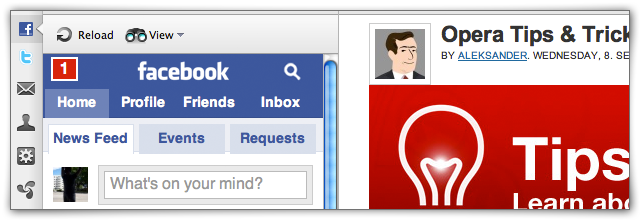
- Go to the mobile site you want to use. touch.facebook.com or mobile.twitter.com
- Drag the tab (browser window) to the panel.
- Done!
You can also bookmark the page, click "Details" in the bookmark window and make sure "Show in Panel" is ticked. It does the same, but requires you to bookmark the site first.
There are thousands of mobile sites that work fabulous as a Web Panel. Experiment and share your results with the rest of us. What about m.youtube.com?
About this article
| Published in | Choose Opera |
|---|---|
| Date | September 8, 2010 |
| Author | Aleksander Aas |
| Tags | Opera Tips, Web Panels |
| Original | Internet Archive |
mistressEVILWednesday, September 8, 2010 12:58:47 PM
TamilWednesday, September 8, 2010 1:00:26 PM
MorphdreamerWednesday, September 8, 2010 1:00:41 PM
lucideerWednesday, September 8, 2010 1:01:02 PM
Also, as an alternative to the six step guide above, you can also drag a link straight to the panel.
Charles SchlossWednesday, September 8, 2010 1:30:24 PM
JaredWednesday, September 8, 2010 1:32:53 PM
Twitter (mobile.twitter.com)
x.facebook.com - which is touch.facebook.com
Dropbox mobile (m.dropbox.com)
And Incognito Mail (dropbox.com/m/login)
Just a ques Mr.Aleks is that a screenshot from your new Mac?
LukášWednesday, September 8, 2010 1:56:14 PM
HokkutWednesday, September 8, 2010 2:20:24 PM
But I have bug with Google Reader in panel. When I hide reader's side bar appear a white blank line in the bottom. How can I fix this?
http://files.myopera.com/hokkut/files/1.jpg
http://files.myopera.com/hokkut/files/2.JPG
Rafael LuikWednesday, September 8, 2010 2:51:37 PM
Aleksander AasWednesday, September 8, 2010 2:56:17 PM
Originally posted by pieRr0Ur:
Yeah!
Originally posted by lukaydo:
Filed as a bug right now!
Originally posted by hokkut:
No idea, but I'll poke someone!
FurkanWednesday, September 8, 2010 3:00:49 PM
Originally posted by Aleksander:
And this is the cause of that good looking fonts. touch.facebook fonts look awful in PC.Artur „Jurgi” JurgawkaWednesday, September 8, 2010 3:02:20 PM
Cutting SpoonWednesday, September 8, 2010 3:28:13 PM
Midhun PankajWednesday, September 8, 2010 3:42:42 PM
Pål Unanue-ZahlWednesday, September 8, 2010 3:43:31 PM
Spadar ShutWednesday, September 8, 2010 3:54:24 PM
Весёлый Всеволод НиколаевичWednesday, September 8, 2010 4:04:24 PM
https://www.email.ru/loginchk.wcgp?altlanguage=russian&Skin=Mobile
https://www.email.ru/loginchk.wcgp?altlanguage=&Skin=Mobile
http://op.yandex.ru/
http://mail.yandex.ru/pda/
http://talkgadget.google.com/talkgadget/popout
http://o.aolcdn.com/aim/gromit/icq2go/gm/090911.1.3508.en-us/WidgetMain.html
https://www.google.com/accounts/ServiceLogin?service=mail&passive=true&continue=https%3A%2F%2Fmail.google.com%2Fmail%2Fx%2F1qk4k51dpm6yu9oa4y3&ss=1&scc=1<mpl=ecobh&hl=en&nui=5&btmpl=mobile
HplusKWednesday, September 8, 2010 4:04:41 PM
silaslenzWednesday, September 8, 2010 4:06:30 PM
jAMIL aHMEDWednesday, September 8, 2010 4:06:49 PM
TsagaWednesday, September 8, 2010 4:08:37 PM
+1
Ещё бы прицепить панель от vk.com:)
Раша невер слипс
HokkutWednesday, September 8, 2010 4:11:13 PM
Originally posted by Aleksander:
Thanks
Originally posted by Jurgi:
+1 It very and very usefull.
I have one idea about this bookmarks in panel. What if use twitter, facebook, etc. bookmarks like expansions in Google Chrome and FF with notifications or just with a number of unread messages near the icon? Is it possible?
Patryk ZeraWednesday, September 8, 2010 4:41:58 PM
antyr295Wednesday, September 8, 2010 4:49:20 PM
chusoWednesday, September 8, 2010 5:05:08 PM
Sami SerolaWednesday, September 8, 2010 5:16:52 PM
Весёлый Всеволод НиколаевичWednesday, September 8, 2010 5:17:15 PM
Originally posted by hokkut:
enable and disable the opera(Turn off the opera. turn on opera.)
Nyk EdingerWednesday, September 8, 2010 5:29:25 PM
Sami SerolaWednesday, September 8, 2010 5:32:39 PM
EDIT: One good reason to display m.gmail.com inn side panel is that then you see titles of received email.
EDIT: And do not foget you can scale the view with -/+ buttons
HokkutWednesday, September 8, 2010 5:58:18 PM
http://files.myopera.com/hokkut/files/Opera%20Google%20Search.png
there is link http://www.google.com/cse/home?cx=018364187703161434668:9i6adepmrzg
NimeshWednesday, September 8, 2010 7:43:44 PM
-----------------------------------
MyOpera (Mobile Layout)
http://my.opera.com/community/change-mobile-full-view.dml?mobile=true
Yahoo Mobile
http://m.yahoo.com/
Yahoo Mail Mobile
http://m.yahoo.com/mail/
Facebook Touch
http://touch.facebook.com
or
http://x.facebook.com
Facebook Chat
http://www.facebook.com/presence/popout.php?lite=true
GMail (iPhone Mode)
https://mail.google.com/mail/x/gdlakb-/gp/
GMail Chat
http://talkgadget.google.com/talkgadget/popout
Delicious Mobile
http://m.delicious.com
*These links can be added in Opera Mini Speed Dial also as these are mobile friendly sites*
Andrew NguyenWednesday, September 8, 2010 8:54:47 PM
Anton DiazWednesday, September 8, 2010 9:21:01 PM
http://twitter.com/ZiminS/status/22395844789
MichelThursday, September 9, 2010 12:35:39 AM
http://vkontakte.ru/im.php?act=a_box&popup=1
Yandex.Slovari / Yandex.Lingvo panel:
http://m.slovari.yandex.ru/
NahSoRThursday, September 9, 2010 1:17:10 AM
Kyle BakerThursday, September 9, 2010 5:13:27 AM
http://m.last.fm/
Reddit
http://m.reddit.com/
Digg
http://m.digg.com/
Aleksander AasThursday, September 9, 2010 5:38:51 AM
Originally posted by theadolescent:
You could always have a go at some UserCSS to improve it! I also like the dictionary idea! I'll give it a goSami SerolaThursday, September 9, 2010 6:54:50 AM
Originally posted by nimeshthakkar:
On some of the mobile Web sites one just need to remember open the links into different tab
wazzup105Thursday, September 9, 2010 8:03:23 AM
AercyThursday, September 9, 2010 8:26:05 AM
isn't there a opera wiki where all info such as this can be found? i've seen lots of good tips and it's lying all around in myopera
+1!!!!
JaredThursday, September 9, 2010 11:08:27 AM
Originally posted by theadolescent:
The system fonts looks nice by default! On a PC platform I find it somewhat tough to change these. Using linux is somewhat smooth on my experience. The cleanliness of a mac makes me want to buy a mac for collegeDanieleThursday, September 9, 2010 5:35:51 PM
Ps I'm on MacosX 10.6.4
markumanThursday, September 9, 2010 6:24:52 PM
is there a way to auto reload those panel? for example twitter panel would be nice.
Muji hartonoThursday, September 9, 2010 6:29:40 PM
Arun KumarFriday, September 10, 2010 2:05:41 AM
Sami SerolaFriday, September 10, 2010 6:26:50 AM
Originally posted by markuman:
"Right click" on twitter mobile panel and select 'Reload every'... But this is what you can do on client side
EDIT: Although I thought the twitter service would check the updates anyway every now and then
EDIT: Seems to affect only on the page on the current tab open, not the panel
Muji hartonoFriday, September 10, 2010 11:33:38 AM
RachelSaturday, September 11, 2010 7:06:51 AM
Софья ИльиноваSaturday, September 11, 2010 9:38:55 AM
Originally posted by hokkut:
You can use http://www.google.com/reader/i/
Panels I use:
http://op.yandex.ru/ — Yandex Panel for Opera,
http://www.google.com/reader/i/ — Google Reader for mobiles,
http://mobile.twitter.com/ — Twitter mobile,
http://m.weather.yandex.ru/ — Yandex.Weather for mobiles,
http://m.slovari.yandex.ru/ — Yandex.Dictionaries for mobiles,
http://m.habrahabr.ru/ — Habrahabr for mobiles.
Muji hartonoSaturday, September 11, 2010 12:09:50 PM