
Saved Pages in Opera Mobile
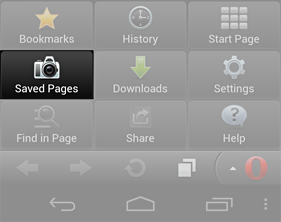
Did you know that you could save pages in Opera Mobile and view them later?
This is a really useful feature for those of you who are not on an unlimited data plan or just want to read something offline or when you don't have a working data connection. This is how it works:
When you have come across an interesting article (like our travel suggestions) and you want to save the current webpage to read it later (even if offline), then follow these simple steps:
- Select the menu icon, then "Saved Pages".
- Select the + icon next to the page you want to save.
- Edit the title if you wish, then select "Save".
- To read it later, select the menu icon, then "Saved Pages".
- To delete it, long-press or long-click it to bring up the context menu, then select "Delete".
Readers' comments 21
Left under the original article, as archived.
About this article
| Published in | Choose Opera |
|---|---|
| Date | July 25, 2012 |
| Author | Espen André Øverdahl |
| Tags | tips and tricks, saved pages, opera mobile |
| Original | Internet Archive |
Ятоки СакаFriday, July 27, 2012 7:35:22 AM
alekksanderFriday, July 27, 2012 8:26:32 AM
David KinlayFriday, July 27, 2012 8:58:37 AM
Anna RohlederFriday, July 27, 2012 10:51:04 AM
Originally posted by Daverogk:
Yes, it works on Opera Mini too!
Harry ParmarFriday, July 27, 2012 11:41:14 AM
ELVIS mr. RATEMOFriday, July 27, 2012 1:15:49 PM
okeFriday, July 27, 2012 5:46:11 PM
I used Opera for long on desktop and didn't know mobile can do it as well.
shazymanSaturday, July 28, 2012 3:58:17 AM
Ab.Razaque.keerioSaturday, July 28, 2012 10:43:09 AM
osemwoSaturday, July 28, 2012 4:30:01 PM
For the playbook ! PLEASE !
D1sasterp1eceSunday, July 29, 2012 11:42:27 AM
Originally posted by osemwo:
You actually have some misconceptions and rather want Opera Mobile for BlackBerry OS.mechack vitalSunday, July 29, 2012 9:56:11 PM
David KinlayMonday, July 30, 2012 9:04:31 PM
Nahuel SanchezTuesday, July 31, 2012 2:40:53 PM
When OperaMini for Android will have the "smartpage" of OperaMini.
I am waiting that from a long time. Thanks.
syufyanSaturday, August 4, 2012 2:07:07 PM
David KinlaySaturday, August 4, 2012 4:42:47 PM
Александр СукачёвSaturday, August 4, 2012 8:59:48 PM
Hannes BrandtFriday, August 10, 2012 1:22:31 AM
ndangsuryanaFriday, August 17, 2012 4:08:51 AM
asal ghaemSunday, September 9, 2012 2:13:43 AM
DEWMonday, September 17, 2012 3:15:20 AM