
Speed Dial - Clear
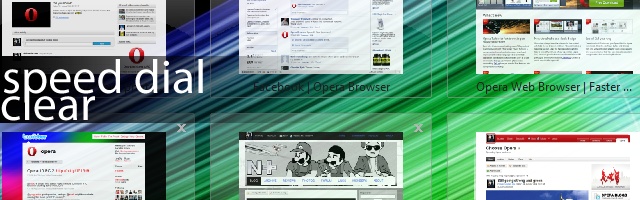
Not long ago we held a Speed Dial contest on My Opera. One of the winners, WOFall, was kind enough to share how he created his Speed Dial. Have a look at the post WOFall made on his blog!
It's amazing how a small tweak like this can make a major impact on the feel of the Speed Dial.
Be inspired! Customize your Opera experience!
Readers' comments 16
Left under the original article, as archived.
About this article
| Published in | Choose Opera |
|---|---|
| Date | August 31, 2009 |
| Author | Aleksander Aas |
| Tags | download, opera 10, chooseopera, frontpage, browser, blog |
| Original | Internet Archive |
random414Monday, August 31, 2009 3:11:38 PM
This tweak should definitely be included in the Standard Skin!
And maybe a little new tweak should also be added: some shadow to the text or, at least, the option to change the color of the text, because, the way it's now, on a darker Speed Dial background image you can not read the text.
mistressEVILMonday, August 31, 2009 3:14:22 PM
awesome!
*uses*
Rafael LuikMonday, August 31, 2009 3:20:27 PM
MyOpera team, please fix this!Monday, August 31, 2009 3:24:21 PM
TamilMonday, August 31, 2009 3:26:31 PM
Originally posted by fearphage:
You can change color.random414Monday, August 31, 2009 3:49:30 PM
Originally posted by Tamil:
You can change it, but I think that there should be a more user-friendly way to do that: an option to change the color of the text in the Configure Speed Dial box, or no color change but a cool permanent shadow under the text like on the Windows desktop; than you should be able to read the text under all circumstances.Charles SchlossMonday, August 31, 2009 4:53:53 PM
AriesptnMonday, August 31, 2009 5:53:59 PM
Tu0rMonday, August 31, 2009 7:38:19 PM
Diego Schild SmithsMonday, August 31, 2009 8:20:05 PM
http://files.myopera.com/tekonaza/images/speed_dial_001.jpg
How can I chance the text color?
random414Monday, August 31, 2009 8:33:23 PM
Originally posted by tekonaza:
Add the bellow two lines to the "skin.ini" file located in the "[Opera Skin Directory]speed_dial_-_clear-1_0.zip" archive (don't forget to replace [Opera Skin Directory] with the real path opera:config#UserPrefs|SkinDirectory if the link doesn't work, manually copy and paste the text in the address bar).I had also edited the "speeddial-selected.png" image adding this way some kind of shadow under the text.
Diego Schild SmithsMonday, August 31, 2009 8:53:45 PM
Originally posted by random414:
Thanks.
IKokeMonday, August 31, 2009 11:48:17 PM
HristoTuesday, September 1, 2009 4:32:30 AM
WOFallTuesday, September 1, 2009 12:57:23 PM
Uncle MickWednesday, September 2, 2009 5:39:13 PM
I also like that you already have Speed Dial backgrounds for download.