
Try Twiget - the new Twitter widget

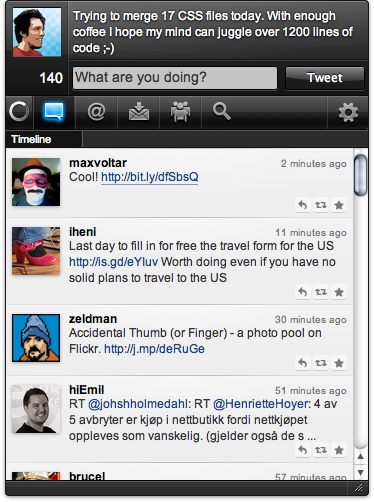
Tell the world what you are up to using Twiget, our new and improved Twitter widget. Get quick and easy access to your Twitter account, post updates and read what your friends are doing.
We're working on a new version with more eye candy stuff and improved functionality. This is what you got in store:
Readers' comments 41
Left under the original article, as archived.
About this article
| Published in | Choose Opera |
|---|---|
| Date | September 7, 2010 |
| Author | Espen André Øverdahl |
| Tags | twiget, widget, twitter |
| Original | Internet Archive |
metudeTuesday, September 7, 2010 8:23:11 AM
Sami SerolaTuesday, September 7, 2010 8:23:43 AM
While installing I get: "There are some problems with PIN..."DanieleTuesday, September 7, 2010 8:24:24 AM
Mağruf ÇolakoğluTuesday, September 7, 2010 8:26:48 AM
TamilTuesday, September 7, 2010 8:27:31 AM
Sami SerolaTuesday, September 7, 2010 8:32:26 AM
Artur „Jurgi” JurgawkaTuesday, September 7, 2010 8:35:29 AM
GentaculeTuesday, September 7, 2010 9:22:28 AM
Almoes mohammedTuesday, September 7, 2010 9:22:49 AM
Fabio LambertiniTuesday, September 7, 2010 9:43:04 AM
Originally posted by Gentacule:
same here. what to do?
TamilTuesday, September 7, 2010 9:57:07 AM
Originally posted by Gentacule:
Click sign in, widget will Open twitter.com for authorization, allow Opera Twiget and then Twitter will give you pin.Fabio LambertiniTuesday, September 7, 2010 10:50:00 AM
Originally posted by Tamil:
It doesn't work. If i click sign in it says that there are some preoblems with the pin. I can't see any Twitter authorization window
Espen André ØverdahlTuesday, September 7, 2010 10:51:19 AM
Originally posted by frem82:
It opens automatically in a new window in your web browser. Check your default web browser for the pin number.Fabio LambertiniTuesday, September 7, 2010 10:56:41 AM
In the error console: JavaScript - widget://wuid-049cccc2-fc36-0e03-02d8-28eefc36b8e6/libs/jquery.cookie.js Linked Script not loaded
Espen André ØverdahlTuesday, September 7, 2010 11:24:24 AM
Sami SerolaTuesday, September 7, 2010 11:27:06 AM
FavTuesday, September 7, 2010 11:28:11 AM
lowikTuesday, September 7, 2010 11:31:17 AM
Juan Sebastián Marulanda PulidoTuesday, September 7, 2010 11:44:12 AM
Charles SchlossTuesday, September 7, 2010 12:15:18 PM
How do you update the widget? I noticed it was updated 4 days ago
lowikTuesday, September 7, 2010 12:21:01 PM
Aleksander AasTuesday, September 7, 2010 1:45:06 PM
Fabio LambertiniTuesday, September 7, 2010 1:50:50 PM
Originally posted by Juan Sebastián Marulanda Pulido:
Same here! I'm on Linux Mint 9 (derivated from lucid). I hope you could fix this.
Yeni SetiawanTuesday, September 7, 2010 1:57:49 PM
One important thing is: I think Twitget needs a new icon, the sweet one.
zombieTuesday, September 7, 2010 3:47:57 PM
karlosrocksTuesday, September 7, 2010 4:27:00 PM
Pedro SerraTuesday, September 7, 2010 5:13:04 PM
peterTuesday, September 7, 2010 5:37:47 PM
Upon closing Twiget and starting it again, Chrome opened up with the Twitter OAuth thingy with a PIN.
SejiTuesday, September 7, 2010 6:14:06 PM
metudeTuesday, September 7, 2010 6:15:19 PM
Originally posted by Seji:
Confirmed
DavorTuesday, September 7, 2010 9:29:20 PM
Switched preffered browser to Firefox for a minute, and i got that PIN
Works fine now !
Fabio LambertiniWednesday, September 8, 2010 1:05:49 PM
It's a bit funny that i've to use chrome for get working an opera widget
АлибулатWednesday, September 8, 2010 2:58:29 PM
batspeedWednesday, September 8, 2010 3:22:03 PM
Originally posted by lowik:
I found a solution for this problem.
On Ubuntu in system>preferences>favorite application
I wrote
opera --pd .opera
As default web browser.
Found this solution watching error message while launching a widget from a terminal, it couldn't find the personnal directory.
batspeedWednesday, September 8, 2010 3:22:58 PM
SAMUEL SENTSHOWednesday, September 8, 2010 4:42:09 PM
not support
Fabio LambertiniThursday, September 9, 2010 7:31:47 AM
JaredFriday, September 10, 2010 12:33:21 AM
Originally posted by metude:
Yep this is not mine:
Not Mine
Mine has texts on tabs:
Mine
metudeSunday, September 12, 2010 5:43:53 AM
You can find new bug fixed and update ui version of Twiget here
JaredSunday, September 12, 2010 12:30:36 PM
Originally posted by metude:
Thank You.
Marcel LettertThursday, September 16, 2010 4:00:24 PM