
We like you so much better when you're naked
Check out the "Opera Z1 Glass" skin by Z1-AV69. This new skin (for Opera 10.50 snapshots only) goes all out in terms of transparency effect in Opera 10.50:
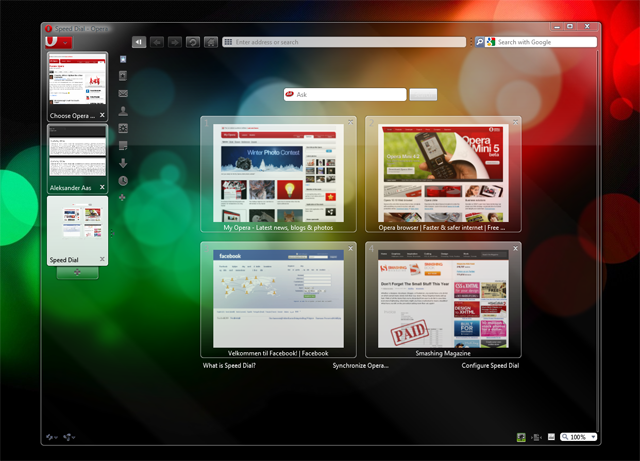
How to make it work:
- Download the latest Opera 10.50 snapshot from the Desktop Team blog.
- Download the skin Z1-Glass to your skin folder.
- Select the skin from Tools » Appearance.
- Click this button to move all tabs to the left (it won't be all transparent if you have the tabs on top).
Auto install
Auto install - Requires the latest Opera 10.50 snapshot. Thanks to Lali!
This skin only works in works with Opera 10.50 on Windows Vista or Windows 7 with Aero support! Backup Opera before experimenting.
Readers' comments 50
Left under the original article, as archived; 2 pages of comments could not be recovered.
About this article
| Published in | Choose Opera |
|---|---|
| Date | January 25, 2010 |
| Author | Aleksander Aas |
| Tags | skin, Opera 10.50, transparency |
| Original | Internet Archive |
Sami SerolaMonday, January 25, 2010 11:09:57 AM
Tri M. NguyenMonday, January 25, 2010 11:11:20 AM
Anthony Museatlantis FletcherMonday, January 25, 2010 11:21:14 AM
netwolfMonday, January 25, 2010 11:25:36 AM
putriMonday, January 25, 2010 11:30:09 AM
really coool..
arrmrayMonday, January 25, 2010 11:42:42 AM
Z1-AV69Monday, January 25, 2010 11:49:09 AM
There is a newer version of the skin available here. I will keep updating this with the progress of 10.5 snapshots, updates will be posted on my blog.
Have fun with the skin!
LukášMonday, January 25, 2010 11:53:52 AM
Sami SerolaMonday, January 25, 2010 12:00:22 PM
Yeni SetiawanMonday, January 25, 2010 12:35:12 PM
PhilippMonday, January 25, 2010 12:47:32 PM
Anthony Museatlantis FletcherMonday, January 25, 2010 12:48:04 PM
Sami SerolaMonday, January 25, 2010 12:51:45 PM
Originally posted by Museatlantis:
I don't want to mess up my PC at work, and I noticed there's no version for Linux available yet to try Opera 10.50 at home
Aleksander AasMonday, January 25, 2010 1:12:12 PM
Originally posted by Z1-AV69:
Thanks for making the awesome skin
Originally posted by serola:
We will keep you posted on any Linux versions as soon as they arrive!
Paul GeorgeMonday, January 25, 2010 1:14:04 PM
arashpourMonday, January 25, 2010 1:15:35 PM
Taufiq AhmedMonday, January 25, 2010 2:33:24 PM
Mağruf ÇolakoğluMonday, January 25, 2010 2:44:28 PM
LaliMonday, January 25, 2010 2:53:52 PM
Aleksander AasMonday, January 25, 2010 2:56:39 PM
Charles SchlossMonday, January 25, 2010 3:11:05 PM
SteveMonday, January 25, 2010 5:37:19 PM
civitassterMonday, January 25, 2010 5:41:34 PM
IKokeMonday, January 25, 2010 7:00:30 PM
Aleksander AasMonday, January 25, 2010 7:59:00 PM
Originally posted by sgunhouse:
That's my bad
Jakub MartonMonday, January 25, 2010 8:36:49 PM
i've been waiting for this for some time already
well, no more background image in my speed dial
macecoshubiMonday, January 25, 2010 8:38:23 PM
civitassterMonday, January 25, 2010 9:09:16 PM
techlawsamMonday, January 25, 2010 9:18:27 PM
Thanks Z1 you ROCK!!
Victor IMonday, January 25, 2010 9:29:36 PM
vipin kumarMonday, January 25, 2010 10:34:24 PM
techlawsamMonday, January 25, 2010 11:03:43 PM
Originally posted by tareqf1:
yes you can! (no pun intended
BlueFalconTuesday, January 26, 2010 12:37:44 AM
muhammad mhajnaTuesday, January 26, 2010 1:43:55 AM
but it's don't work !
Duong Hoang VuTuesday, January 26, 2010 2:07:21 AM
But I think it makes the text on webpage a little blur, doesn't it.
sunday ogbuefiTuesday, January 26, 2010 2:07:59 AM
vipin kumarTuesday, January 26, 2010 2:43:11 AM
Originally posted by mvk6:
doesn't seem to work!!
d4rkn1ghtTuesday, January 26, 2010 3:03:50 AM
techlawsamTuesday, January 26, 2010 3:38:27 AM
http://files.myopera.com/samMD/files/Z1-Glass%20skin%20search%20button%20in%20speed%20dial%20text%20is%20invisible.PNG -
D3ad3nd3dTuesday, January 26, 2010 5:06:43 AM
MOHAMMEDGTTuesday, January 26, 2010 10:17:03 AM
JaredTuesday, January 26, 2010 11:12:47 AM
the-hqTuesday, January 26, 2010 11:13:26 AM
eagerly awaiting the beta now!
Itachi UchihaTuesday, January 26, 2010 11:35:48 AM
nightweelsTuesday, January 26, 2010 12:22:29 PM
Kid - Bếp nhỏTuesday, January 26, 2010 2:31:39 PM
Z1-AV69Tuesday, January 26, 2010 2:38:56 PM
D3ad3nd3dTuesday, January 26, 2010 2:51:08 PM
ladiesman69Tuesday, January 26, 2010 3:17:05 PM
Dustin WilsonTuesday, January 26, 2010 5:56:26 PM