
Welcome to Opera Next

Fresh from the Opera servers, the brand new Opera 11.50 alpha with two cool new features! Opera Next and Speed Dial Extensions! This time there are no reasons not to play around with it, as Opera Next allows you to create a brand new testing environment without compromising your daily browsing!
Opera Next

Opera Next is an independent Opera install that lets you try the latest pre-release versions without affecting your everyday browser. Opera Next automatically updates when new versions become available. Opera Next builds are probably unstable and contain bugs, but now you can test like a boss without compromising your main Opera installation!
So, how does this work you ask? Well when you install Opera Next you'll receive a fresh Opera install independent of your main Opera installation. This new Opera Next installation will never touch your Opera installation, so you're safe to play around with alphas, betas and even snapshots!
Whenever there is a new testing version available Opera Next will let you update your Opera Next installation. Play around with exciting stuff such as the new Speed Dial Extensions knowing that your main browser settings are safe!
Speed Dial Extensions
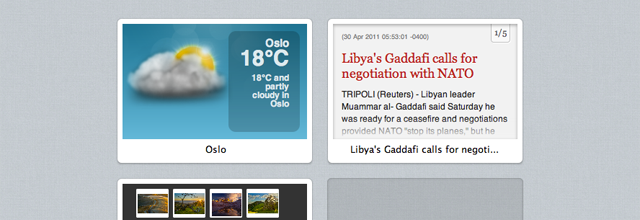
Extensions were introduced in Opera 11. Now with Opera 11.50 we take them to the next level! Developers can add new functionality to your Speed Dial. A click of your mouse opens a new tab that could show live news feeds, display the weather, present email notifications or much more.
Want to make your own Speed Dial Extension? Check out the sweet article on Dev.Opera for more details!
Download Opera 11.50 alpha
What are you waiting for? With the Opera Next all you have to do is go to www.opera.com/browser/next/. Give the new alpha a spin using Opera Next!
About this article
| Published in | Choose Opera |
|---|---|
| Date | July 8, 2011 |
| Author | Aleksander Aas |
| Tags | download, launch, alpha, opera 11.50 |
| Original | Internet Archive |
Angel Manuel Perez3. May 2011, 08:07
praetor873. May 2011, 08:09
Gary Walsh3. May 2011, 08:11
Muhammad-Ubaid raza3. May 2011, 08:13
Aleksander Aas3. May 2011, 08:16
Swordfish and Opera Next
Introducing Opera 11.50 "Swordfish"
Gary Walsh3. May 2011, 08:21
Liam Griffiths3. May 2011, 08:32
Good work Opera Team, Brilliant browser!!
h0mayun3. May 2011, 08:50
Necroman3. May 2011, 08:55
Aleksander Aas3. May 2011, 09:04
Originally posted by Necroman:
Sounds smart, but for now I suggest you create a new testing account for Opera Link!
David3. May 2011, 09:50
Henry3. May 2011, 09:53
ps polevaulted
Phriend3. May 2011, 09:59
Tamil3. May 2011, 10:40
Matthew Wilcoxson3. May 2011, 10:48
Question: Are speed dial extensions synchronised with Opera Link?
Thanks for always innovating in Opera!
agresiff3. May 2011, 11:23
Abhinav3. May 2011, 11:33
Peter3. May 2011, 11:37
Cole3. May 2011, 11:47
Yuro3. May 2011, 11:51
One question : where can i post my ideas or maybe bugs? (is it only me or grooveshark is not working correctly? looks like i cant use the horizontal slider (when you add all popular songs to playlist).)
Faizan Munir Khan Rajput3. May 2011, 12:15
Yeni Setiawan3. May 2011, 12:41
Alexodius Prime3. May 2011, 12:48
Originally posted by colej2000:
No need - LastPass is for that
Aleksander Aas3. May 2011, 13:03
Originally posted by colej2000:
It's there, but it's not being pushed as of now!
zoozd3. May 2011, 13:24
Cole3. May 2011, 13:31
Originally posted by Aleksander:
I'm betting Google Docs still doesn't work either
Charles Schloss3. May 2011, 13:48
Daniel3. May 2011, 14:45
Alexodius Prime3. May 2011, 15:07
Cole3. May 2011, 17:08
Originally posted by theadolescent:
Agreed, it just goes to show the dev team aren't really listening to people which means Chrome and Firefox have no need to worry.
It's still not compatible with Google Docs so they obviously aren't bothered about that and no sign of password synchronization
Charles Schloss3. May 2011, 17:33
Originally posted by colej2000:
THat could be an Opera bug being worked on or a bug in Google's code, right now I am getting strange code in gmail, that other Opera users don't get
Tanel3. May 2011, 18:16
Originally posted by Chas4:
Opera's incompatibility with Google Docs is still the main reason why I have to fire up another browser casually, and why I don't dare to advertise Opera to others, as GDocs's a standard working environment these days around here.
On the other side, I'm happy to see the mating of extensions and speed dial and dig the idea of Opera Next.
Maybe a default button somewhere in the UI for reporting pugs would be something to consider as well. To prompt testers to actually file in their findings and also to emphasize the fact that it's not the final build. As of now Opera offers everyone a way to test their browser, but there's no explanation whatsoever on what to do if one should actually find something that needs to be fixed.
Miles Davis3. May 2011, 19:17
d4rkn1ght3. May 2011, 19:23
jaleelpkader3. May 2011, 20:05
hundredorzero3. May 2011, 23:45
Alexodius Prime4. May 2011, 00:27
Originally posted by jaleelpkader:
You mean opera:config?
Joel4. May 2011, 04:09
Francisco Porras A.4. May 2011, 08:26
sasquatchsecurity4. May 2011, 09:07
Huangyinchina4. May 2011, 15:06
Nice work!
aderemi4. May 2011, 21:49
sasquatchsecurity4. May 2011, 22:45
Originally posted by remmy38:
You said it! Beautifully said.
Jho-jho5. May 2011, 02:43
Now every time I open zynga poker .. I always get the alarm's security ... but if I go through other providers can only be .. please explain in as much detail as possible to address E-mail me .. [email protected]
yousaf5. May 2011, 03:16
aderemi5. May 2011, 07:32
Peter5. May 2011, 09:14
Tamil5. May 2011, 09:19
Now My Opera shows username next to name.
Peter5. May 2011, 09:31
Tamil5. May 2011, 09:37
http://my.opera.com/community/forums/findpost.pl?id=3861571