
Zoom to make the Web easier on your eyes
Opera has long had an ability to magnify and resize webpages that was far and away better than anything else out there because Opera increases the size of all elements on the page, not just text, and reflows the content to fit perfectly on your screen. Read on to learn about various ways that you can use this great feature.


Sometimes page zoom is thought of as being most relevant for people with poor vision - and it is indeed helpful for such people, but today zoom is a feature that is more important than ever for almost anyone. Display resolutions have been steadily increasing, meaning that objects like letters and images on screens is getting smaller - and thus more difficult to see. Couple that with the large amount of information packed onto webpages, and you have some serious eyestrain going on.
Additionally, many people are connecting computers to HDTVs or projectors and reading webpages from across the room. Opera's zoom makes this a far more enjoyable experience than with most other browsers, because things need to be much larger to easily be read from ten or fifteen feet away.
Zoom also can be useful for zooming out if you are viewing large images or pages intended for a monitor larger than yours. This way you can view the entire page or image all at once.
There are many ways to use Opera's zoom - you can choose the method that is most convenient for you:
-
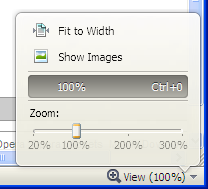 Click the zoom control at the bottom right of the browser window that displays the current zoom level. This brings up a slider that you can drag or scroll over with a scrollwheel to adjust the zoom level from 20% to 300%.
 - Use the + and - keys on the keyboard to zoom in and out. (Users of US English keyboards must hold Shift on the = key) The number pad +/- keys also work well.
- Hold the Control key while you zoom in and out with the scroll wheel on your mouse for quick adjustments.
- You can reset your zoom level back to 100% with the Ctrl+0 shortcut (or the number pad * key.
Note that the zoom level is preserved for each tab that you use, so that navigating to a new page uses the same zoom level as you left off. Other tabs have independent zoom levels, so you don't have to worry about zooming and messing up the display of your other tabs.
Try out these different ways of zooming so that you can enjoy one of Opera's great features and give your eyes an easier time with the Web!
Readers' comments 34
Left under the original article, as archived.
About this article
| Published in | Choose Opera |
|---|---|
| Date | August 6, 2010 |
| Author | Joseph D. Lien |
| Tags | features, opera, eyestrain, zoom |
| Original | Internet Archive |
TamilFriday, August 6, 2010 12:13:42 PM
Originally posted by jdlien:
Or number pad * key.Sami SerolaFriday, August 6, 2010 12:19:19 PM
Originally posted by Tamil:
Many thanks for that tip http://files.myopera.com/serola/smilies/trillian_cheering.gif -
mistressEVILFriday, August 6, 2010 12:22:05 PM
One of most handy features for sure; especially on pages with too small font size, why bother the eyes when you can rest on zoomed in text.
PurgatoriFriday, August 6, 2010 12:30:32 PM
unruledFriday, August 6, 2010 12:40:24 PM
ZotlanFriday, August 6, 2010 12:57:16 PM
Originally posted by unruled:
There are a number of image resize scripts available from extendopera.
zoqueteFriday, August 6, 2010 1:06:07 PM
By the way, Gecko (Firefox, Seamonkey) has both types of zooming.
WOFallFriday, August 6, 2010 1:14:28 PM
unruledFriday, August 6, 2010 1:26:33 PM
Originally posted by Zotlan:
that's not the point. Why should I (or any end user) have to resort to using botchy scripts when it is definitely something that should be in the browsers core functionality?
clearly you miss the point, sir.
AvolaFriday, August 6, 2010 1:28:47 PM
Originally posted by Tamil:
Or CTRL+Middle click
ZotlanFriday, August 6, 2010 1:33:14 PM
Originally posted by unruled:
Not at all, i agree it would be a nice feature to have. I was just pointing out some solutions for those who do not want to wait for the devs to implement it.
(botchy? have you even tried any of the scripts?)
Charles SchlossFriday, August 6, 2010 2:00:55 PM
unruledFriday, August 6, 2010 2:10:45 PM
Originally posted by Zotlan:
Alright. Pardon my frustration, but many attemps to contact Opera have amounted to nothing
With botchy, what I really mean to say is how, well.. a script is an add-on. Whilst you can accomplish a lot of things with a script, it will be lacking the polish that a regular, out of the box implementation would have. (and it is the polish on the Opera browser that makes it so great!). Hope that clarifies
Joseph D. LienFriday, August 6, 2010 2:55:21 PM
Originally posted by Avola:
Wow, even I didn't know that one! Cool.
David BloomFriday, August 6, 2010 2:58:39 PM
AvolaFriday, August 6, 2010 3:22:03 PM
PengeFriday, August 6, 2010 3:29:44 PM
User Prefs|Scale=xxin the override.ini? (rhetorical question)Originally posted by Zotlan:
Great, but it doesn't compatible with the Fit-to-Width feature.
Rafael LuikFriday, August 6, 2010 3:54:47 PM
SondeckisFriday, August 6, 2010 5:16:23 PM
d4rkn1ghtFriday, August 6, 2010 9:09:37 PM
Artur „Jurgi” JurgawkaFriday, August 6, 2010 9:41:21 PM
AngelikiFriday, August 6, 2010 10:29:52 PM
Originally posted by jdlien:
+1
tomasbSaturday, August 7, 2010 10:29:18 AM
Originally posted by Penge4:
Not all Opera pref are site specific.
However I reported bug for zoom and fit-to-width and
will push it to be implemented.
Violeta RosalesSunday, August 8, 2010 4:25:06 AM
KYLESunday, August 8, 2010 12:09:19 PM
Abinya syafiqMonday, August 9, 2010 12:39:27 AM
KYLEMonday, August 9, 2010 5:54:24 AM
informaleThursday, August 12, 2010 6:25:26 PM
meitosisWednesday, October 6, 2010 4:38:56 AM
"Note that the zoom level is preserved for each tab that you use, so that navigating to a new page uses the same zoom level as you left off. Other tabs have independent zoom levels, so you don't have to worry about zooming and messing up the display of your other tabs."
It's kind of ambiguous, does it mean the zoom level is preserved in 'each'(ie. every) tab, or just in one tab? Is there a way to preserve it across all tabs (like in i.e. 8) so that I don't have to be constantly resizing every tab? Because after signing up for and using Opera for a few hours, that's what I have been ending up doing: resizing every freakin tab.
Thanks.
Rafael LuikThursday, October 7, 2010 5:58:54 PM
Originally posted by meitosis:
Menu > Settings > Preferences > in the "Webpages" tab > Page zoom. You can define the default zoom there. That's what you were searching for?ArstenSaturday, October 23, 2010 11:11:45 PM
baki_princWednesday, November 3, 2010 11:32:38 AM
MackTuesday, November 9, 2010 8:28:43 PM
Zoomed page looks great in latest version, before it was blurry and chopped. Right now I'm still on firefox because of zoom.
Ajith NairWednesday, December 29, 2010 7:21:19 PM
Originally posted by informale:
Yes, I think Firefox got it perfect -- it remembers zoom settings for each site across browsing sessions. That is what I miss the most when I switch from Firefox to Opera. And what's more cool about Firefox is that it can sync zoom settings across computers also.