
Developers › Desktop Team blog
Featherweight and plugin installation improves, plus important fixes
Mondays are often depressing, so here is a new build with improvements to our Featherweight skin to help lighten your day.  Some of the highlights are:
Here are a couple of screen shots from Mac and Windows. Can you spot the changes?
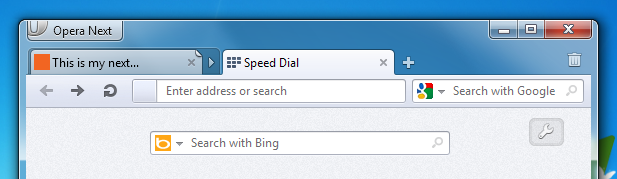
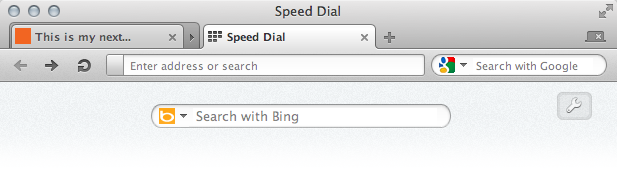 Here is a view with the panel showing. This time I'll highlight the change for you.
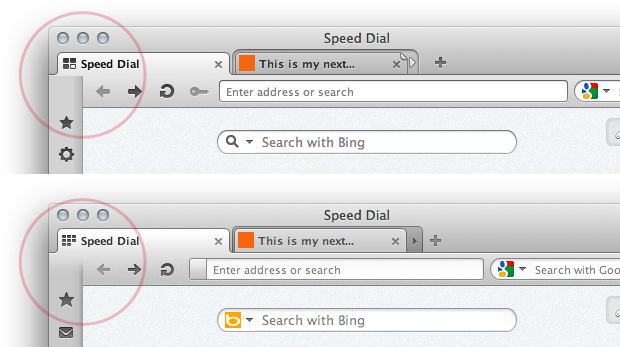 Additionally, we have also done a fair amount of work on our auto-update and plugin installation features, and fixed a handful of annoying recent regressions.
For a more complete list of changes, scroll down to the change log below.
WARNING: This is a development snapshot: It contains the latest changes, but may also have severe known issues, including crashes, and data loss situations. In fact, it may not work at all.
Download
Some of the highlights are:- The icons have been polished and aligned
- Badge graphic has been tuned
- The panel now blends with the active tab
- Tuned colorization on Windows and Linux to blend more with the platform colors
- New URL drop down look, with easier to use search suggestions
Here are a couple of screen shots from Mac and Windows. Can you spot the changes?
Here is a view with the panel showing. This time I'll highlight the change for you. Additionally, we have also done a fair amount of work on our auto-update and plugin installation features, and fixed a handful of annoying recent regressions. For a more complete list of changes, scroll down to the change log below.
WARNING: This is a development snapshot: It contains the latest changes, but may also have severe known issues, including crashes, and data loss situations. In fact, it may not work at all.
Download
Changelog
Featherweight Skin
- DSK-321398 (Reduce package size of the skin files)
- DSK-336005 (Not enough padding around text only tab captions in Mac skin)
- DSK-340045 (Add tab (New Page) icon should not jump)
- DSK-340053 (The zoom menu has bad show/hide behavior)
- DSK-340095 (New zoom slider button not centered correctly in default 100% state)
- DSK-340161 (Search button has no hover effect)
- DSK-340225 (Extra white-space right of stacked tabs and normal tabs on Mac)
- DSK-340331 (No longer possible to open O-Menu by clicking and holding mouse button)
- DSK-342227 (Zoom menu can be clicked even when it is disabled for particular pages)
- DSK-342777 (Minor glitches in Mac Opera Next tab labels)
- DSK-343886 (Tab and Page bar items are inconsistent when performing a pin tab action)
- DSK-347061 (Overlay dialogs lost padding)
- DSK-347077 (Extension pop-out dialog's balloon pointer arrow is not painted correctly)
- DSK-347087 (After removing the search field from the Address Bar, the Star Menu callout is misaligned)
- DSK-347237 (Zoom popup layout gets broken on hover)
- DSK-347297 (Address field bookmark star is positioned too high/looks too small on Mac)
- DSK-347447 (View tools and address field page info badge pop-outs cannot be closed and its position is not updated when necessary)
- DSK-347534 (Tab group expander missing or broken)
- Make URL drop down 'featherweight': Two columns, page title (icon only on focus) and page url
- Search suggestions against default search engine in URL field without keyword: configure with opera:config#UserPrefs|ShowSearchesInAddressfieldAutocompletion
Auto update
- DSK-339545 (Crash when a pending auto-update is set to install later and you wait a few days before starting Opera)
- DSK-327716 (Auto-update doesn't schedule a new update request if it has just been updated.)
- DSK-345746 (When starting several instances of the same install of Opera while upgrading, a fresh junk install of Opera is created)
- DSK-347506 (Opera is not started after being auto-updated)
- DSK-346689 (Auto-update claims to be up to date after installing an update even if there is a newer update on the server)
Plugin installation wizard
- DSK-336701 (Allow user to hide plugin installer download progress)
- DSK-337207 (Crash when trying to install flash from widget first time)
- DSK-337213 (Crash when pressing Read license agreement when installing plugin from widget)
- DSK-344731 (Cancelling installation dialog does not cancel installation)
- DSK-330597 (Provide option to open plugin data in external application when plugin is not available)
- DSK-337496 (Plugin toolbar doesn't always show)
- DSK-344749 (Missing Plugin Toolbar displayed even if plugin installed)
- DSK-341660 (Two install dialogs are displayed)
- DSK-343045 (All available buttons displayed on missing plugin tab)
- DSK-336843 ("Resizer" appears next to the scrollbars suggesting that EULA viewport can be resized)
- DSK-347140 (Plugin install dialog does not proceed to next step)
- DSK-341237 (Nothing happens when clicking in application/x-oleobject placeholder)
- DSK-337428 (Wrong missing plugin page when PluginAutoInstallEnabled is disabled)
- DSK-337190 (Opera crashes when opening pdf file from EULA window)
- DSK-344267 (Crash when opening Install plugin dialog)
- Translation fixes
Desktop
- DSK-345975 (Implement a new Add to Panel dialog (Add Panel: Add Web Panel) to replace the old Bookmarks dialog)
- DSK-347594 (User JavaScript (UserJS)/extensions doesn't work after a clean install)
- DSK-347720 (Top padding missing from mail buttons)
- DSK-341729 (Clones of the Opera Unite Home service in Unite Panel)
- DSK-343528 (Crash on deleting private data with geolocation data)
- DSK-346994 (CSS units improvement tests are failing)
- DSK-347371 (Mac Widget Installer crashes on launch if you have any bookmarks)
- First item in URL drop down should not be activated on pressing Enter
- No search suggestions in private tabs
Readers' comments
Comments left by My Opera members under the original post: the first 50, as archived.
About this article
| Published in | Desktop Team blog |
|---|---|
| Date | October 10, 2011 |
| Author | Ruarí Ødegaard |
| Tags | 12.00, Plugins, featherweight |
| Original | Internet Archive |
newscpqMonday, October 10, 2011 3:01:28 PM
CristiancristianerMonday, October 10, 2011 3:06:09 PM
Ruarí ØdegaardruarioMonday, October 10, 2011 3:09:07 PM
Originally posted by newscpq:
Yes, but since it is late in the day here in Norway and we don't do it immediately, autoupdate is unlikely to come into affect until tomorrow.Vladimyr IvanovVladimyrMonday, October 10, 2011 3:10:05 PM
Have it on Win7 and doesn't have on XP.
p.s.: please also notice translation bug
UnknownFactorMonday, October 10, 2011 3:10:19 PM
[edit] Cancel that, I just got an old auto update. Just now.
Not so fast.
andresleonardoafMonday, October 10, 2011 3:11:08 PM
Bhikkhu PesalaPesalaMonday, October 10, 2011 3:16:39 PM
Александр КарпинскийhommMonday, October 10, 2011 3:19:05 PM
http://twitpic.com/6ycg47
minhoMonday, October 10, 2011 3:19:51 PM
GwenDragonMonday, October 10, 2011 3:20:29 PM
Is this a known bug?
minhoMonday, October 10, 2011 3:27:05 PM
woj-tekMonday, October 10, 2011 3:27:40 PM
<3
finally each item = one line!
nesl247Monday, October 10, 2011 3:28:05 PM
nimu_channimuchanMonday, October 10, 2011 3:31:12 PM
AsiresMonday, October 10, 2011 3:31:27 PM
minhoMonday, October 10, 2011 3:32:29 PM
http://files.myopera.com/minho/albums/6005422/4Sem%20título.png
win 7 x64
Patrick O'Reillypaddy2kMonday, October 10, 2011 3:33:23 PM
The tab bin is hardly visible:
Style still missing from opera:gpu
Image uploads to MyOpera doesn't work (flash based I believe).
Had to post this from Chrome.
Ubuntu 10.10 - 32Bit - Stock
minhoMonday, October 10, 2011 3:35:06 PM
Originally posted by paddy2k:
No problem here.
win 7 x64
m910qMonday, October 10, 2011 3:39:28 PM
Originally posted by Pesala:
For God sakes, no!
The feature to be able to catch the actual window is important. Why do you think every other window on your system has one?
It's one of the very few reasons I don't like Chrome
Ruarí ØdegaardruarioMonday, October 10, 2011 3:45:48 PM
Originally posted by paddy2k:
Yeah that is kinda expected since you are missing a feature there. When it is needed, it'll work!AvolaMonday, October 10, 2011 3:45:58 PM
Originally posted by m910q:
That's why it should be optional by changing Chrome Integration Drag Area.
The panel alignment is slightly off again:
I also don't really like the new back/forward buttons, they're small and "unproffesional" looking, and look too much like Chrome.
Ruarí ØdegaardruarioMonday, October 10, 2011 3:46:19 PM
Originally posted by techwg:
Give us time. We haven't even had an alpha yet! These builds are all pre-alpha.XombiemubaidrMonday, October 10, 2011 3:46:33 PM
But please do change "old scroll bars look" and if you could modernize progress bar!
Patrick O'Reillypaddy2kMonday, October 10, 2011 3:50:49 PM
Originally posted by ruario:
LOL Touché Mr.Ødegaard, touché
It was just that I'd seen screen from our Redmond lovin' brothers with the familiar opera: style. Looking forward to both
Nimesh nimeshthakkarMonday, October 10, 2011 3:51:37 PM
AvolaMonday, October 10, 2011 3:54:00 PM
http://i.imgur.com/uYT7R.png
Edit: Using an old skin in this pic, but the same happens with the new one
nesl247Monday, October 10, 2011 3:54:25 PM
Also, please allow us to place the bookmarks button on the bookmarks toolbar like Chrome allow you have Other Bookmarks.
alekksanderMonday, October 10, 2011 3:56:01 PM
eidurMonday, October 10, 2011 3:56:08 PM
Someone please confirm.
-Mac OS 10.5.8
minhoMonday, October 10, 2011 3:56:25 PM
Originally posted by ruario:
fisherman10Monday, October 10, 2011 3:59:01 PM
Originally posted by eidur:
confirmed on windows 7 32bit too!
and also, I keep getting "You need to download and install the Adobe Flash Player plug-in to view this page correctly" after watching a few youtube videos.
vasstrMonday, October 10, 2011 4:00:31 PM
"IE9 support is coming soon."
http://www.dartlang.org/
no opera?
m910qMonday, October 10, 2011 4:01:46 PM
Showed here:
http://dl.dropbox.com/u/1098960/feather.png
Win 7
OlliOlli91Monday, October 10, 2011 4:02:09 PM
This is a regression since 1065 - already sent a crash report for that. Since nobody confirmed this until now this stays pretty strange.
Edit: When I stop loading the page shortly before it has fully loaded (but the video can already play) it doesn't crash. I'm pretty sure this has to do with the new JS compiler for Mac. Please work on that.
SaperRMonday, October 10, 2011 4:02:41 PM
Ronit KumarronitrexMonday, October 10, 2011 4:11:25 PM
Originally posted by paddy2k:
Well, my search suggestions are invisible, instead a blank white area is shown.
Win 7 x64
Patrick O'Reillypaddy2kMonday, October 10, 2011 4:14:00 PM
Originally posted by vasstr:
Not Opera's problem, it's browser sniffing by Google.
It'll work if you type the following into the console.
earth01Monday, October 10, 2011 4:15:35 PM
Skin regression : there is an unclickable 1px line over the Opera menu again.
Core improvement : JS now works properly
New desktop bug : There is an install plugin bar at http://www.lefigaro.fr whereas the plugin (Flash) is already installed.
Bhikkhu PesalaPesalaMonday, October 10, 2011 4:17:56 PM
Originally posted by m910q:
Since the default drag area maximized is 1 pixel the default setup will still allow dragging of the window, but users will be able to change this to 0 to get the tabs at the top of the window without editing the skin. That's why the skin must be fixed. The drag area can be as big as you want it to be, but values less than 0 are ignored.Some of us always use Opera maximised on Win XP, so we never need to drag the window.
SafetyCarMonday, October 10, 2011 4:18:35 PM
Alexander FutekovSasko88Monday, October 10, 2011 4:22:18 PM
This one is as old as featherweight, badges have different widths when collapsed, even more, now no single badge has a proper symmetrical right padding.
(actually only the magnifying glass for when you're searching is ok)
In addition, the green 'secure' badge does not have a hover effect, every other badge has one.
Another thing - when you play with the zoom slider in the status bar while in speed dial, the changes don't take place until you hover the wrench button.
Last one - please, please, please add a working 0 value to 'Chrome Integration Drag Area Maximized'. It is an option, so why not do it?
Still, good job on all the icons and the general feel of the skin, it is much better now.
SafetyCarMonday, October 10, 2011 4:22:56 PM
Satan D. LucifersupertrolMonday, October 10, 2011 4:23:01 PM
using this skin in 11.51 stable
but Avola's comment is true that is actually a bug
also,notice how the size of the standard skin file of this build
its small(777KB compared to 11.51 956KB)
can featherweight skin reach 100KB?
Hoping for more featherweight fixes before final:yes:
coyotemonMonday, October 10, 2011 4:26:01 PM
http://i52.tinypic.com/2ev7taq.png
~600 MiB of ram after ~10 min
UtkarshUtkarsh1Monday, October 10, 2011 4:29:12 PM
1. Address bar dropdown box bug:
http://i53.tinypic.com/pn1pz.jpg
2. When Opera starts with only one single tab, the tab width is slightly lesser than the normal tab width. When another tab is opened this problem is rectified and the first tab returns to normal width.
3. The first element in the Address Bar during typing/searching is not visible.
OS: Windows 7 SP1 32bit
Igoruha FroloviIgoruhaMonday, October 10, 2011 4:29:14 PM
Fix this please.
danielmmmmMonday, October 10, 2011 4:29:15 PM
minhoMonday, October 10, 2011 4:29:38 PM
Originally posted by SafetyCar:
Same here.
win 7 x64
NiColaoSNikDaMarkMonday, October 10, 2011 4:30:32 PM
I still cannot change tabs while I've set "drag maximized = 0". Also, the Menu Button doesn't touch the top-edge either, currently. It's like the entire "#main-window" needs to go up by 1px.
Win7 x64
P.S. Would be great if you could reduce generally the curved-corners ( everywhere ) to at least 2.5px or ideal... 2px! I'm dreaming though, I know.
Shahid_UAShahidUAMonday, October 10, 2011 4:35:52 PM
find more themes:
https://addons.opera.com/themes {404:Page not found}