
Developers › Desktop Team blog
Hello Bookmarks Bar
In this build we introduce the new Bookmarks Bar. It replaces the old personal bar which was located above the Tab Bar, and is located below the Address Bar.
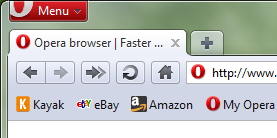 How to enable the Bookmarks Bar:
If you want the Bookmarks Bar to show in the old location of the Personal Bar:
Known Issues
WARNING: This is a development snapshot: It contains the latest changes, but may also have severe known issues, including crashes and data loss situations. In fact, it may not work at all.
Download
How to enable the Bookmarks Bar:- Open the O Menu
- Select "Toolbars"
- Check the check mark for "Bookmarks Bar"
If you want the Bookmarks Bar to show in the old location of the Personal Bar:
- Open the "Appearance dialog (Shift + F12) > Toolbars"
- Click "Show hidden toolbars while customizing"
- Above the Address Bar a Bookmark Bar appears, click in once to mark it. (A Yellow outline shows around the bar)
- Click "Placement" And select "Top" inside the Appearance Dialog
- Mark the new Bookmarks Bar located below the Address Bar, and choose "Placement Off"
- Click OK
Known Issues
- DSK-313018 (Progress bar doesn't disappear until you hover the UI)
- DSK-311692 (Crash when opening from download dialog directly into Opera)
WARNING: This is a development snapshot: It contains the latest changes, but may also have severe known issues, including crashes and data loss situations. In fact, it may not work at all.
Download
Changelog
Desktop
- Move Personal Bar below the Address Bar, and rename to Bookmarks Bar
- Improved keyboard navigation on Bookmarks Bar (using Tab to jump between items)
- "Toolbars" menu moved to the top level of the "O-menu"
- DSK-266440 (Default skin size for checkbox radio buttons should be 13x13px)
Core
- CORE-30558 (Search for spaces in page matches seemingly random pieces of text)
Readers' comments
Comments left by My Opera members under the original post: the first 50, as archived.
About this article
| Published in | Desktop Team blog |
|---|---|
| Date | September 15, 2010 |
| Author | Helge Gjølme |
| Tags | Bookmarks Bar |
| Original | Internet Archive |
newscpq15. September 2010, 10:16
lwiczek15. September 2010, 10:24
OK - on the plus side you've overcome the transparency problem that was present since introduction of the new UI.
But the mamangement of the position of this bar is still diffictult (not that much of flexibility)...
d4rkn1ght15. September 2010, 10:24
marbross15. September 2010, 10:27
newscpq15. September 2010, 10:30
Originally posted by havaard:
can we expect that Opera will release autoupdates on all snapshots, to support the "Download All Snapshots" command of the Opera:config file, then?
stivo8515. September 2010, 10:33
eliotcougar15. September 2010, 10:33
earth0115. September 2010, 10:34
Publisher15. September 2010, 10:34
Tommy A. Olsen15. September 2010, 10:35
earth0115. September 2010, 10:36
Originally posted by Publisher:
totally agree !
sabisan15. September 2010, 10:43
Originally posted by earth01:
Totaly agree +2!J-K-L15. September 2010, 10:45
Originally posted by stivo85:
There is also a new context menu entry "style" for the new Bookmarks Bar.
This entry is missing if you set the Bookmarks Bar to the top as described in the blog post. So it seems by these steps you only activate the old Personal Bar
I like the old placement better, so I'm happy they left an option to choose.
getnikkoo15. September 2010, 10:49
#1 chrome
#2 Firefox
#3 opera
#4 INTERNET explorer
#5 safari
but few days before it was
#1 chrome
#2 opera
#3 safari
#4 Firefox
#5 INTERNET explorer
pursanovd15. September 2010, 10:50
1-it must be smaller, because now its too big at top and the old one was not bad at bottom because of transparency.
2-in bookmark edit menu there is still string: "Show on Personal Bar"
Rijk15. September 2010, 10:53
Originally posted by getnikkoo:
Which benchmark, and how is this related to testing snapshot browsers? Also, how exactly is it bad news that users of *all* browsers, in the near future, will be able to enjoy a browser that is much faster than the fastest browser was a year ago?Francesco De Domenico15. September 2010, 10:59
earth0115. September 2010, 11:01
Originally posted by Rijk:
I think he is speaking about this one : http://internet-browser-review.toptenreviews.com/ (see in his opera blog) But I have also noticed that they take Opera 9.6 and not Opera 10.6. That makes a difference.OperaDrBruce15. September 2010, 11:01
Originally posted by stivo85:
There was a problem with the old personal bar, because if it was on top, above the tabs, title bar appeared. And Opera looked fat. We pointed to this for months and they finally fixed it.
http://files.myopera.com/CrazyPersonalBar/files/Snap3.jpg
prd315. September 2010, 11:03
Originally posted by newscpq:
What on earth does this have to do with the team growing?
Originally posted by getnikkoo:
Why do people insist on posting inane, baseless, sourceless claims like this? If you want to be taken seriously, ADD A SOURCE FOR YOUR CLAIMS.
Publisher15. September 2010, 11:04
Originally posted by getnikkoo:
I think it is not the most important who is the fastest browser. Important is that all parties always improve their product.
By the way... browser benchmarks are not representative. Because benchmarks differentiate from the system where they ran.
Алексей15. September 2010, 11:12
Brano15. September 2010, 11:15
Daniel Hendrycks15. September 2010, 11:17
Turn on Turbo via Settings>Quick Preferences>Enable Turbo
Result: This will not turn on Turbo
J-K-L15. September 2010, 11:20
you can test it on this page right here:
1. search for a single space with inline find (via "." in the default config)
2. cancel the search by clicking on an empty area of the page, not by hitting ESC
3. random text (mostly links) on the page is highlighted (you might have to scroll up or down to get to this highlighted text)
the search itself is fine. can anyone confirm this? Feel free to file it as a proper report if it is not already known
Linux Mint 9, i386
Edit: and WinXP32 SP3
Crabman15. September 2010, 11:22
Originally posted by J-K-L:
Yes. Win7 64Bit.
FreeBrain15. September 2010, 11:22
TIP:
Its is possible to drag favorite bookmarks using shift and drop them LEFT of the CLOSE TABS icon...
(I got 12 icons there (no text): gmail,yahoo,digg,weather,stumble upon etc... and I algo got the readability special button)...
*** I Love the customization capabilities of OPERA!...
- I know this is not a bug report but I know some users maybe don't know about this customization!
Giuseppe Bilotta15. September 2010, 11:25
OperaDrBruce15. September 2010, 11:28
Originally posted by FreeBrain:
Or you can put them to address bar too.
withme15. September 2010, 11:44
Andomar15. September 2010, 11:47
bachokocho15. September 2010, 11:48
You can try this, at least it's funny
http://www.youtube.com/watch?v=pDxn0Xfqkgw&feature=player_embedded#!
Matt Cox15. September 2010, 11:49
You have made lots of ex-Firefox users happy.
amit itzhaki15. September 2010, 11:50
Excellent work, thanks Opera team!
Spadar Shut15. September 2010, 11:54
Rijk15. September 2010, 12:03
Originally posted by SKYnv:
In fact, the menu only toggles the Bookmarks bar (and other in-tab toolbars) on or off for the active tab and new tabs. Toolbar placements in other already opened tabs will not changes their. This is not new behavior, but likely more visible now.Rijk15. September 2010, 12:05
Originally posted by SpShut:
Not likely, because the list of widgets is not tied to your Opera installation anymore. You can create folders in the Windows Start menu of course. BTW, this is all totally off topic here.Michał15. September 2010, 12:06
"Revision: 11
Author: jerry
Date: 09:29:47, 7 września 2010"
Last 4 builds have the same problem :/
pursanovd15. September 2010, 12:07
Originally posted by FreeBrain:
GREAT TIP! Thank you
Dmitry Simonchik15. September 2010, 12:08
shaneh15. September 2010, 12:09
ah-jong15. September 2010, 12:12
Matheus S. Bitencourt15. September 2010, 12:12
shaneh15. September 2010, 12:12
metude15. September 2010, 12:12
PS: Delete from bookmarks could be nice for bookmarks bar.
Rijk15. September 2010, 12:13
Originally posted by frankdd89:
That is an artifact of the default white line that Windows itself puts inside the border edge.Rijk15. September 2010, 12:14
Originally posted by shaneh:
That was in fact the same issue as the core bug that got fixed.crisps15. September 2010, 12:23
But +1 for the effort already
Michel Budnyatsky15. September 2010, 12:25
Michel Budnyatsky15. September 2010, 12:28
I have about 100 bookmarks and only 10 of them I use every day, so it will be great if I could place them on bookmark panel, exactly as I do it in Chrome/Firefox.