
Developers › Desktop Team blog
Introducing Opera 12 alpha
The last months Opera 12 snapshots have received two major updates of its JavaScript engine, Carakan, which make it more memory efficient and fully ECMAScript 5.1 compliant. Last week the new HTML 5 parser Ragnarök was added. Today Opera 12 alpha introduces another major technological milestone: full hardware acceleration with WebGL.
WebGL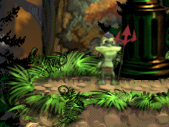
WebGL in combination with new ECMAscript features like type arrarys makes it possible to develop and run games with high quality graphics in your browser. To demonstrate the possibilities of these new technologies Opera has ported the game Emberwind to HTML5. There are several other demos like Formula 1 and Don't click.
Full hardware acceleration
Opera aims to give the best possible performance for all users. This is why we already have a "software accelerated" backend in Vega. However with the new hardware accelerated backend Opera will draw the whole user interface using the GPU, not just specific elements of the webpage like the canvas element. This will offload the CPU significantly and make it possible to accelerate the rendering of all webpages. On systems with outdated drivers or buggy graphics cards, Opera will fallback to the heavily optimized Vega software rendering engine.
Currently hardware acceleration is in an alpha stage and only uses an OpenGL backend. We would like to get your feedback about how well it works for you. Opera 12 alpha works best with modern graphics cards and up to date drivers. In future snapshot we'll add support for DirectX and more graphics cards. Be aware that testing Opera 12 alpha can trigger bugs in your graphics card and in worst case blue screen your computer.
Themes
Opera 12 makes it easier than ever to personalize your browser. It's now possible to create simple lightweight themes based on a nice photos or other graphics. It's also easier to install and try out new and existing themes (previously called skins). Try them out here! They are currently only available for Windows and Mac (more information for Linux/FreeBSD users).
Check out what's new in Opera 12 alpha and have fun test driving Opera 12 alpha!
WARNING: This is an Opera 12.00 Alpha build: It is not feature complete and may have severe known issues, including crashes, and data loss situations. If you are uncomfortable with this, please use the latest stable Opera instead.
Download
WebGL

WebGL in combination with new ECMAscript features like type arrarys makes it possible to develop and run games with high quality graphics in your browser. To demonstrate the possibilities of these new technologies Opera has ported the game Emberwind to HTML5. There are several other demos like Formula 1 and Don't click.
Full hardware acceleration
Opera aims to give the best possible performance for all users. This is why we already have a "software accelerated" backend in Vega. However with the new hardware accelerated backend Opera will draw the whole user interface using the GPU, not just specific elements of the webpage like the canvas element. This will offload the CPU significantly and make it possible to accelerate the rendering of all webpages. On systems with outdated drivers or buggy graphics cards, Opera will fallback to the heavily optimized Vega software rendering engine.
Currently hardware acceleration is in an alpha stage and only uses an OpenGL backend. We would like to get your feedback about how well it works for you. Opera 12 alpha works best with modern graphics cards and up to date drivers. In future snapshot we'll add support for DirectX and more graphics cards. Be aware that testing Opera 12 alpha can trigger bugs in your graphics card and in worst case blue screen your computer.
Themes
Opera 12 makes it easier than ever to personalize your browser. It's now possible to create simple lightweight themes based on a nice photos or other graphics. It's also easier to install and try out new and existing themes (previously called skins). Try them out here! They are currently only available for Windows and Mac (more information for Linux/FreeBSD users).
Check out what's new in Opera 12 alpha and have fun test driving Opera 12 alpha!
WARNING: This is an Opera 12.00 Alpha build: It is not feature complete and may have severe known issues, including crashes, and data loss situations. If you are uncomfortable with this, please use the latest stable Opera instead.
Download
Readers' comments
Comments left by My Opera members under the original post: the first 50, as archived.
About this article
| Published in | Desktop Team blog |
|---|---|
| Date | October 13, 2011 |
| Author | Huib Kleinhout |
| Tags | webgl, 12, alpha, themes, hardware acceleration, 3d |
| Original | Internet Archive |
LeoCGThursday, October 13, 2011 7:03:26 AM
Let's test.
VorlanderThursday, October 13, 2011 7:05:50 AM
ZimakThursday, October 13, 2011 7:05:53 AM
Stephen Turrellstve10Thursday, October 13, 2011 7:07:03 AM
chuueyThursday, October 13, 2011 7:08:27 AM
netmainThursday, October 13, 2011 7:09:35 AM
blint63Thursday, October 13, 2011 7:09:40 AM
DavideDoskyThursday, October 13, 2011 7:11:18 AM
FitzTNThursday, October 13, 2011 7:13:31 AM
Ronit KumarronitrexThursday, October 13, 2011 7:15:57 AM
sabisanThursday, October 13, 2011 7:17:26 AM
Win7x64
Geforce 9500GT
FitzTNThursday, October 13, 2011 7:20:16 AM
olliThursday, October 13, 2011 7:24:28 AM
Originally posted by FitzTN:
Tried upgrading your drivers?
Think 280.26 is tne latest: http://www.nvidia.co.uk/object/notebook-win7-winvista-280.26-whql-driver-uk.html
Do a search here: http://www.nvidia.co.uk/Download/index.aspx?lang=en-uk
I just searched for win32 etc
RijkThursday, October 13, 2011 7:24:33 AM
Originally posted by FitzTN:
This is nicely specific feedback that would be good example comment for http://my.opera.com/desktopteam/blog/2011/10/12/hardware-accelerationpursanovdThursday, October 13, 2011 7:26:42 AM
Widows 7 x64 geforce GT 230.
Hope to test this alpha more, but it seems too slow and strange =)
PS: Updated to latest nVidia drivers. Now Opera is fast as hell! =) Small issues on changing tabs(some latency), but overall looks OK. Continuing testing.
sabisanThursday, October 13, 2011 7:28:53 AM
Originally posted by FitzTN:
After I disabled hardware acceleration - things get back to normal too.
FitzTNThursday, October 13, 2011 7:29:48 AM
@Rijk: I will post it there later, but would like to see if someone else has the same problems.
sonique88Thursday, October 13, 2011 7:30:27 AM
SUUUUUUUUUUUX OPTION AND NOT DISABLE
very long time liar
diasable option first finel relased the teb stack
but no option disable
liar team
DrillSargeThursday, October 13, 2011 7:36:20 AM
AECXThursday, October 13, 2011 7:36:43 AM
raghunandan85Thursday, October 13, 2011 7:37:53 AM
How can I turn off hardware acceleration?
Windows7x64, NVIDIA 6200TC
eruptThursday, October 13, 2011 7:38:06 AM
Originally posted by raghunandan85:
Read this link, section: Testing. http://my.opera.com/desktopteam/blog/2011/10/12/hardware-accelerationWhere can we get a list of the supported GPUs?
MichałEmdekThursday, October 13, 2011 7:39:22 AM
But tab bar is cut off on KDE:
http://simplest-image-hosting.net/jpg-0-plasma-desktoppb4961
But UI reacts like it was normal (I can click few pixels under buttons to access them).
EDIT
Whole rendering of page and UI (except of menu bar which still has incorrect background) is moved up:
http://simplest-image-hosting.net/jpg-0-plasma-desktopew4961
АлександрDragonLPThursday, October 13, 2011 7:39:37 AM
http://alteredqualia.com/three/examples/webgl_cars.html
prasi666Thursday, October 13, 2011 7:40:40 AM
it's very fast and consumes as much RAM as always.
good work!
eruptThursday, October 13, 2011 7:43:46 AM
Originally posted by DragonLP:
Have you checked in opera:gpu if your system actually works with HWA? "If the page says "Vega backend Software", try to upgrade your driver. Note that some cards are not supported by the vendor anymore, and these may still be blocked even if you have the latest driver for that card."Read the full story on http://my.opera.com/desktopteam/blog/2011/10/12/hardware-acceleration
ugly95Thursday, October 13, 2011 7:44:45 AM
I also notice the Speed Dial swap animations are very smooth. In previous snapshots the animation was choppy.
АлександрDragonLPThursday, October 13, 2011 7:45:11 AM
Originally posted by erupt:
Vega backend - OpenGlMichałEmdekThursday, October 13, 2011 7:47:01 AM
Originally posted by erupt:
Mine has and this doesn't work (other examples works so far), hoiwever shows FPS but screen is black.
fisherman10Thursday, October 13, 2011 7:50:35 AM
KilokilozaThursday, October 13, 2011 7:52:27 AM
Originally posted by sabisan:
I have the same laptop... running Nvidia 285.38 drivers, Windows 7 x64... have also disabled gpu acceleration and it this snapshot now usable again. Very slow, sluggish, unresponsive with it on... memory sitting at the 1GB usage mark.StrabsThursday, October 13, 2011 7:56:08 AM
Using windows 7 x32.
Also this release seems to have a high memory consumption and cpu usage.
TigTexThursday, October 13, 2011 7:56:19 AM
100% cpu usage, takes more than 2 minutes to have a completely distorted window browser with no rendering at all.
Sugestion: disable HW aceleration by default.
This Opera snapshot is unusable to me (1st time this happens)
Corey MwambacoreymwambaThursday, October 13, 2011 7:56:45 AM
openSUSE 11.3, 2GB RAM, Intel 855GM
hurugThursday, October 13, 2011 7:57:48 AM
MichałEmdekThursday, October 13, 2011 7:59:16 AM
Also I'm adding next bug in KDE style, incorrect message box background:
http://simplest-image-hosting.net/jpg-0-plasma-desktopsg4961
nimu_channimuchanThursday, October 13, 2011 8:00:01 AM
btyopThursday, October 13, 2011 8:01:31 AM
Originally posted by pursanovd:
Agree with latency on changing tab, and closing tabs too. RAM consumption relatively much higher than previous snapshot, hopefully it's not a leak.
Smooth scrolling somewhat feels choppy in this build.
Win 7 32-bit. ATI Mobility Radeon HD 530v (driver: 8.743.2.2000)
XombiemubaidrThursday, October 13, 2011 8:03:20 AM
ClashCityRockerclashcityrockerThursday, October 13, 2011 8:05:08 AM
But then it's alpha, and they have told us how to disable hardware accel. However I think it needs some serious work before beta.
xeon0541Thursday, October 13, 2011 8:06:01 AM
windows xp sp3
display card: intel Q35 epxress chipset family
zogsterThursday, October 13, 2011 8:06:48 AM
christopoThursday, October 13, 2011 8:08:21 AM
MaximSailorMaxThursday, October 13, 2011 8:10:17 AM
wellofsoulsThursday, October 13, 2011 8:12:31 AM
DanieldesicThursday, October 13, 2011 8:13:46 AM
eliotcougarThursday, October 13, 2011 8:15:17 AM
Windows7 x64
PS: I'll try this build on 8800GS later at home...
VitaliyVarrkanThursday, October 13, 2011 8:18:10 AM
joshasThursday, October 13, 2011 8:19:43 AM
It is nice to see WebGL demos working in Opera, where Chromium gives video card not supported error on Linux. Of course, there were some crashes and interface sometimes act funny when WebGL demo runs, but I hope it will be fixed until Beta.
Overall perceived 3D performance I think is on par with Flash 11.
Tested on Ubuntu Linux 11.04 x86_64 with ATI Radeon HD 2400 XT video card with Catalyst drivers.
FluxidThursday, October 13, 2011 8:21:57 AM
Blocklist version: 1
Blocklist status for: 2D Supported
Blocklist status for: 3D Blocked driver version
Reason for 3D status: Mesa before 7.10.3 hangs when compiling shaders.
GL_VENDOR: Tungsten Graphics, Inc
GL_RENDERER: Mesa DRI Intel(R) Ironlake Desktop x86/MMX/SSE2
GL_VERSION: 2.1 Mesa 7.10.2
Sabayon GNU/Linux x86 with WMII window manager:
1. When switching windows Opera window appears black for a while
2. Opera's window titlebar doesn't appear active though window IS active
3. It takes few seconds to redraw window when changing its size
4. On http://magazyn-arigato.pl/ - the image carousel on the right hang for a while on last frame
Apart from that... it's friggin' fast. Zooming pages work super fast, while in stable opera 11.51 it hangs and stutters. Canvas animations are superfast too. I'm impressed.
Psychedelic browsing: 2046rpm while on stable only 7.
I guess it's the case where It Just Works (except WebGL)
And I'm checking it on my work computer which is poor, I'll test it later on my home computer with ATI card.
Didn't notice memory problems at all.