
Developers › Desktop Team blog
Mail goes two-lined and grouped
Today's build contains a big update for Opera's mail client. You'll see changes everywhere! Now, it is well known that 'change' is a scary word for many people, but we think the mail client needed it. It is designed to work nicely on big and/or wide screens. What you'll see:
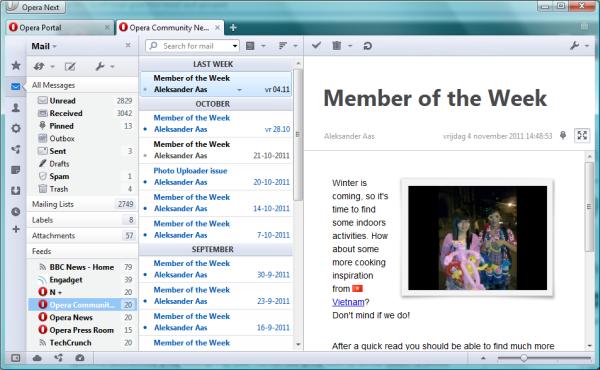
Two-lined message list
Opera Mail will now default to 'list on the left, message on the right', with the newest message on top, and always showing message threads. This layout uses a brand new two-lined list view. If you switch back to 'message below' or 'list only', you'll get the traditional single-line list again. This behavior can be changed using opera:config setting 'Mail View Two Lined Messages' (0=always single lined messages, 1=two-lined messages with 'message on the right', 2=always two-lined messages).
Mail grouping
Opera will automatically group messages by date. You can also group them by unread status, by pinned status, or not at all.
Cleaned up look
The mail toolbars are simplified, and icons have been redesigned. In the two-lined messages list the column headers are removed (you can still sort using the 'Sort' button), icons that don't add useful information have been removed, labels are indicated with a single icon, etc. This gives an easier overview of the information that really counts: who sent what message?
Messages can now be shown in two ways: expanded to use all the available width, but now also with a limited width to make it easier to read. For newsfeeds (RSS, Atom), there's a separate design now.
The Quick Reply feature is now off by default. But when you enable it, it is now possible to see and control where the quick reply gets send to!
New settings dialogs
The 'View' dropdown menu with all its sub-menus has been replaced by an overlay dialog that can be reached by clicking the 'wrench' button. This dialog makes it easier to change mail window layout and other settings, and you can now also change the default sorting and grouping for all message views. To complement this, there's a separate overlay dialog to set custom sorting and grouping settings for each view. Click on the 'Sort' button above the message list to see this in action.
Pinning
You can now 'pin' messages with one click in the message list or in the message headers, to mark a message for attention. This pinning is mapped to the IMAP \Flagged feature, so this will sync with 'starring' and 'flagging' in other IMAP clients, and with Gmail's starred messages.
Also included: a couple of mail bug fixes.
Reminder: Opera Next should not be downgraded, so install this build separately from your Opera 12.00 installation.
Known issues
Download

Two-lined message list
Opera Mail will now default to 'list on the left, message on the right', with the newest message on top, and always showing message threads. This layout uses a brand new two-lined list view. If you switch back to 'message below' or 'list only', you'll get the traditional single-line list again. This behavior can be changed using opera:config setting 'Mail View Two Lined Messages' (0=always single lined messages, 1=two-lined messages with 'message on the right', 2=always two-lined messages).
Mail grouping
Opera will automatically group messages by date. You can also group them by unread status, by pinned status, or not at all.
Cleaned up look
The mail toolbars are simplified, and icons have been redesigned. In the two-lined messages list the column headers are removed (you can still sort using the 'Sort' button), icons that don't add useful information have been removed, labels are indicated with a single icon, etc. This gives an easier overview of the information that really counts: who sent what message?
Messages can now be shown in two ways: expanded to use all the available width, but now also with a limited width to make it easier to read. For newsfeeds (RSS, Atom), there's a separate design now.
The Quick Reply feature is now off by default. But when you enable it, it is now possible to see and control where the quick reply gets send to!
New settings dialogs
The 'View' dropdown menu with all its sub-menus has been replaced by an overlay dialog that can be reached by clicking the 'wrench' button. This dialog makes it easier to change mail window layout and other settings, and you can now also change the default sorting and grouping for all message views. To complement this, there's a separate overlay dialog to set custom sorting and grouping settings for each view. Click on the 'Sort' button above the message list to see this in action.
Pinning
You can now 'pin' messages with one click in the message list or in the message headers, to mark a message for attention. This pinning is mapped to the IMAP \Flagged feature, so this will sync with 'starring' and 'flagging' in other IMAP clients, and with Gmail's starred messages.
Also included: a couple of mail bug fixes.
Reminder: Opera Next should not be downgraded, so install this build separately from your Opera 12.00 installation.
Known issues
- Crash on installing spell check dictionaries
- Crash on editing mail signature
- Opera 11.60 snapshots will not be auto-updated (only 12.00 snapshots).
- Native Mac and Linux styling for the new mail window not done yet.
- Flash Player 11 crashes on Mac. We recommend disabling it or downgrading for the time being.
- This is an Opera build not Opera Next. You should backup your stable profile before upgrade.
Download
Changelog since the previous 11.60 snapshot
Core
- CORE-41959 print preview broken for multipart/* documents (breaks mail printing)
- CORE-42479 Crash on installing extension
- CORE-42024 Stack exhaustion due to deeply recursive compilation of RE construct
- CORE-42088 Avoid blowing the stack when compiling regexp loop sequences
Desktop
- DSK-349634 Search engines are with no icons
- DSK-349628 Opera should not crash on exit after checking for mail/RSS
- Two-lined message list
- New message display window
- Message grouping
- Support for Pinning, mapped to IMAP \Flagged
- Quick Reply redesign
- New overlay dialogs for the mail view settings
- Ctrl-Enter to send quick reply
- Update mailproviders.xml for iCloud
- DSK-201988 Message displayed even though no message selected
- DSK-222658 Show image enclosures inline in feeds
- DSK-260891 Paste with mouse in Mail Compose window is mouse position dependant
- DSK-277400 Message formatting is slow
- DSK-309380 Enable Fit to Width for Opera Mail
- DSK-311982 Show account connection status in mail panel
- DSK-319023 Unread in Mail panel returns after a restart
- DSK-340859 Messages in INBOX are not fetched before the folder is selected on Gmail accounts
- DSK-342882 Mail data is corrupted, all mail redownloads
- DSK-343439 after deleting a block of mail, selected message is not next to the selected block
- DSK-343444 Cannot Rename Folders for RSS Feeds
- DSK-344164 Remove '[x] from loading database progress bar
- DSK-344565 Need to mark message as read twice before it is read
- DSK-345346 Expunged messages in other clients are not expunged in Opera Mail
- DSK-348639 Broken progress bar skin with windows native skin
Readers' comments
Comments left by My Opera members under the original post: the first 50, as archived.
About this article
| Published in | Desktop Team blog |
|---|---|
| Date | November 7, 2011 |
| Author | Rijk |
| Tags | two-lined, grouped-mail, 11.60, pinning, mail |
| Original | Internet Archive |
Helder Jefferson Ferreira da LuzDante003Monday, November 7, 2011 4:59:34 PM
Ruarí ØdegaardruarioMonday, November 7, 2011 5:04:16 PM
Joonas LehtolahtigodjonezMonday, November 7, 2011 5:04:18 PM
EDIT: After Ruarí's message, when the next 12.00 build comes next week or so, will these changes for 11.60 be included?
James CassellelitegeekMonday, November 7, 2011 5:05:29 PM
Swapnil RustagiSwapnil99proMonday, November 7, 2011 5:05:43 PM
tormenthorMonday, November 7, 2011 5:07:23 PM
marbrossMonday, November 7, 2011 5:11:57 PM
HoborgoperatonMonday, November 7, 2011 5:14:50 PM
exzentrikMonday, November 7, 2011 5:15:06 PM
Originally posted by godjonez:
Look at the sample pic. It comes from Opera Next. So I guess we will see these changes in one of the next 12.00 builds, too.
btw - the folder icons in the bookmark bar are now grey. Is this intended in this 11.60-build?
Ruarí ØdegaardruarioMonday, November 7, 2011 5:15:55 PM
Originally posted by exzentrik:
Originally posted by godjonez:
yesMaximSailorMaxMonday, November 7, 2011 5:16:25 PM
ClashCityRockerclashcityrockerMonday, November 7, 2011 5:23:10 PM
Yi Wangwangyi6854Monday, November 7, 2011 5:25:02 PM
ClashCityRockerclashcityrockerMonday, November 7, 2011 5:33:38 PM
However it's put me in a conundrum.
Do I downgrade from 12.0 so I don't suffer the ****REALLY*** annoying DSK-344565 bug thats fixed in this release.
Or do I continue to put up with it until next week :-)
BUG: Dragging a message from the message list to the tab bar shows it as a valid drop location, but when you let go it does nothing.
alf245Monday, November 7, 2011 5:37:45 PM
SafetyCarMonday, November 7, 2011 5:42:33 PM
Ruarí ØdegaardruarioMonday, November 7, 2011 5:47:58 PM
Originally posted by alf245:
Moved to the archive. Which build did you want Windows, Mac, Linux, etc.?FisiuMonday, November 7, 2011 5:51:27 PM
Ruarí ØdegaardruarioMonday, November 7, 2011 5:52:10 PM
Originally posted by Fisiu:
You didn't read the comment in the displayed README. Click the download link again and read it.EDIT: Ok, we have added then now, for reference it stated:
HoborgoperatonMonday, November 7, 2011 5:53:30 PM
for posts which have proper html tags in them for direction of the text, Opera works good without any problem.
but when the post doesn't have html tags to define direction of the text, Opera shows it in Left-to-Right direction by default.
this is really annoying when the text is in a Right-to-Left language and it has an English word in a paragraph. this is an example:
درود بر اپرا دوستان
درود بر Opera دوستان
(Opera = اپرا)
they're totally the same sentence. as you see because of the word "Opera", that sentence's form is broken; half of that sentence is being shown at the left side of the word "Opera" and the other half (دوستان) on the other side. this is the correct form (Right-to-Left and Aligned to Right) :
that is why LTR and ALIGN RIGHT tags (most of the times together) are being used in right-to-left pages to prevent these things from happening.
just imagine how would it be when you receive a blog post in Opera's Feeds client and the writer of the post didn't mention the text direction in html codes (or the feed system that blog/site is using, doesn't include the html tags in feeds and exports them as plain text).
that's really a pain and i do believe that Opera really misses an option similar to "Switch Page Direction" in IE and FF (esp. in Mail client)
Torrente TorrenteMonday, November 7, 2011 5:57:24 PM
1. Shift + Right click/Paste&Go doesn't work.
2. Shift + Enter doesn't work in speed dial tab.
PetruspetrusMonday, November 7, 2011 6:01:12 PM
http://www.theverge.com/
AvolaMonday, November 7, 2011 6:06:09 PM
Speaking of old bugs, could you please finally fix the one that sometimes makes the minimize/maximize/close buttons stay highlighted after hovering them (on Windows 7)?
Tiago WakabayashiozoratsubasaMonday, November 7, 2011 6:09:30 PM
alf245Monday, November 7, 2011 6:09:58 PM
Originally posted by ruario:
Thx for asking, but I don't currently have any need for a specific build. I just want to make sure that all previous snapshots are accessible for me just in case I need one. The download link ( http://snapshot.opera.com/unix/chicken_11.60-1134/ ) in the previous announcement doesn't work as expected. It suggets to look at http://arc.opera.com/snapshot/ where I can't find any 11.60 build either. So where do I have to look if I want to download a previous 11.60 snapshot?Ruarí ØdegaardruarioMonday, November 7, 2011 6:14:53 PM
eliotcougarMonday, November 7, 2011 6:19:51 PM
OlliOlli91Monday, November 7, 2011 6:22:40 PM
alf245Monday, November 7, 2011 6:24:11 PM
Originally posted by ruario:
Thanks. It would also be nice to have working download links in the previous announcement ( http://my.opera.com/desktopteam/blog/2011/11/04/opera-11-60 ) to the corresponding builds.Ide StoutjesdijkCrimiMonday, November 7, 2011 6:29:50 PM
Francis Adu-Gyamfiicewalker2gMonday, November 7, 2011 6:30:22 PM
Ruarí ØdegaardruarioMonday, November 7, 2011 6:32:02 PM
Originally posted by alf245:
we would prefer that people didn't download old builds by mistake. Hence we break old links intentionally.minhoMonday, November 7, 2011 6:33:53 PM
Good work!
Testing.
alekksanderMonday, November 7, 2011 6:49:27 PM
so far: except little skin and animation bugs i find "full article" text, that is under every rss message damn too small.
WardMonday, November 7, 2011 6:50:15 PM
Also, the title is too big - can it be resizable?
praetor87Monday, November 7, 2011 6:51:32 PM
Originally posted by Ward:
It's sorted by feeds, but you should klick on the sender "group". RSS maybe needed a faster reaching and separate from the mails. I stacked a tab for it but it's recently change to mail.
alf245Monday, November 7, 2011 6:55:01 PM
Originally posted by ruario:
As long as each previous announcement contains its corresponding build number so I can find the corresponding snapshot in the archive, this sounds ok to me. Currently, the build number is hidden inside the download links.Rafael Novaski rnovaskiMonday, November 7, 2011 6:55:52 PM
CyberStream.uscyberstreamMonday, November 7, 2011 6:56:25 PM
There are honestly a ton of different issues I'm seeing with the drop down menu. If I resize the window so it is very narrow, the arrow points right. Also, when you toggle the settings drop down, the window flickers, which is annoying. Those are just a couple of the more annoying bugs.
Suggestion: In the "Mark as read" menu, it would be nice to have a "when read" option. Some people I know would prefer to just click on message and it is automatically changes from bold to unbold state instead of having the blue bold, black bold and unbold states.
minhoMonday, November 7, 2011 7:00:32 PM
Manoj ChandrasekharanmachsMonday, November 7, 2011 7:02:59 PM
Its back as my default mail client!!
Thanks a lot guys and keep it coming!!
Robin GrolleauRobin-GrolleauMonday, November 7, 2011 7:06:17 PM
Win 7 x64 usb installation
minhoMonday, November 7, 2011 7:14:34 PM
Originally posted by Ward:
+1
RijkMonday, November 7, 2011 7:16:24 PM
Originally posted by Robin-Grolleau:
Yes, we know.Originally posted by minho:
Change the default sort settings, click the wrench button?Originally posted by cyberstream:
Yes, we are aware of those issues.Originally posted by alekksander:
It's a bit tiny if you go back to 'message below', yes...Originally posted by eliotcougar:
Thanks.MaximSailorMaxMonday, November 7, 2011 7:17:42 PM
eliotcougarMonday, November 7, 2011 7:20:13 PM
minhoMonday, November 7, 2011 7:23:14 PM
Originally posted by Rijk:
Wow, awesome!
Thanks, I love Opera Desktop Team!
MartinezZMonday, November 7, 2011 7:23:21 PM
I'm little confused. So I hope that Opera don't make same mistake like other browsers and not make separately development lines like "finally builds" (11.5x), "develop builds" (11.6x) and "somethink-like-pre-develop-builds" (12.x) and start hyper-versioning
minhoMonday, November 7, 2011 7:24:30 PM
Originally posted by SailorMax:
Confirmed here.
win 7 x64
Ruarí ØdegaardruarioMonday, November 7, 2011 7:26:31 PM
Originally posted by alf245:
All you have to do is hover those links.