
Developers › Desktop Team blog
Meet your new address field, mouse gestures, and updated mail panel and extensions
As preparations to the upcoming beta of Opera 11 we are exclusively giving you two new features and several mail enhancements today.
A safer address field
 The address field in the browser is an extremely important feature. It's the key to how you navigate, search and to keep you safe on the web. For Opera 11, we want to bring it the next level, making it less crowded and helping you be more focused on the most important tasks. Before looking at it, please first note that the new address field is intended as a help for the vast majority of users who think they are on Google when on google.com.spoof.com, and others who don't automatically parse URL strings without conscious effort. The technical audience of Opera might understand query strings, but, in most cases, they are just gibberish to the user.
While a server might do it another way, the solution attempted is to show the parts which are most likely to tell users where they are.
Opera's new address field features
Visual mouse gestures
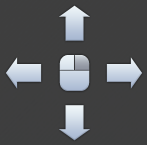 Many of you know of and love the ability to control the browser by doing small and fast gestures with your mouse. Mouse gestures is another genuine Opera innovation that was first introduced in Opera 5.1 in April 2001. Ten years later it is about to time to give it a massive face-lift. Our focus has been two-fold. First, we want more people to discover the basics of this extremely nice and sticky feature. Second, we want people to learn more mouse gestures than just the simple back and forward. To use the visual guide to mouse gestures, simply long press the right mouse button. But those who don't already use use mouse gestures in Opera should be aware of one thing before they test this out: This is addictive stuff!
A nice mail update
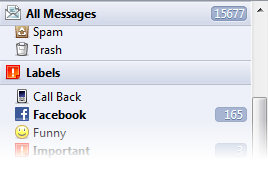 The mail team has also prepared some nice changes for you! We listened to your feedback and changed from multiple scrollbars to one global scrollbar for the mail panel. The scrollbar keeps section headers on the top which allows you to quickly scroll back up to them.
We have merged the old filters, labels and saved searches into the new more powerful labels. We consolidated all mail search fields into one, which enables you to search wherever you want, with the help of a new toolbar that appears when searching. If you want you can save this search as a rule that will automatically label all the matching messages. You can set a custom icon on your new label in the label dialog, but the label dialog is going to undertake some changes soon.
We also did some improvements when it comes to the mail startup speed, mail skin fixes for Windows and Mac, some HTML compose related and other bug fixes.
Updates to extensions
 We have also done a lot of work on extensions. They will now run on secure sites (HTTPS) by default, and we have added a privacy setting where you can allow/disallow extensions to run on secure connections or in privacy mode (disabled by default).
In addition to that, we now allow extensions to have an preferences page. Both the options page and privacy settings can be accessed from the extensions manager.
You should also be aware of some changes to requirements that will affect currently available extensions:
WARNING: This is an awesome development snapshot: It contains the latest incredible changes, but may also have severe known issues, including crashes and data loss situations. In fact, it may not work at all.
Download
A safer address field
 The address field in the browser is an extremely important feature. It's the key to how you navigate, search and to keep you safe on the web. For Opera 11, we want to bring it the next level, making it less crowded and helping you be more focused on the most important tasks. Before looking at it, please first note that the new address field is intended as a help for the vast majority of users who think they are on Google when on google.com.spoof.com, and others who don't automatically parse URL strings without conscious effort. The technical audience of Opera might understand query strings, but, in most cases, they are just gibberish to the user.
While a server might do it another way, the solution attempted is to show the parts which are most likely to tell users where they are.
Opera's new address field features
- All web pages gets a badge to the left of the address field. The badge replaces protocols like HTTP, HTTPS and opera:, which are shown only when focusing on the address field.
- Clicking on the badge provides a easy overview of the potentially more complex security state of the current web page.
- Parameters at the end of web addresses are visually hidden when the address field is not focused. (You can disable this with opera:config#UserPrefs|HideURLParameter if you still want to see the whole address all the time.)
- And lastly, there is a badge for browsing with Opera Turbo on. Clicking on this gives, for example, information about estimated data savings for the Opera Turbo session.
Visual mouse gestures
 Many of you know of and love the ability to control the browser by doing small and fast gestures with your mouse. Mouse gestures is another genuine Opera innovation that was first introduced in Opera 5.1 in April 2001. Ten years later it is about to time to give it a massive face-lift. Our focus has been two-fold. First, we want more people to discover the basics of this extremely nice and sticky feature. Second, we want people to learn more mouse gestures than just the simple back and forward. To use the visual guide to mouse gestures, simply long press the right mouse button. But those who don't already use use mouse gestures in Opera should be aware of one thing before they test this out: This is addictive stuff!
A nice mail update
 The mail team has also prepared some nice changes for you! We listened to your feedback and changed from multiple scrollbars to one global scrollbar for the mail panel. The scrollbar keeps section headers on the top which allows you to quickly scroll back up to them.
We have merged the old filters, labels and saved searches into the new more powerful labels. We consolidated all mail search fields into one, which enables you to search wherever you want, with the help of a new toolbar that appears when searching. If you want you can save this search as a rule that will automatically label all the matching messages. You can set a custom icon on your new label in the label dialog, but the label dialog is going to undertake some changes soon.
We also did some improvements when it comes to the mail startup speed, mail skin fixes for Windows and Mac, some HTML compose related and other bug fixes.
Updates to extensions
We have also done a lot of work on extensions. They will now run on secure sites (HTTPS) by default, and we have added a privacy setting where you can allow/disallow extensions to run on secure connections or in privacy mode (disabled by default).In addition to that, we now allow extensions to have an preferences page. Both the options page and privacy settings can be accessed from the extensions manager.
You should also be aware of some changes to requirements that will affect currently available extensions:
- Extensions must include an access request for the pages you want to access with the background-process. You can do this by adding <access origin="http://example.com"> to the config.xml
- Extensions must include an index.html file in the package or include a <content src="someStartFile.html"/> in the config.xml.
- Extensions must use broadcastMessage() properly: broadcastMessage() only takes one argument: a string or an object literal: so either broadcastMessage("hi") or broadcastMessage({'say': 'hi' }
WARNING: This is an awesome development snapshot: It contains the latest incredible changes, but may also have severe known issues, including crashes and data loss situations. In fact, it may not work at all.
Download
Known issues
-
The context menu (right click) doesn't work unless mouse gestures are enabled
- DSK-318727 (Extension blocks execution of userjs)
- DSK-317999 (Extension + UserJS blocks page loading)
- DSK-319065 (Privacy setting is not applied for some extensions)
Changelog
Desktop
- Improvements to the address field: see main blog entry for details
- Implemented a new visual interface for mouse gestures: see main blog entry for details
- DSK-267463 (Support importing Firefox bookmarks from places.sqlite)
- DSK-277625 (Normal font and Monospace font settings don't work.)
- DSK-290360 (Default search box can not be dragged from Appearance -> Buttons)
- DSK-296813 (Graphic element layout issues in mail dialogs)
- DSK-300575 (Broken search field in Apperance > Buttons > Search)
- DSK-306374 (First scroll event being sent to window instead of scrollable area)
- DSK-309272 (Private tab search terms can show in non private speed dial search)
- DSK-311007 ("Did you mean '...'?" opens a new tab when "Reuse current tab" is unset)
- DSK-313944 ("Ctrl+Shift+V" opens in a new background tab)
- DSK-314125 (Paste'n'Go not working in F2("go to page")-Dialog)
- DSK-315773 (Auto update fails to display authentication dialog when updating without write permissions)
- DSK-315856 (Master Password dialog opens shortly and closes again when logging in through the Auth dialog)
- DSK-316091 (Can't double-click empty workspace to open new tab)
- DSK-316145 (Gmail not working)
- DSK-318907 (Tab title displays incorrectly with modified toolbar setup)
- DSK-319075 (Make a pref to not hide the URL parameters): opera:config#UserPrefs|HideURLParameter
- Implemented super scrollbar
- Merged filters, labels and saved searches into the new labels
- DSK-130346 (Unicode attachment filenames sent by M2 unreadable in clients like Outlook)
- DSK-312784 (Panels (F4) are brought up when focus is on RSS feed tab, even after panels were previously closed)
- DSK-312548 (Mail view opened when clicking the expand arrow in the treeview)
- DSK-317039 (Attachment to e-mail disappears after viewing it)
- DSK-310643 (Mail selection lost when new emails arrive)
- DSK-309797 (Feed folders views use 'Sent' instead of 'Published' as column header)
- DSK-311987 (Mailpanel categories added at bottom of mailpanel on enabling)
- DSK-264794 (Mail header uses large text size instead of bolded text)
- DSK-313836 (Section header is deaf when readded to the panel)
- DSK-270470 (Wrong attachment names (Content-ID) displayed)
- DSK-212904 (Wand loses login information after changing server name)
- DSK-299655 (Line breaks in signatures are not respected when changing plain/HTML)
- DSK-317670 (HTML mail message doesn't add default mail compose font to body style attribute)
- DSK-312506 (Cannot modify the spam filter)
- DSK-312572 (Remove the "Manage Feeds" dialog)
- DSK-312577 (Deleting parent feed folder does not delete it's children)
- DSK-312686 (Multiple views selected in the new mail panel)
- DSK-305028 (Don't initalize the indexer in mail when no accounts exist)
- DSK-311306 (Don't populate treeview while loading mail database)
- CORE-28033 (Inlined images sent from Thunderbird are recognized as attachments and not content id elements)
Extensions
- DSK-318540 (Opening dialogs on Windows through popup closes the popup window and possibly crashes opera)
- DSK-319114 (Popup href == http://.. shouldn't be subject to <access> restrictions)
- DSK-318440 (opera.extension.tabs.create opens wrong url)
- CORE-34186 (Extension should work on https by default with opt-out possibility to switch off per extension)
- CORE-33649 (Extensions Options page - included)
- CORE-34288 (Add flag to disallow oex/ua without file extension)
- CORE-34443 (Only disallow toplevel replacing on form submission on the main gadget window / extension background process)
- CORE-34288 (Require file name extension when upgrading widget configuration)
- DSK-318970 (Cogwheel is not disabled for disabled extensions)
- Fix for link handling in widgets)
- Updated: Extensions installer
- Updated: Extensions manager
- Added Extensions Options page UI support
- Extensions update dialog, update button in extensions manager
- New: Privacy dialog
- New: Update dialog
- Crash fix
Core
- CORE-33950 (301 status code response are not redirected after browser restart)
- CORE-34280 (IME composes duplicated strings in contentEditable text areas)
Windows (Installer)
- DSK-271980 (Canceling an autoupdate or upgrade at the wrong time can leave you with a broken Opera installation)
- DSK-314579 (Cancelling new installer on Win7 makes Windows ask if the program was correctly installed)
- DSK-315494 (Installer continues too fast if Opera is still shutting down)
- DSK-315582 (It's confusing that all checkboxes are selected for portable installation even tho they are grayed out)
- DSK-315583 (Add UAC shield to the install button)
- DSK-315728 (Language choice in installer doesn't work unless you also change "Install for" (operaprefs_default.ini not created))
- DSK-315790 (Make the installer remember which options was set during upgrade)
- DSK-315899 (Hovering the "Terms of Service" button shows a cut off border)
- DSK-316080 (Uninstalling Opera while it's running leaves Opera.lnk.10.70.bak on the desktop)
- DSK-316244 (Wrong error message when trying to install to %programfiles" and selecting "Install for: External device")
- DSK-316254 (Profile lost when upgrading a classic single user installation in %programfiles% on Vista and 7)
- DSK-316259 (Error when trying to upgrade Opera when files in the installation folder are locked by other programs)
- DSK-316262 (No operaprefs_default.ini created on Vista and 7 with default installation settings)
- DSK-316766 (Install for "Just me" option in new installer may be confusing): changed to Standalone
- DSK-316795 (Unable to write CLASSES\.xbm\OpenWithProgIds\Opera.Image)
- DSK-317424 (Failed to modify the registry named Software\Microsoft\MediaPlayer\ShimInclusionList\OPERA.EXE\(null)
- DSK-317736 (Cancel installation doesn't work)
- DSK-318317 (No error message when trying to install standalone installation in %programfiles% (and installation succeeds the second time you try))
Mac
- DSK-316225 (input type="range" buggy)
- DSK-316546 (Add mac specific speed dial background)
- Updated drop-down toolbars
- New address bar graphics, including search, address field & button changes
- New scrollbar in the address and search field drop-downs
- Fixed highlighting underneath the address and search fields
Linux/FreeBSD
- Use PGO (Profile-guided optimization) on *nix
- DSK-301547 (Flash with wmode transparent crashes in widgets)
- DSK-316375 (Alt is hardcoded to open the O-Menu): Now possible to map an alternative shortcut
- DSK-318050 (Search and URL dropdown gets clipped in non compositing environments): F2 drop down is not re-enabled by this
- DSK-318398 (File download can recursively overwrite folders without warning when using the Gtk file selector)
- DSK-318434 (The --geometry argument has no effect on first run)
- DSK-318585 (Opera should accept the CFF font format)
- DSK-316214 (Invoking opera --fullversion argument doesn't work when Opera is running)
- DSK-318115 (File type dropdown is broken in the file chooser)
- DSK-318724 (Disable smooth scrolling by default on UNIX): still possible to enable via a preference
- DSK-318764 (KDE skin is missing a browser skin element)
- DSK-318407 (After inputting Latin characters, IME cannot be turned on in search field): further fix needed for compositing
- DSK-318509 (Dead keys stop working after the second character due to change of focus): further fix needed for compositing
- Improved some of the focus handling code: watch out for regressions
Happy bug hunting!

Readers' comments
Comments left by My Opera members under the original post: the first 50, as archived.
About this article
| Published in | Desktop Team blog |
|---|---|
| Date | November 17, 2010 |
| Author | Huib Kleinhout |
| Tags | 11, address field, mail panel, mouse gestures, Extensions |
| Original | Internet Archive |
Obese Maurice17. November 2010, 21:22
I like the new installer icon.
Edit: Address field is awesome.
Igor17. November 2010, 21:22
IKoke17. November 2010, 21:22
Daniele17. November 2010, 21:25
Adam Kaczmarek17. November 2010, 21:27
hehe - I will definitely test it
Martin17. November 2010, 21:28
d4rkn1ght17. November 2010, 21:32
arnaud lautier17. November 2010, 21:32
Giving it a try on Snow leopard.
Bardokas17. November 2010, 21:32
Mark17. November 2010, 21:37
"This is an awesome development snapshot: It contains the latest incredible changes" :-)
eehsun17. November 2010, 21:37
serious17. November 2010, 21:39
the only thing I don't like is the domain highlighting though (as discussed in the desktop wishlist I'd really prefer for the domain being bold instead of the rest being dimmed). it's not "that bad" though as the dimming is really minor -> readability is mostly preserved.
slamwarp17. November 2010, 21:40
SteveKong17. November 2010, 21:40
Obese Maurice17. November 2010, 21:43
SteveKong17. November 2010, 21:44
- buttons in badge details look like being cut off
- enabling turbo prevents security details to be displayed
maexl17. November 2010, 21:45
Asires17. November 2010, 21:48
I cannot see web protocol. Truly controversial snapshot
11 is now beta.
HPearce17. November 2010, 21:48
Michael Thompson17. November 2010, 21:48
Kyle Baker17. November 2010, 21:51
João David17. November 2010, 21:52
I love all the new visual enhancements.
Also, thanks for finally bringing to Opera the new safer address field with domain in bold.
Is it just me, or this build has the scroll a lot smoother than any previous build? It feels like butter to scroll down and up!
KhronX17. November 2010, 21:52
Originally posted by hpearce:
I lost the right-click as well, both on my touchpad and my usb mouse :\
Aaron Toth17. November 2010, 21:52
flm17. November 2010, 21:54
Originally posted by hpearce:
Same, but on regular mouse...
coyotemon17. November 2010, 21:56
Windows XP SP3 es-ES
No lang files yet?
yeah, UserScripts working
IKoke17. November 2010, 21:57
WinXP SP3.
maexl17. November 2010, 21:59
Originally posted by flm:
+1
Originally posted by Asires:
I think you have to click into the adressbar
flm17. November 2010, 22:00
BS-Harou17. November 2010, 22:01
Haavard17. November 2010, 22:02
Originally posted by BS-Harou:
That is a potential way to do spoofing.gavro17. November 2010, 22:04
I do believe it comes with a change in gesture detection. My gestures need to be 'larger' than in any previous build. I use really quick and short gestures for browsing, and now I have to redo my gestures really often with a larger 'working area'.
Is it just me?
// logic dictates that this might be because you have some rule "when mouse *almost* doesn't move with right mouse button held --> show visual mousegesture"; is that so?
maexl17. November 2010, 22:05
Originally posted by flm:
Same here - thank you
KhronX17. November 2010, 22:05
Originally posted by flm:
Great catch! Thanks for the tip
Now, if only this could be fixed in the next build...
MyOpera team, please fix this!17. November 2010, 22:08
Originally posted by desktopteam:
Is this intentionally delayed/slow/laggy? I often attribute lots of things to having >100 tabs open so I'm not sure if that is on purpose or not.Rafal17. November 2010, 22:08
Originally posted by BS-Harou:
You still get them on tabs.
Originally posted by gavro:
It's not only you. They need to be larger.
Jan Frode Høines17. November 2010, 22:08
Looking forward to the real beta, even though opera:about says beta
samMD17. November 2010, 22:11
Nils Herde17. November 2010, 22:14
Kudos! Still won't use this as my main browser due to userscript-problems, but you're closing in on replacing 10.63 ;-)
Good work!
MyOpera team, please fix this!17. November 2010, 22:15
Daniel Hendrycks17. November 2010, 22:15
Less padding when viewing a webpage on the info part
Do something with this, not show it or include info like "Speed Dial"
(Note: I am splitting hairs) Thank you!
Rafael Luik17. November 2010, 22:15
maexl17. November 2010, 22:15
Can't find it?! Can you help me? Or do the authors of the extensions have to 'allow' or config it?
Z1-AV6917. November 2010, 22:17
Originally posted by gavro:
I noticed the same, guess we have to get used to it?
Is there a way to disable the "tutorial-mode"? Longterm addicts will probably know a lot of gestures already and hopefully the rest will know soon too. I would prefer not to have the overlay then...
(But it's well done and might really help until you learned it.)
Overall very nice and welcome changes, thank you.
MyOpera team, please fix this!17. November 2010, 22:17
Originally posted by desktopteam:
"I'm so jealous" -- Windows userdknippers17. November 2010, 22:20
coyotemon17. November 2010, 22:20
janek201217. November 2010, 22:24
maexl17. November 2010, 22:25
Originally posted by janek2012:
Try to allow gestures - then it should work.
For me right click in Speed dial works.
gavro17. November 2010, 22:26
I also forgot to mention something: excellent release! Keep up the amazing work!