
Developers › Desktop Team blog
Startup and shutdown profiling
This snapshot introduces our new startup and shutdown profiling. This is a tool for us to get an overview on what is causing slow startup and shutdowns for some users. We hope this tool will let us gather some data on where we should focus our efforts on further improving startup performance.
If the below instructions seem difficult then you probably should not attempt it. But if your comfortable with running the commands, and Opera is slow to startup or shutdown, then please follow the below instructions.
Instructions for Windows
 Instructions for Mac OS
Instructions for Linux
You can then submit your unmodified log file as a text file attachment to DSK-314250@bugs.<yourfavoritebrowser>.com. Make sure to include it as an attachment and not in the mail body as attachments will be easier for us to process in volume.
No personal information is stored in the logs. Full logs submitted as blog comments will be deleted.
WARNING: This is a development snapshot: It contains the latest changes, but may also have severe known issues, including crashes and data loss situations. In fact, it may not work at all.
Download
If the below instructions seem difficult then you probably should not attempt it. But if your comfortable with running the commands, and Opera is slow to startup or shutdown, then please follow the below instructions.
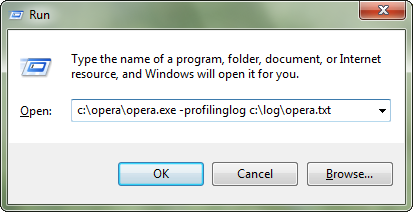
Instructions for Windows
- Press Windows key + R
- Drag the Opera shortcut from your Desktop or the opera.exe and drop it on the Run dialog
- Append "-profilinglog c:\log\opera.txt" after the path (as shown below)
- Wait for Opera to fully startup before you quit it
Instructions for Mac OS- Run the Terminal application (locate using Spotlight)
- Drag the Opera application to Terminal
- Append "/Contents/MacOS/Opera -profilinglog ~/Desktop/opera.txt"
- Wait for Opera to fully startup before you quit it
Instructions for Linux
- Run "opera -profilinglog ~/opera.txt"
- Wait for Opera to fully startup before you quit it
You can then submit your unmodified log file as a text file attachment to DSK-314250@bugs.<yourfavoritebrowser>.com. Make sure to include it as an attachment and not in the mail body as attachments will be easier for us to process in volume.
No personal information is stored in the logs. Full logs submitted as blog comments will be deleted.
WARNING: This is a development snapshot: It contains the latest changes, but may also have severe known issues, including crashes and data loss situations. In fact, it may not work at all.
Download
Changelog
Desktop
- Startup and shutdown profiling through "-profilinglog" argument
Mac
- DSK-313808 (Some dialogs hides the main window when loosing focus)
Readers' comments
Comments left by My Opera members under the original post: the first 50, as archived.
About this article
| Published in | Desktop Team blog |
|---|---|
| Date | September 22, 2010 |
| Author | Petter Nilsen |
| Tags | performance, snapshot, damer, 10.70 |
| Original | Internet Archive |
decodedthought22. September 2010, 14:38
say I open 11 tabs and then close 6 of them, it uses around 500MB+ but it is not the same case with Windows !
bachokocho22. September 2010, 14:45
Could you tell us more about the info that this tool will gather?
In case somebody doesn't want you to know what kind of naked people he/she likes to watch but still would like to help the desktop team
yossariane22. September 2010, 14:46
Tamil22. September 2010, 14:47
Joel22. September 2010, 14:49
Error 1722. There is a problem with this Windows Installer package. A program run as part of the setup did not finish as expected. Contact your support personnel or package vendor. Action SetDefaultBrowser, location: ... \opera.exe, comman...
After running the installer again, it looks like it installed correctly though.
Daniel Aleksandersen22. September 2010, 14:50
Originally posted by bachokocho:
“No personal information is stored in the logs.” You can open the text file in your favourite editor to see what is included. It is just a list of different modules inside Opera and how long they take to start.pursanovd22. September 2010, 14:51
Originally posted by bachokocho:
Open the log file and see all yourself. The profiling tool is really good thing for debug, hope it wont slow down the overall browser
Nico22. September 2010, 14:51
All in all, I have no real issues with Opera's startup and shutdown time, but the cold start could be a little bit faster, so I'll participate.
Good luck with gathering the data!
Robert9022. September 2010, 14:53
HyaeneLeipzig22. September 2010, 14:54
Originally posted by spadija:
+1
Win XP service pack 3
Daniel Aleksandersen22. September 2010, 14:58
Originally posted by Robert90:
It is only initialized with the -profilinglog argument. Starting Opera without it (normal startup) will not initialize the tool, make a log, or affect startup time.Roman22. September 2010, 14:58
prd322. September 2010, 15:05
ahgdipsd22. September 2010, 15:06
Mod edit: Off-topic comment removed. Please post logs rather than speculation.
nimu_chan22. September 2010, 15:07
Now downloaded.
porneL22. September 2010, 15:09
Moderator comment: Please don’t use this method if you have more than one Opera.app anywhere on your system.
Penge22. September 2010, 15:19
Originally posted by daniel:
Sometimes the software environment and the Windows event log also would be useful to the developers.
Or is it wouldn't be so significant in terms of bugfixing?
Gousti Fruit22. September 2010, 15:20
Enrico22. September 2010, 15:25
Originally posted by spadija:
I had the same problem
vasstr22. September 2010, 15:25
Roman22. September 2010, 15:25
i wasn't asking for help. the question was if this behavior is a bug..
did you read that posting before deleting?!
thought this here is the place for bug hunting
Penge22. September 2010, 15:26
Originally posted by spadija:
Confirmed (Win7 x64)
Arayn Nyara22. September 2010, 15:34
Zotlan22. September 2010, 15:36
Jimmy Tsatsos22. September 2010, 15:41
Originally posted by spadija:
+1 Windows 7 x64
Luis Tar Quince22. September 2010, 15:42
+1 Windos XP SP3
http://img521.imageshack.us/img521/5820/opera10709049inexeerror.png
joshas22. September 2010, 15:45
MasterPhW22. September 2010, 15:45
Originally posted by spadija:
Win7 x64... but it seems it installed correctly.
Mark22. September 2010, 15:53
Art Vandelay22. September 2010, 15:54
Perhaps the profiling log should contain that kind of performance-sensitive config settings?
Kai Ockendorf22. September 2010, 15:58
Enrico22. September 2010, 15:59
fmbb22. September 2010, 16:03
r2151422. September 2010, 16:03
RSD22. September 2010, 16:05
Luchio22. September 2010, 16:06
Charles Schloss22. September 2010, 16:07
Open Apple n does not work (for a new window, it is a grey box)
but when I click the grey area I get the speeddial window
Dr0N22. September 2010, 16:09
Originally posted by spadija:
Confirmed. Win7 x86 Ult. I tried run MSI installer and overwrite 9050 build.
Sorry for my bad english.
Cutting Spoon22. September 2010, 16:11
EDIT: Though honestly Opera is quite fast to load with so many tabs open, a fact I was happy to see echoed in Tom's Hardware's heavy-load test.
Penge22. September 2010, 16:13
1: Open the Notes panel
2: Click to any existing note item.
3: Click to the empty area of notes list.
4: New note item created.
Works also with left and right mouse click.
If it's feature it really annoying. Anyone confirm?
Joel22. September 2010, 16:16
Originally posted by joshas:
That started with 9046. Already reported as DSK-313659 and I got an email back from Daniel Davis saying the report would make its way to the right developers to be fixed.
Daniel Aleksandersen22. September 2010, 16:23
Originally posted by Luchio:
This is not necessary. The logs would not show anything interesting.Originally posted by Chas4:
Known regression that started one or two builds ago.sebt22. September 2010, 16:26
Opera does not load after OKing this error. Opera 10.62 release and earlier builds work just fine on the same machine. What's up?
Seb
Muhammad Ubaid raza22. September 2010, 16:29
Uesuauos22. September 2010, 16:33
Error 1722. There is a problem with this Windows Installer package. A program run as part of the setup did not finish as expected. Contact your support personnel or package vendor. Action SetDefaultBrowser, location: ... \opera.exe, comman..."
idem (win XP SP3) and moreover I got an error message (windows couldn't open this program...) after having added "-profilinglog c:\log\opera.txt" after the path and validated.
belthur22. September 2010, 16:42
belthur22. September 2010, 16:43
OperaDrBruce22. September 2010, 16:43
Roman22. September 2010, 16:48
and does not work at all for widgets.
can someone confirm?
(debian, lenny, x64, e17)
Cutting Spoon22. September 2010, 16:55
Originally posted by WillYum:
I assume that like any good teen, this person discovered the truck by running into it with a car stolen from the neighbor?