
Better error handling with window.onerror
Introduction
onerror is a DOM event handler. It is started when an error occurs during object loading. While window.onerror is an event handler, there is no error event being fired: instead, when there is an uncaught exception or compile-time error, the window.onerror event handler is called with contextual information about the error, making for some more powerful error handling opportunities.
- uncaught exceptions
throw "some messages"call_something_undefined();cross_origin_iframe.contentWindow.document;, a security exception- compile error
<script>{</script><script>for(;)</script><script>"oops</script>setTimeout("{", 10);, it will attempt to compile the first argument as a script
Scripts are first compiled and then they are run. If the compile is successful the first time, it is not compiled again later on. However, a script or a function that compiled successfully might have runtime errors when it is run, and a function can be called multiple times.
In this article we will look at when and how to use window.onerror, along with some examples to get you started.
When should we use window.onerror?
Usually when there is an error in our JavaScript code we open the browser error console to check what errors are being thrown. This can become cumbersome when developing complex web applications using a lot of JavaScript code. How nice would it be to be able to deal with these errors in a programmatic way through JavaScript?
window.onerror allows us to do just this, allowing us to report error messages in a more convenient fashion that suits our context. We will cover a few ways to use window.onerror next.
A very simple message
To understand what is happening, let’s create a JavaScript debug.js with this simple script.
window.onerror = function(message, url, linenumber) {
  alert("JavaScript error: " + message + " on line " + linenumber + " for " + url);
}
the arguments accepted by our function are:
message: the error message (DOMString)url: the URL of the file containing the error (DOMString)linenumber: the line number where the error occurred (unsigned long)
Now let's create a second script — clumsy.js:
document.alert("Ooops, I'm bad with paranthesis!"Finally we'll create an HTML page that calls these two scripts:
<!DOCTYPE html>
<html>
<head>
    <meta charset="utf-8">
    <title>Demo of window.onerror</title>
    <script src="debug.js"></script>
    <script src="clumsy.js"></script>
</head>
<body>
    <p>This should throw an alert message.</p>
</body>
</html>
When accessed by a browser that supports window.onerror, a pop-up will appear displaying the type of error, the line number where the error occurs and in which file — see Figure 1. This is very useful for debugging.
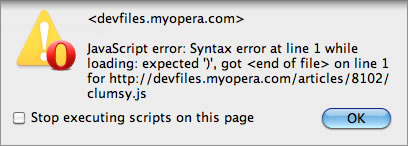
Figure 1: Our simple error massage shown in Opera.
onerror has been attached to window for historical reasons. It could be defined anywhere and would still be working the same way. Script errors might occur in places that have no relation to the document tree at all, such as setTimeout("oops()", 10).
You could also have used a very simple onerror on the document <body>:
<body onerror="alert([event, source, lineno].join('\n'))">body onerror sets window.onerror just like body onload sets window.onload. Some event handlers on body are reflected on window. So by using body onerror, window.onerror gets a value assigned. When trying to set both in the same context, the last one wins (just like when we assign a value to window.onerror twice).
semantics: The window.onerror reports the error at the script source URL, with the problematic line number, in the script's origin, using the onerror event handler of the script's global object. If the error is still not handled after this, then the error may be reported to the user.
Fancy error messages
If you prefer having a fancier style for the error message than the usual common chrome of the browser.
var fancyerror = function(message, url, linenumber) {
var errorbox = document.createElement("div");
errorbox.className = 'fancyerror';
errorbox.innerHTML = 'JS: <span class="errmsg"' + message.replace('<', '<').replace('>', '>') + '</span><br>line number: ' + linenumber + '<br>located: ' + url;
document.body.appendChild(errorbox);
return true;
}
window.onerror = function(message, url, linenumber) {
return fancyerror(message, url, linenumber);
}Try the fancy error example. You should try playing with the styling on the fancyerror and errmsg classes to see what you can come up with.
Suppressing errors: a dangerous feature?
When focusing on other things during development work, you might want to suppress all JavaScript error messages to start off with, until you are ready to do a proper round of debugging. This can be done like so:
function noErrorMa() {
  return false;
}

window.onerror = noErrorMa;
A better error handling with server logging
A pop-up window is not very useful, specifically if there is a lot of opportunities for errors. It would also be neat to be able to collect all these errors in a single file so we can inspect them later on. XMLHttpRequest offers an elegant way to record messages on a server. On the client side, the JavaScript will look something like this:
window.onerror = function(message, url, linenumber) {
  if (window.XMLHttpRequest) {

    var xhr = new XMLHttpRequest();
    var scripturl = "http://yourdomain.example.com/log";
    var log = linenumber + message + url;
    xhr.open("POST", scripturl);
    xhr.setRequestHeader("Content-Type", "text/plain;charset=UTF-8");
    xhr.send(log);
  }
  return false;
}
Then as usual when dealing with XMLHttpRequest, you just need to create a script which will parse the XMLHttpRequest data and save it locally.
Security
To prevent information leaking from one server to the other, it is important to be careful with scripts that have two different origins. If the script URL is has a different origin to the document then the three arguments returned by window.onerror are always ‘Script error.’, ‘’, 0. Read X-Script-Origin, we hardly knew ye for more details.
Browsers supporting window.onerror
- Chrome 13+
- Firefox 6.0+
- Internet Explorer 5.5+
- Opera 11.60+
- Safari 5.1+
Karl Dubost

Karl is working from Montréal, Canada. It has been participating to the Web since its inception under different roles including Web designer, CTO, W3C staff, translations volunteer, bits pusher, http poet, …
About this article
| Published in | Dev.Opera |
|---|---|
| Date | December 14, 2011 |
| Author | Karl Dubost |
| Tags | ajax, DOM, error message, event, javascript, security, window.onerror |
| Original | Internet Archive |