
Building applications for the Opera TV Store
- Introduction
- Building your application
- Requirements specific to Opera TV Store applications
- Submitting to the Opera TV Store
Introduction
The Opera TV Store is a moderated, hosted catalogue of TV-specific web applications. Developers can submit and share their apps through this portal. It presents end users with a storefront (itself a web-based application) which allows them quick and easy access to the applications.
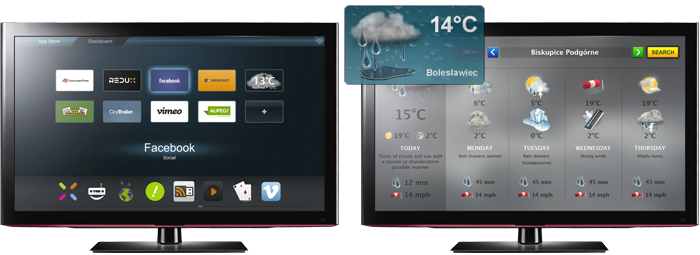
Sample Opera TV Store and a sample weather application
Applications in the Opera TV Store will be presented as static thumbnail images in a dashboard. Users are able to browse the TV Store catalogue and "install" applications, adding them to their dashboard. Selecting an application launches it in full-screen mode.

A simple overview of the Opera TV Store architecture
The full-screen web applications themselves are not hosted directly on Opera's servers. The Opera TV Store only acts as a directory, with references to the actual URLs of the applications.
Building your application
Applications for the Opera TV Store are, in essence, regular web applications, which are rendered by a customised version of Opera Devices SDK browsing environment on the user's TV. As such, developers can tap into all the traditional web technologies (HTML5, CSS 3, JavaScript, SVG) supported by the Opera browser. See our documentation on web specifications supported by Opera (and in particular our comparison of support in different Opera product lines) for a thorough breakdown.
Although the Opera Devices SDK is built on the same core rendering engine as our desktop browsers, there are still platform-specific APIs and subtle integration differences that developers need to be aware of. For this reason, it is recommended that developers test their applications on an actual TV running the Opera TV Store and/or with the Opera TV Emulator.
Developing web content for TV brings with it its own challenges – from a difference in user interaction to considerations regarding device capabilities and performance optimisation. For an introduction to some of the necessary adaptations and techniques see our documentation on creating web content for TV and other articles in our TV section.
Requirements specific to Opera TV Store applications
Due to the way in which applications will be integrated into, and launched from, the Opera TV Store, developers need to be aware of the following additional requirements:
Resolution
All TV Store applications have to support 1280×720 resolution. Other common TV resolutions (1920×1080, 960×540) are currently not supported. Although the TV Store browser itself supports regular scrolling, applications should be designed not to require scrolling, and if needed should provide their own custom mechanisms for displaying long lists of items or content.
Opera TV Store API
All TV Store applications should use the Opera TV Store API, which includes helper functions to facilitate the use of remote control functional keys and to provide explicit controls for closing an application. This API can easily be added to an application with the inclusion of the following script element:
<script src="https://apps.tvstore.opera.com/js-api/api.js"></script>Navigation and functional keys
The Opera TV Store is designed to use the standard four-way directional keys on a remote control for spatial navigation. Authors should test that their applications work correctly using the default spatial navigation built into the Opera TV Store browser. Authors may also choose to handle the navigation of their application themselves by intercepting key presses from the remote control. As the exact key codes for remote control functional keys varies between different devices, the Opera TV Store browser provides built-in constants (tailored to the device currently running the TV Store). See the article on Functional key handling in Opera TV Store applications for further details.
Closing application
Once an application is launched from the dashboard, it is effectively opened full screen in a new window. The Opera TV Store browser (based on the Opera Devices SDK, responsible for rendering the applications and the TV Store itself) does not present any standard interface elements to the user – it runs as a completely "chromeless" browser, with no address bar or back button. Users will be able to close the application and return to their dashboard via the remote control's EXIT and/or RETURN key. It's recommended, but not required, that developers provide an explicit option or button in their UI to close the application with the custom opera.app.close() method, provided as part of the Opera TV Store API.
Submitting to the Opera TV Store
Once your application is ready, it can be submitted to the Opera TV Store. Log in to the Opera TV Store – Submission portal and follow the steps required in the submission dialog.
This article summarises the most important guidelines that applications need to follow for inclusion in the Opera TV Store. Further restrictions and requirements are listed in the acceptance criteria of the Opera TV Store application publishing guidelines. Please ensure that your application fulfills those criteria – as well as the best practices and suggestions laid out in our developer articles – before submitting your application.
Patrick H. Lauke

Web Evangelist in the Developer Relations Team at Opera Software ASA.
About this article
| Published in | Dev.Opera |
|---|---|
| Date | February 10, 2012 |
| Author | Patrick H. Lauke |
| Tags | opera tv store |
| Original | Internet Archive |