
Developers › Opera Dragonfly blog
Improved script selection
We have updated the drop-down select in the Scripts panel in our latest cutting-edge and experimental builds. It now has a filter, to make it easier to find a script file, and an improved keyboard interaction.
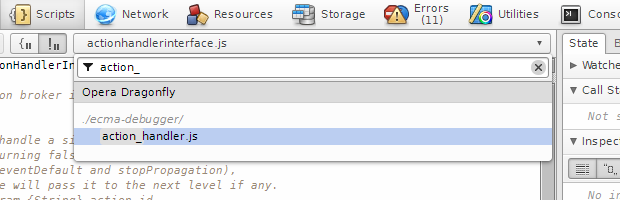
When you open the drop-down the filter gets focus automatically. ↑ and ↓ cursor keys will move the selection, and with ENTER you select the file to be displayed. When you type a part of the script file path, the amount of selectable options will get reduced accordingly. When you select a file with ENTER, the current search token gets stored, allowing you to quickly perform a previous search: when you open the drop-down, you can go through your previous searches with SHIFT+↑/↓. A summary of the available shortcuts:
- ↑ and ↓ cursor keys: navigate the options
- ENTER: select the script
- SHIFT+↑/↓: navigate the filter history
- CTRL+F3: open the drop-down, also from any other view.
The build is available on experimental and cutting-edge. Try it out and tell us what you think!
Readers' comments 17
Left under the original article, as archived.
About this article
| Published in | Opera Dragonfly blog |
|---|---|
| Date | February 14, 2012 |
| Author | Christian Krebs |
| Original | Internet Archive |
Martin KadlecTuesday, February 14, 2012 6:56:39 PM
Patrick H. LaukeTuesday, February 14, 2012 7:02:31 PM
Christian KrebsTuesday, February 14, 2012 7:56:07 PM
Martin KadlecTuesday, February 14, 2012 11:30:16 PM
Christian KrebsWednesday, February 15, 2012 8:16:16 AM
Originally posted by BS-Harou:
Yes, i agree. At the moment we don't know the name on our side, but we will look into that.
SteveKongWednesday, February 15, 2012 10:13:24 AM
Unregistered userWednesday, February 15, 2012 11:34:58 AM
Unregistered userThursday, February 16, 2012 2:50:38 PM
Unregistered userThursday, February 16, 2012 6:11:55 PM
JanghouWednesday, February 29, 2012 4:17:13 PM
Unregistered userThursday, March 1, 2012 2:34:14 PM
JimTuesday, March 6, 2012 7:35:26 AM
Martin KadlecWednesday, March 7, 2012 11:02:50 PM
JanghouThursday, March 15, 2012 11:05:09 AM
Originally posted by Janghou:
Tried the newest Opera Next and deleted old profile,
Even resizing dragonfly when docked is taking seconds
Switching from docked to undocked 10 seconds
Ubuntu 10.10 64
Version 12.00 alpha
Build 1331
Quadcore AMD 630
Maybe it's not dragonfly but new Linux GTK handling in 12 alpha,
1161 is much faster with same (experimental) dragonfly
will file bug: DFL-2927
Christian KrebsThursday, March 15, 2012 7:48:11 PM
JanGenFriday, March 16, 2012 4:52:33 PM
I guess, still it's most noticeable using Dragonfly.
Also expanding DOM feels slower.
JanghouMonday, March 26, 2012 7:02:05 PM
Originally posted by aleto:
Right. seems to be fixed in new Version 12.00 alpha, Build 1351
although now the close window button doesn't work in docked state.