
WebGL and Hardware Acceleration

A long time ago, in an office far far away...Opera released a custom build showing an implementation of a 3D canvas context. Now, more than 3 years later, we are releasing the first public build with a standards-based 3D canvas implementation using WebGL for Windows.
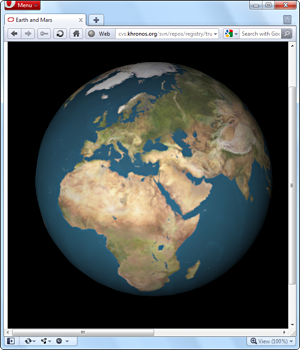
WebGL is a standard developed by the Khronos group, where Opera is an active member participating in the standardization process. We have been working on a WebGL implementation since early 2009, when the standardization process started. The specification has been changing quite frequently over the past few years, but now it is starting to mature and stabilise, which makes this the perfect time to release a public preview of our current WebGL implementation.
For those of you who have never heard of WebGL, it is a context to the canvas element which gives you hardware-accelerated 3D rendering in JavaScript. The API is based on OpenGL ES 2.0, which means that it is possible to run WebGL on many different devices, such as desktop computers, mobile phones and TVs. The WebGL public wiki contains more information about the standard, including tutorials and lots of demos – so it is a good place to go if you want to see our WebGL implementation in action.
Hardware acceleration
In June 2008 – around the same time as our first 3D canvas experiments – we showed a video preview of our fully hardware-accelerated renderer. One of the requirements we had for enabling that code was that the software fallback – used when hardware acceleration is not available – should be at least as fast as what we were using in our desktop product at the time. To achieve that, we spent a lot of time and resources on optimizing our software renderer, which has been used in Opera's desktop browser since version 10.50 and has proven to be one of the fastest renderers around. Following the release of 10.50, we once again focused on our hardware renderer.
The results of this work have been rolled into this preview as well, meaning that this build also has full hardware acceleration enabled (on systems with compatible hardware and drivers).
Our hardware acceleration is a bit different from what other browsers are doing. Like IE9 and Firefox 4, we do full hardware acceleration of all draw operations - but unlike those browsers, who only offer this acceleration on Windows Vista and Windows 7, our implementation will run on any OS with sufficient hardware support. This means we can have full hardware acceleration on Windows XP, Linux, Mac OS X and OpenGL ES 2 capable devices such as recent smart-phones and web-enabled TVs.
OpenGL
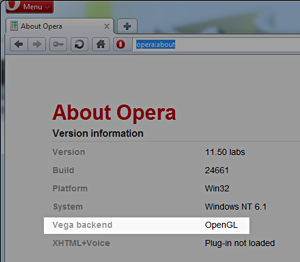
This build only has an OpenGL backend. That means your system must have an OpenGL 2.x compatible graphics card and related drivers for hardware acceleration and WebGL to work. In future builds we will also add a Direct3D backend, which will reduce the requirements on drivers and should work out of the box on most modern systems.
So how can you tell if hardware acceleration is enabled? There are two easy ways to check. The first option is to load some WebGL content – if it works that means your hardware and drivers are compatbile, and hardware acceleration is enabled in the browser. Alternatively, you can check the new "Vega backend" entry in opera:about – if the backend listed is OpenGL, you have hardware acceleration enabled; otherwise, the entry will show that the browser is using Software backend.
Download it!
This preview is currently only available for Windows – builds for other operating systems will be coming soon.
Opera 11 preview with WebGL and Hardware Acceleration for Windows
Disclaimer: this is not a stable build – it is an early preview of upcoming technologies in Opera. Neither WebGL nor hardware acceleration will be included in the upcoming release of Opera 11.10 for desktop. Some other aspects, such as SVG rendering, may not work correctly. We will continue working on these new features – fixing on all remaining bugs and optimizing our code – and we will release further preview builds to keep you up to date with our progress.
Please give us your feedback – but remember to include information about which graphics card and driver version you have, and if Vega is using the OpenGL or Software backend.
About this article
| Published in | Opera Labs |
|---|---|
| Date | February 28, 2011 |
| Author | Tim Johansson |
| Original | Internet Archive |