
A colourful Opera 12.50 snapshot
As work steadily continues on our next stable release, this week's Opera 12.50 snapshot provides a colourful mixed bag of new features and improvements. As ever, we've cherry-picked the ones we find most interesting for developers.
Context Menu API for extensions
Another new API for extensions? Yes indeed! This time, it's a handy method to add items to the context / right-click menu. This can be useful for any kind of interaction with a page or its contents.
The API allows fine-grained control, making it possible for an extension menu item to only appear in the context menu for a link, or to only be present on certain domains. It's also possible to add sub-menu items which can be created with a folder-style structure. When a menu item is clicked, there are also a variety of event properties to enable you to work with things such as a link's URL or some text selected by the user.
In short, this API is ideal for developers wanting to activate their extension through more than just a toolbar button, so feel free to try it out following our freshly released Context Menu API documentation.
Fullscreen API
The Fullscreen API provides a simple set of JavaScript methods (such as element.requestFullscreen() and document.exitFullscreen()), as well as a new :fullscreen pseudo-class, that allow pages – and, more interestingly, even individual elements within a page, like a custom video player or a canvas game – to go fullscreen.
As a simple demo, I've hacked up one of my old video player examples (with custom HTML-based controls) to include this new functionality: HTML5 video - fancy video controls with JavaScript, including Fullscreen API support. Note that in this demo it's not just the video element, but the whole container – including the custom controls – that is going fullscreen.
As ever, with the new "HTML5 the living-on-the-edge standard", specs chop and change. This snapshot implements the Fullscreen API editors' draft 7 February 2012, while the standard has now mutated in the latest July 2012 version.
HTML5 <ol reversed>
A nifty feature from HTML5-the-living-standard is <ol reversed>. The specification says "The reversed attribute is a boolean attribute. If present, it indicates that the list is a descending list (..., 3, 2, 1). If the attribute is omitted, the list is an ascending list (1, 2, 3, ...)."
Note that if you combine reversed with the start attribute (which was bizarrely deprecated in HTML 4 but re-instated as a full member of the attribute gang in HTML5) you could encounter lists counting to zero or below. If you're using a counter style that isn't decimal (for example, alpha or roman numerals), the list will be decimal when it drops below the value that corresponds to 1. The spec says:
Numbers less than or equal to zero should always use the decimal system regardless of the type attribute.
For browsers without support, there's a clever and semantically meaningful reverse ordered lists polyfill by Louis Lazaris.
SPDY support
They grow up so quickly...only last month we released an Opera Labs build with SPDY support, and now it graduated to our main branch, on track for inclusion in our next stable release.
As a bonus, this snapshot also comes bundled with a SPDY indicator extension that shows you when a site uses SPDY...no more hunting around in Opera Dragonfly's network panel for those extra headers!
If you previously installed extensions in Opera Next, the bundled extension may not show up automatically. Either reinstall this snapshot with a clean profile, or simply grab the SPDY indicator extension from the addons site.
Nested @media blocks
As a first step towards our implementation of CSS 3 Conditional Rules, this build introduces support for nested @media blocks. Instead of long and repetitive @media feature lists such as:
@media only screen and (orientation: portrait) and (min-width: 480px) {
    ...
}
@media only screen and (orientation: portrait) and (min-width: 600px) {
    ...
}
@media only screen and (orientation: portrait) and (min-width: 768px) {
    ...
}
it's now possible to nest media queries, allowing for much cleaner, leaner and most importantly more understandable CSS:
@media only screen {
    @media (orientation: portrait) {
        @media (min-width:480px) {
            ...
        }
        @media (min-width: 600px) {
            ...
        }
        @media (min-width: 768px) {
            ...
        }
    }
}
Support for images with ICC Profiles
Beyond containing the image data itself, many image formats (JPG, PNG, TIFF to name a few) allow for embedded colour profiles. These ICC profiles tell programs how the raw image data should be interpreted, mapped to the currently-used colour space, and ultimately displayed. The large majority of images on the web don't contain embedded ICC profiles, so browsers will simply display them without any sort of color correction. However, photo enthusiasts and perfectionists will be pleased to know that, should their images contain specific profile information, Opera will display these as intended.
For further information on ICC profiles, I'd recommend this excellent and accessible primer on Digital Image Color Spaces, but here's a simple example.
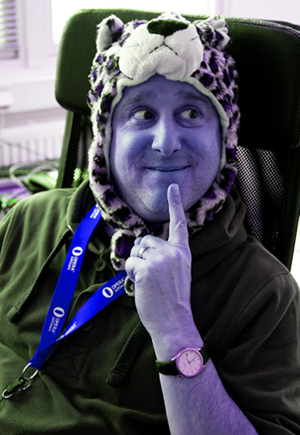
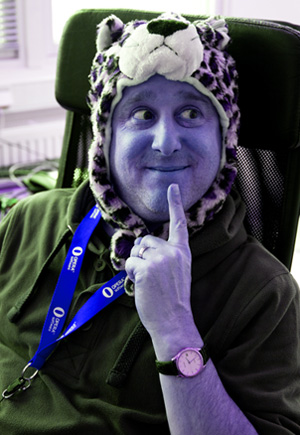
If Bruce looks blue in both images, your browser doesn't support ICC profiles.
Both of these images are exactly the same, in terms of their raw image data. They were created using an exaggerated custom colour profile, to more clearly illustrate the point. The first image contains an embedded ICC profile, which signals to colour-managed programs how to interpret the data, while the second image doesn't. In browsers that don't support colour profiles, both images will be displayed without any colour correction (resulting in the funky colour shift), while ICC-aware browsers will correct and display the first image based on its embedded ICC profile.
And here's the Russian translation of this post: Красочная сборка Opera 12.50.
Readers' comments 22
Left under the original article, as archived.
About this article
| Published in | ODIN blog |
|---|---|
| Date | August 28, 2012 |
| Author | Patrick H. Lauke |
| Original | Internet Archive |
Charles SchlossTuesday, August 28, 2012 3:20:49 PM
iosaddictTuesday, August 28, 2012 3:42:51 PM
NecromanTuesday, August 28, 2012 4:02:51 PM
netmainTuesday, August 28, 2012 4:02:53 PM
DillonTuesday, August 28, 2012 4:07:31 PM
netmainTuesday, August 28, 2012 4:11:43 PM
Originally posted by Astrophizz:
Originally posted by Haavard:
so, yeah .. maybe
Patrick H. LaukeTuesday, August 28, 2012 4:18:36 PM
opticyclicTuesday, August 28, 2012 6:52:45 PM
Can we have an API to set the User Agent from an extension now please.
http://my.opera.com/community/forums/topic.dml?id=1404832
Charles SchlossTuesday, August 28, 2012 8:56:53 PM
Originally posted by patrickhlauke:
might also poke them to remove the prefixes as it does no good on the web, your not going to be using one web engine for every where you go
lucideerTuesday, August 28, 2012 10:08:53 PM
Originally posted by opticyclic:
Ditto. Fantastic!
Joel SpadinTuesday, August 28, 2012 11:34:59 PM
Daniel DavisWednesday, August 29, 2012 2:46:55 AM
I'll pass it on to the developers.
Bruce LawsonWednesday, August 29, 2012 9:03:22 AM
Originally posted by iosaddict:
and so do you!
Patrick H. LaukeWednesday, August 29, 2012 11:26:45 AM
http://people.opera.com/patrickl/experiments/video/fullscreen/
Mağruf ÇolakoğluWednesday, August 29, 2012 2:06:07 PM
FransWednesday, August 29, 2012 3:20:17 PM
Originally posted by lucideer:
Tritto. I think it should be a part of HTML5 instead of the stupid override stuff in use right now.GuilimoteWednesday, August 29, 2012 11:55:16 PM
However, there seems to be still a missing feature, the output needs to be mapped to monitor profile. Is it planned?
In fact, if you use a dedicated profile for your screen (example: if you have calibrated it, or if you use a wide gammut monitor.), colours are still wrong.
If you look at this link:
http://gearoracle.com/guides/web-browser-color-management-guide/
Opera has the same problem as IE9:
Michael A. Puls IIThursday, August 30, 2012 5:06:42 AM
Originally posted by Frenzie:
That would be cool.lucideerSaturday, September 1, 2012 6:19:24 PM
Originally posted by burnout426:
Tritto
Arvo JägelMonday, September 17, 2012 5:13:30 PM
Originally posted by Guilimote:
Same question here - will you support monitor profile and when? Embedded profile support itself is good thing, but without proper monitor profile support it doesn't help much
QuHnoTuesday, September 25, 2012 3:51:27 AM
Originally posted by Guilimote:
How should that be done? My calibrated monitor does not tell the OS when it recalibrates his internal LUT and a normal monitor does not tell the OS when a user e.g changes the brightness to get a better over all match when he does a simple calibration by pure visual calibration methods.
Apart from that: Consumer LCD monitors can not be used for real soft proofing for various reasons like dependencies of the view angle etc.
Check it with the "evil test image" I posted here:
http://my.opera.com/QuHno/blog/color-management-throw-away-your-lcd
Arvo JägelTuesday, October 16, 2012 7:28:42 PM
Originally posted by QuHno:
No one is talking about LUTs (neither in video adapter nor in monitor) or professional monitors (which profiles are written into monitors) or DDC/CI data exchange (which can be used to query most monitors to get brightness and many other values from these) or similar.Windows maintains its monitor profile (by default sRGB, but calibration tools do change it), characterizing monitor data - color coordinates, white point data and gamma value; that is easily accessible through Windows API and should be used to final conversion of any images. This profile may also contain LUT tables for video adapter to load - this loading is done by windows itself (or, for XP, I load it using 3rd party utility).
And no one is talking about real proofing of images; we are just interested on displaying images, using our calibrated monitors profiles.