
Opera 14 for Android is out!
Yay, and — dare I say it — w00t! Opera 14 for Android is released!
Opera 14 for Android is built on top of Chromium 26, with a total overhaul of the UI in native code, making it fit well with the latest Android design guidelines. Go get the build from Google Play or point your browser to m.opera.com, and give it a spin!
A great browser for Android 2.3 and up
Currently, we support Android 2.3 and higher. That's important, as 38.5% of Android users are still on Gingerbread — now they can get top of the range features and performance, just like users on newer Android versions!
Note that we don't have an Opera 14 build ready for tablets yet: we're still working on various tablet-specific UI optimizations, and this will be released later on.
A whole new engine
Opera 14 is based on Chromium 26, which does not include Blink just yet. However, as we plan to stay closely in sync with the Chromium development cycle, doing frequent updates, you can expect it in a future release. In the meantime, we've added/enabled some extra standardsy goodness already for you to use:
-
<input type=color>support: try it with this simple demo - WebGL 3D context is enabled: you can try out our Odin demo, for instance, or why not try building something with WebGL yourself?
-
CSS3
@supports, which allow you to do simple feature detection using CSS.
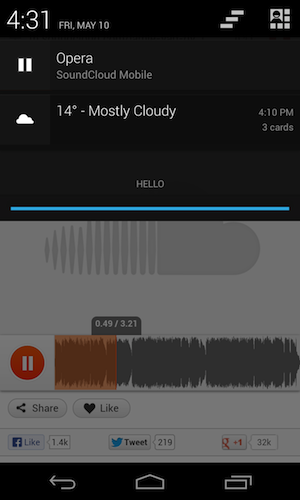
We've also done something cool with how we handle HTML5 audio: if you start playing e.g. this excellent song on SoundCloud, you'll see that a pause button appears in the Android notification area. You can now switch tabs, or even open other apps while the song is playing, and easily control playback from the notification area.
Note: some things we don't support in this first release include custom search providers and access to about://flags.
We've also adjusted our UA string, so as to avoid old sniffing traps: it's similar in format to the Chrome UA string, with, for this release, OPR/14.0.1074.57453 appended at the end. Of course, you shouldn't be looking at this at all, and instead do feature detection, so forget we mentioned it.
New UI and features
When opening Opera for Android, you're greeted by our overhauled Speed Dial, which now combines favorite sites with bookmarks into one view. You can group bookmarks in one level-deep sets by dragging and dropping them on top of each other. A swipe away to the left (rather than hidden away in a submenu somewhere), you find your browsing History, and towards the right, there is our new Discover page, which helps you find interesting online content to jump straight into browsing — ideal to kill those 10 minutes waiting for the bus to arrive.
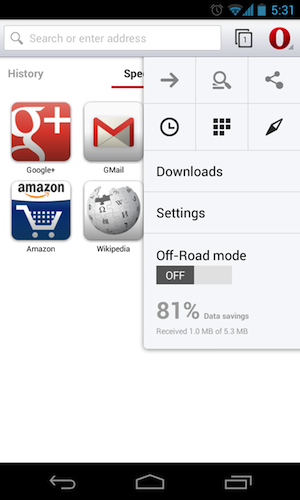
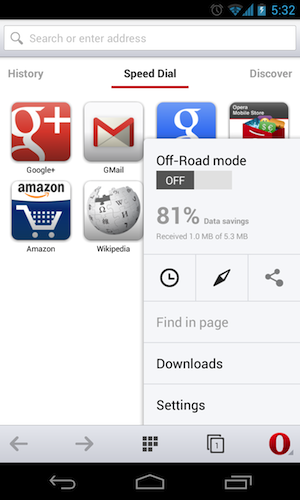
You can of course also query for sites from the redesigned navigation bar on top. And we've made some adjustments here since the beta release: in the Settings menu, you find an option to move the navigation bar to the bottom. It costs you a bit of screen real estate, but makes for a more relaxed single-handed browsing experience.
The red O button has moved to the top right of the screen (unless you put the Navigation bar at the bottom), just like in other Android applications, and it toggles a menu with advanced options such as Sharing, Find in Page, Downloads, Settings, and more.
If you miss an Exit button or want to go back more than one page in the tab's History, long-press the back button. To save a page to read off-line, hit the + icon at the left of the address bar.
Off-Road mode
A special mention for Off-Road mode, available from the red O menu: when toggled on (also subtly indicated by a thin red line on top of the browser), pages are loaded via the Opera Mini servers, thereby reducing bandwidth and data cost. So, no more need to switch browser to get Opera Mini's data compression features: you get it all in one package.
To learn more about optimizing for Opera Mini and Off-Road mode, read our Opera Mini and JavaScript article.
Keep in mind that users can set their own preference of Off-Road-specific image quality: they can increase or decrease image quality, or even opt to receive no images at all (a good option to have, since images account for more than 50% of page size). As my colleague Bruce points out: be sure to use alternative text with images, and remember — it's not just for the visually impaired!
Automatic text wrap
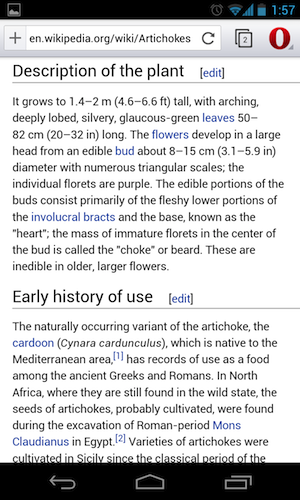
By default, Opera for Android uses the same text autosizing (aka FontBoosting) mechanism that can be found in Chrome for Android. E.g. if you visit this desktop-specific Wikipedia page about artichokes, you see that some of the text is displayed bigger, making it readable without having to zoom in. However, as FontBoosting is only applied selectively and interferes with author-defined text size differences, we've made it possible to turn this off in Settings, and choose for automatic text wrap instead. Turning on text wrap instructs Opera for Android to wrap lines no matter how much you zoom into a page so there's no need for horizontal scrolling.
Remote debugging
Of course, there will be times as a developer when you'll need to debug sites running on Opera 14 for Android. This can be done from Windows, Mac and Linux desktops — see our article about remote debugging Opera for Android.
Made to discover
Of course, there are many more details to talk about — offline pages, private tabs, browser.js — but we'll leave those for you to discover. Enjoy, and let us know what you think!
Readers' comments 50
Left under the original article, as archived; 1 page of comments could not be recovered.
About this article
| Published in | ODIN blog |
|---|---|
| Date | May 21, 2013 |
| Author | Andreas Bovens |
| Tags | chromium, Opera, HTML5, mobile, android, off-road |
| Original | Internet Archive |
Mağruf ÇolakoğluTuesday, May 21, 2013 7:08:25 AM
ouzowtfTuesday, May 21, 2013 8:35:22 AM
Will the Opera Browser Beta in the Play Store continue to be updated with beta versions?
What bugs me since the beta is, that when I copy an url from a text or another browser and paste it in the adress bar (without tapping the adress bar once before!), I have no possibility to approve this to load the page. The keyboard does not come up, no 'paste and go'-option, nothing.
On the discover-page, the page donaukirier is called donakurier.de (one 'u' is missing).
Also I would like to see that I can define myself what pages (not categories) are used as sources.
UnrealmirakulixTuesday, May 21, 2013 9:37:24 AM
faster starting on "Android 4.1+"?
ouzowtfTuesday, May 21, 2013 9:50:26 AM
dz0nyTuesday, May 21, 2013 10:15:14 AM
UnrealmirakulixTuesday, May 21, 2013 10:15:21 AM
One last thing. I wonder why there is still no Opera for iOS, cause Opera Ice was shown on iPad...
Arpit KumarTuesday, May 21, 2013 11:41:32 AM
So, Opera is going to discontinue Opera Mini for Android, right??
spiffytechTuesday, May 21, 2013 11:57:41 AM
FransTuesday, May 21, 2013 11:59:17 AM
Originally posted by ODIN:
Thank you.
Dominykas BlyžėTuesday, May 21, 2013 12:47:53 PM
dinamitesTuesday, May 21, 2013 1:35:16 PM
Sten FriskTuesday, May 21, 2013 1:40:33 PM
Amazing work so far, amazing improvement.
FransTuesday, May 21, 2013 2:31:24 PM
Originally posted by Arpit Kumar:
And why would they do that? Opera Turbo saves bandwidth, but not nearly as much as Opera Mini.
Andreas BovensTuesday, May 21, 2013 2:33:07 PM
RSDTuesday, May 21, 2013 2:35:33 PM
Pedro CostaTuesday, May 21, 2013 2:41:34 PM
What I really wanted to know is why in advanced settings there is some settings that cannot be changed. Like user agent.
Above all why does Opera on first start places 30MB in system data. I have a mid-low range Android (Live with walkman) and this a lot for my phone! Is this really needed? can't it be in the SD Card? (I have 32GB SD, no problem there)
I feel I can't use Opera because of this big memory drain. Can't install anything more after this (and what I have already). Not even make updates to most apps.
JarradTuesday, May 21, 2013 3:10:41 PM
k-mouseTuesday, May 21, 2013 3:45:05 PM
The biggest gripe I have with it is the tab switching. It is just so incredibly slow! The tab button is notably laggy wen clicking it, the animations are slow, and opening a new tab takes even longer than switching to another tab. Just compare it to the old Opera which felt a lot snappier.
This may sound like a small thing, but is very important for the overall feel of the program.
Keep up the good work.
FransTuesday, May 21, 2013 3:57:48 PM
Originally posted by Jarrad:
Try http://ftp.opera.com/pub/opera/android/mobile/
CryioTuesday, May 21, 2013 5:33:17 PM
The Opera 14 beta works, but 14 final won't even want to install. What's up with that?
artmilTuesday, May 21, 2013 6:13:28 PM
Originally posted by Frenzie:
Yes but in O14 the "off-road mode" works just like(?) on the opera mini, it's better then the "turbo mode"
I'll be staying on the old version for now... The lack of urlfilter/override/usercss/userscripts(in that order) and normal bookmarks is a little too much for me. Always loved opera because of the built-in possibility to shape the pages you often visit to your liking.
I would prefer an option to disable the discover tab and replace it with a normal bookmark list.
This version feels a little snappier then the beta(but still slower then 012)... a plus for an option to move the tabs to the bottom and even bigger PLUS for keeping Dragonfly.
sirnh1Tuesday, May 21, 2013 7:26:39 PM
* Any chance of getting back the option "don't use
turbooff-road while using wifi"?* After clicking on the 'show all tabs' button I need to wait for 3 seconds before my tabs are actually shown (previous stable version was instant)
* Doesn't support bookmarks
* Doesn't support Opera link
* Doesn't support rss
* Doesn't have anything that indicates that a page is loading (yes, there is a almost-none-visible-circle in the adresbar. But it's very hard to see)
* How do I turn off the 'google suggestions'?
* That
HTC blinkfeed'discovery' page is only usefull if I can add my own sites (and remove pretty much ALL default ones)ptokTuesday, May 21, 2013 8:05:29 PM
Old tab mechanism was somehow bad, but new one is even worse. Animations are taking to much time. Tabs should be closed by drag down gesture (buttons are so small). Tab mirror-effect is not so bad, but not necessary (performance should be prioritized). Overall changing pages whit tabs feels slow.
Minor suggestions:
I would like Discover to support rss and be more configurable (but is just first stage of that project, right?). Bookmarks should not be discarded. I know they are more or less useless for mobile browsers, but some people like to store lot of links.
When comes to bugs:
Opera does not enlarge (specified hight, 100% width) divs with text which does not fit into them in text wrap mode. That text moves out of div boundary and overlaps other elements.
New release is clearly unpolished and lacking some important options, but not so bad either.
jabe1977Tuesday, May 21, 2013 10:58:51 PM
Beta version of Opera and Opera Mini are in my walkman.
Why can't I find it??
NEOAethyrWednesday, May 22, 2013 12:28:25 AM
Use the ftp to get it, that was the only way I could:
ftp://ftp.opera.com/pub/opera/android/1400/Opera_14_ARMv6ARMv7.apk
@dev's
I'm gonna be running this in the android sdk emulator later on tonight to check and see if you guys connect to servers that you shouldn't be, I'll be checking for spyware.
I know from experience you guys do that on the desktop ver, so before I even attempt to put it on my galaxy s4 I'll be using the sdk which I can run packet scans from...
I'll post back sometime or another, I hope you didn't put spyware in it, especially for a platform that has absolutely no way of checking for it on it's own right now.
Regardless I'm still looking forward to it as long as it behaves lol.
It may become my main browser on the android platform, that is pretty likely actually.
But time will tell
daaawoooWednesday, May 22, 2013 12:49:13 AM
Arpit KumarWednesday, May 22, 2013 3:42:54 AM
ws79Wednesday, May 22, 2013 6:55:51 AM
Sn3ipenWednesday, May 22, 2013 11:09:01 AM
Originally posted by dinamites:
Hold the back button to exit propperly.
jason maresWednesday, May 22, 2013 11:22:32 AM
Anyone know if this is common or a fix. using default browser for now because this is so frusterated.
Bruce LawsonWednesday, May 22, 2013 1:28:21 PM
installation id is something you can use if you send us a crash report - you can tell us the ID so we can find your report. If you clear your data, a new id is generated.
DeWornWednesday, May 22, 2013 4:17:22 PM
DanielThursday, May 23, 2013 3:15:42 AM
But on my device (xperia sola, 1 GHz Dual Core, 512 MB RAM), there is obviously not much free memory left. Almost no fluid scrolling possible when using WebKit, UI-Lags.
The Opera-Mini-Mode (Off-Road) appears to be much faster, there are not so many UI-lags etc.
What I'm trying to say: I think especially on not that fast phones, there is a huge loss of usability, because Opera Mobile 12 was way faster (without Turbo).
Performance improvements should be focused, since you don't have to maintain the rendering-engine anymore.
Bruce LawsonThursday, May 23, 2013 10:44:35 AM
"Internal video player sucks." - can you give me more specific feedback on why, please (and what device you're on)?
xor2Thursday, May 23, 2013 11:49:40 AM
What I don't get is why Chrome on the same phone is way snappier (though not nearly enough compared to "old" and "dead" O mobile 12).
It's much better to just go to chrome://flags in your Chrome browser and select “Enable Data Compression Proxy” to get similar functionality as with Opera Turbo and don't use buggy and slow Opera at all
BTW. why no opera mobile 12 on Play Store anymore? So I just can't install Opera Mobile 12 on unrooted devices anymore?
So much for me suggesting to my clients that they shold try Opera. I was Opera fan but as of now I will never ever suggest this new abomination to anyone and Opera as browser provider is officially DEAD for me
I will probably post similar comment to "new and exciting Windows version of Opera" because it will be damn slow (just as Chromium is on computer I am writing this post on) or even slower...
Pedro CostaThursday, May 23, 2013 12:35:28 PM
It's the biggest problem with Android. Too many specs and configs to make a good experience easy everywhere.
svyrThursday, May 23, 2013 12:40:34 PM
Also please explain the install id in the options.
And add a text size feature and a force text size override like with anroid chrome.
Bruce LawsonThursday, May 23, 2013 2:23:31 PM
Erik HauboldThursday, May 23, 2013 4:34:24 PM
i have a page, which has min-height: 100% if there is not enough content. it basically works, but i'm unable to see my footer while the height is 100%, as it is drawn below the screen.
if there is more content on the page, it works perfectly. latest chrome for android works like a charm too.
sry to bother you here with this, but i havent found any other way to report a bug in opera mobile. this new site is very counter-intuitive..
Bruce LawsonThursday, May 23, 2013 5:50:03 PM
SzubirubiThursday, May 23, 2013 6:16:47 PM
You can't even synch it with your desktop.
My faith in humanity is lost.
Erik HauboldThursday, May 23, 2013 6:20:13 PM
please keep in mind, that this page is some kind of playground for me
the top left button is the navigation and i tested the page on my htc one s and my nexus 7.
edit: fixed a typo in the url
DeWornThursday, May 23, 2013 6:43:12 PM
Originally posted by brucelawson:
Sorry, I should have make it more descriptiveAndreas BovensThursday, May 23, 2013 11:22:38 PM
DeWorn, very good point. I'll bring this up with our developers.
jabe1977Friday, May 24, 2013 1:05:19 AM
Thank you for your help. I got new Opera and enjoying now!
Khaled KhalilFriday, May 24, 2013 2:39:44 AM
Presto deserved much better funeral.
svyrFriday, May 24, 2013 4:24:07 AM
Originally posted by Khaled-Khalil:
+1juniper-3331Friday, May 24, 2013 6:28:32 AM
Version 12 worked flawlessly on my Samsung Galaxy Tab, version 14 barely runs, frequently crashes the browser and even crashes the entire device.
Was this even tested on devices more than two years old?
operafan59Friday, May 24, 2013 8:34:52 AM
ptokFriday, May 24, 2013 5:04:57 PM