
Customize Opera like a boss!
The This is my browser post generated a mountain of comments. It's clear that we love to personalize our browser.
These are only some of our favorites from the comments. I'm sure that if you ask they would love to share some insights on what they did in the comments!
 ChampionScorpio shows of his amazing speed dial. With an overall blue theme to his OS Opera fits in perfectly. His screenshot shows how dramatical you can change your browser by changing your skin.
 We loved this contribution from Sascha. It's simple, yet it fits perfectly on his OS X. You don't have to go overboard to make Opera look stunning and personal.
 Smasty uses a stunning Speed Dial background with some custom Speed Dial images to set the tone for his browser. Did you notice the clever use of small tabs? See this comment for more info!
 This slick Opera browser belongs to Pieter. A clever combination of a soothing color scheme that flows from his desktop background, and a hint of Visual Tabs. Proving once again that you don't have to go overboard. He was kind enough to share more info in his comment.
 Manzel combined a semi transparent skin with a lot of work on his Speed Dials to create this amazing browser. Add some favorite extensions and you are good to go! See this comment for some more info!
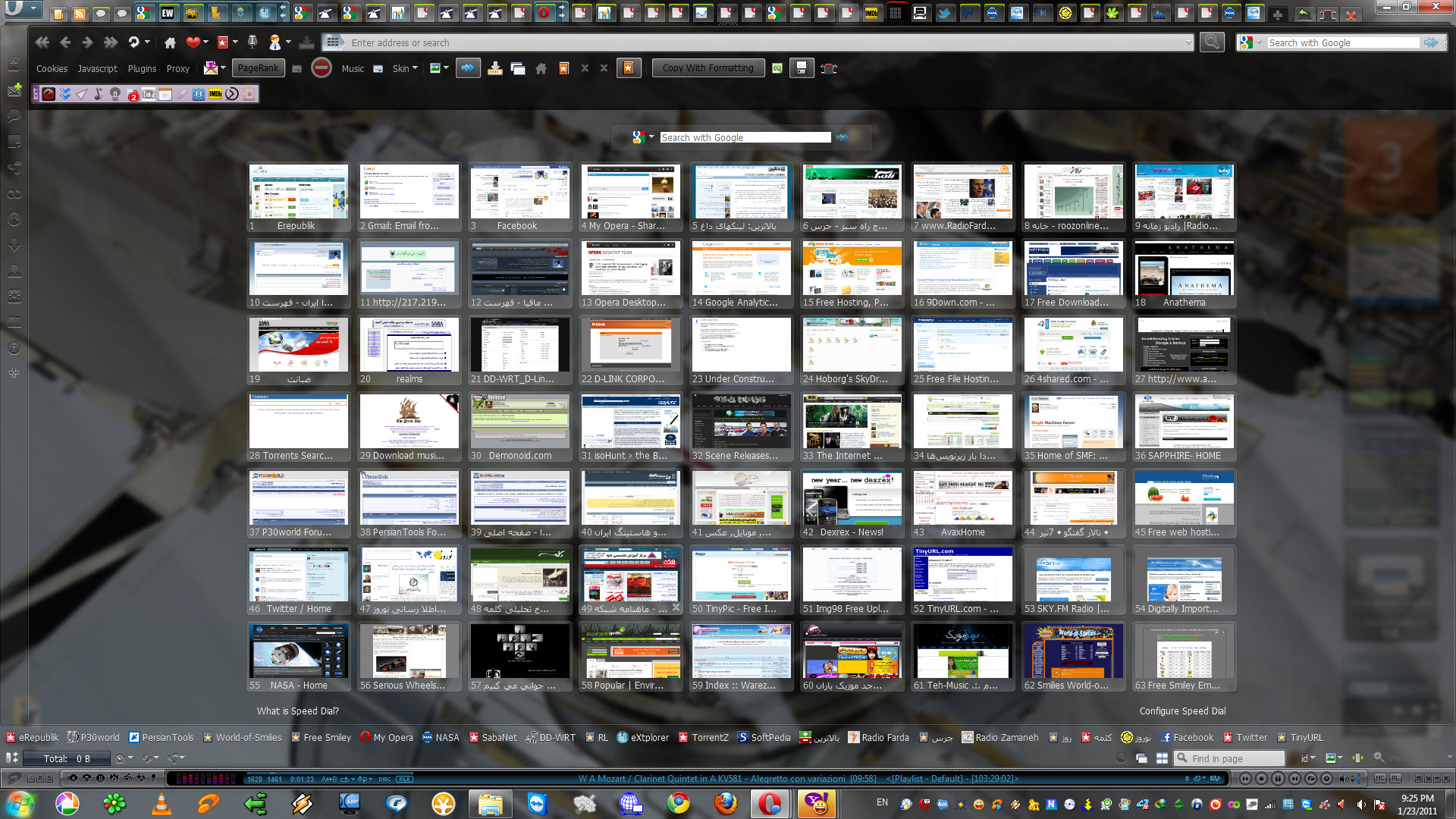 Minimalism might be popular, but maximalism also has it's beauty. Hoborg runs 63 Speed Dials, over 50 tabs in multiple stacks and an unknown number of addons. This surely proves the diversity of Opera.
These where just some of our favorites. If you feel inspired to customize your own browsing experience, check out Opera skins and the Speed Dial Backgrounds. Want to create some awesome custom Speed Dial images? Check out the guide by Tamil, or how about some speed dial extensions for Opera 10.50?
Readers' comments 31
Left under the original article, as archived.
About this article
| Published in | Choose Opera |
|---|---|
| Date | May 14, 2011 |
| Author | Aleksander Aas |
| Tags | speed dial, desktop, opera, custom |
| Original | Internet Archive |
Pei10. May 2011, 13:44
z@h3k10. May 2011, 13:45
Anton Tsigularov10. May 2011, 13:52
I want the Linux one ;(
agresiff10. May 2011, 13:54
Aleksander Aas10. May 2011, 13:57
Originally posted by TheAtilla:
I'm sure Hafk can share some info?Alexodius Prime10. May 2011, 13:58
Anton Tsigularov10. May 2011, 13:59
Tamil10. May 2011, 14:14
Muhammad-Ubaid raza10. May 2011, 14:29
leonmcg10. May 2011, 14:32
hulkandrei10. May 2011, 14:45
Originally posted by leonmcg:
i agree with you,SHARING IS GOOD
smasty10. May 2011, 15:07
For custom logos, I've used a similar technique as Opera Image Dial Generator uses and some random images from the Internet.
Ronit Kumar10. May 2011, 15:32
Serpher10. May 2011, 15:34
Irinel Ursu10. May 2011, 15:49
Charles Schloss10. May 2011, 16:08
I have had some of them in my Opera album here on MyO, have not changed much from it, tho custom searches (which is why I have removed the search box) rock
Abhinav10. May 2011, 16:34
Eric G10. May 2011, 16:51
I do have a bunch of minor tweaks made for my own setup, so I'll just go over the speed dial. If you want me to go other other things, let me know.
I used this skin as a base for my setup. I unpacked my skin file and replaced the default speed dial image with a completely transparent image, I used a plain layer of white at 10 % transparency for a hover image. The New Dial button stays the same.
This is optional, but in the skin.ini under [Speed Dial Thumbnail Image Skin], I changed the radius to 10 10 10 10 to get the rounded effect. The skin also looks nice without it.
The thumbnails are easy to make in GIMP.
-Opera's default Speed Dial size as of 11.10 is 1024 by 640, but you don't need that much clarity for these thumbnails, so I used 512 by 320.
-Make a project file with a one color background at 50%* transparency and using XX as the letters. This will be your template for making dials both now and in the future if you add more.
-As for the dials themselves, the backgrounds can either be flat colors or slight gradients, and using corresponding colors with the site it links to. Saved the finished dials as .png.
-Go through Tamill's tutorial linked at the top for changing speed dials, make sure to keep backups of these images in a separate folder, in case something goes wrong and Opera decides to eat your thumbnails. (I can't blame Opera, these thumbnails DO look delicious!)
My blank dials are just links to opera:blank, with the thumbnail changed to pure transparency. Place them wherever you don't want a speed dial! My background is just something I threw together in a few minutes, but if you want it, here it is.
*A word of advice, if you have a "busy" background image on your speed dial, opt for making the speed dial thumbnails 75-100% opaque instead of 50%, otherwise it will look messy.
Sorry if I rambled on and on there a bit. Any questions, feel free to let me know!
manzel10. May 2011, 16:54
Some of the icons are self-made and some are from the sites they link to, but I edited all of them. Very important for Opera 11.10 is that they have an aspect ratio of 16:10, in my case 292x182.
But I encountered another problem with 11.10. If I change the zoom level of speed dial to something different than 110% some of the icons look terrible because their size does not change. And I do not have any idea why. Here you can see it:
http://db.tt/FwuquwP
http://db.tt/bf2cOqI
Jorjy10. May 2011, 17:31
It's nice to see how people customize their web browser.
Susan Bellwood10. May 2011, 17:59
manzel10. May 2011, 18:05
Originally posted by suzybel57:
Thank you very much!
Pieter10. May 2011, 18:35
I'd like to credit the author of the win7 style: http://tinyurl.com/6j7or7w
My opera skin is "10.6 clean version"
This is the speeddial bgr: http://tinyurl.com/65mvo2w
My desktop wallpaper is a combination of 2 different wallpapers that i've found along the internet.
Alexodius Prime10. May 2011, 18:39
Originally posted by PieterDeBie:
What abt speed dial background and desktop wallpaper?
d4rkn1ght10. May 2011, 22:13
Aleksander Aas11. May 2011, 09:10
Alexodius Prime11. May 2011, 12:44
Originally posted by Aleksander:
Thanks!
Tiago Wakabayashi12. May 2011, 07:51
Originally posted by Serpher:
I liked too =)
orcher13. May 2011, 09:45
http://imageshack.us/m/192/1343/unled1cx.jpg
manzel13. May 2011, 19:00
Originally posted by manzel:
orcher14. May 2011, 11:10
http://imageshack.us/m/863/2000/unled1mj.jpg
Those two icons are the same file. The one on the left links to grooveshark, and teh one on the right links to deviantart. I,ve tried with different files and icons. Result is always the same The deviantart icon is not transparent.
EDIT:
solution for all problems found:
http://my.opera.com/community/forums/topic.dml?id=960172