
On a horse? Opera Turbo to the rescue!
In a jeep? On the train? On a horse? Yes, we enjoy outdoor activities too. But we also enjoy a fast Internet connection in places where you normally wouldn't expect it. That's why we made Opera Turbo. With Opera 11.10 shipping tomorrow, we've made the impossible possible: Opera Turbo is faster than ever before. Areas of improvement include:
- Added WebP compression as a replacement for JPEG
- More efficient, and fewer, network connections
- Faster secure connections (SSL)
- Bugfixes (yeah, we make mistakes too)
The most noticeable difference is probably WebP. An open standard image format that was released with some fanfare by Google last year. We thought it was about time to replace the 20 year old JPEG format with something more modern. Let's take a look at the differences:
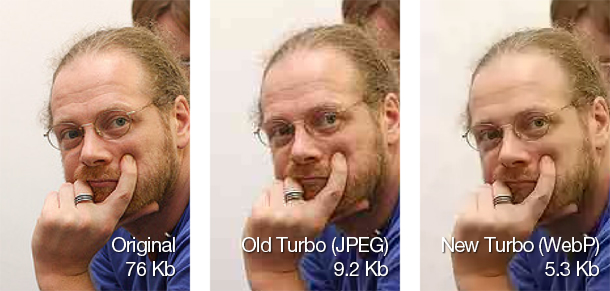
Image courtesy of mauriz.
Overall, WebP produces images with less artifacts and crisper details, even though the image takes less space. Another cool effect is that it also makes people look younger. 
So, how good is Opera Turbo now?
We tested how much data was downloaded for a number of popular websites. In our tests we saw (on average) about 22% less data transferred compared between old and new Opera Turbo. Take a look for yourself:
| Site | Original size | Old Opera Turbo | NEW Opera Turbo |
|---|---|---|---|
| BBC.com (Science) | 1562.5 kB | 1111.0 kB | 724.1 kB |
| Wired | 1152.8 kB | 546.9 kB | 398.7 kB |
| Tumblr | 1680.2 kB | 323.l6 kB | 234.6 kB |
| Pitchfork | 1680.5 kB | 679.2 kB | 680.9 kB |
| dribbble.com | 999.5 kB | 238.9 kB | 234.7 kB |
| Dagbladet.no | 4724.4 kB | 1394.5 kB | 1055.3 kB |
| New York Times | 562 kB | 385.2 kB | 340.2 kB |
| Total data downloaded: | 12361.9 kB | 4679.3 kB | 3668.5 kB |
As you can see, there's both speed and data to be saved. We also did a speed comparison with and without Turbo on a limited connection [1]. Testing is hard. Results will differ from which sites you load, where in the world you are and how slow your network is. In our benchmarks we saw around 260% [2] speed improvement.
So, with even faster Turbo, there's even less reason to sit inside. Summer is around the corner - you're set to hit the road with turbo!
[1] We tested Turbo with Netlimiter, limited DL/UL to 52 kB/s, which is similar to EDGE speeds, and benchmarked with our own custom speedtest, called oBench. OBench is a modified version of iBench, where the webpages in the benchmark, Alexa top 45, are stored on our own servers in order to eliminate effects from slow serverside response times.
[2] based on pages per second with Turbo vs pages per second without Turbo.
About this article
| Published in | Choose Opera |
|---|---|
| Date | April 11, 2011 |
| Author | Audun Mathias Øygard |
| Tags | horse, opera turbo |
| Original | Internet Archive |
Zdenko TimulakMonday, April 11, 2011 2:22:11 PM
Ronit KumarMonday, April 11, 2011 2:24:47 PM
Preman_DatangMonday, April 11, 2011 2:30:32 PM
demlasjrMonday, April 11, 2011 2:31:36 PM
Patrick O'ReillyMonday, April 11, 2011 2:32:08 PM
TamilMonday, April 11, 2011 2:38:33 PM
abdur92Monday, April 11, 2011 3:03:27 PM
Adam-12Monday, April 11, 2011 3:08:29 PM
Charles SchlossMonday, April 11, 2011 3:10:50 PM
.edMonday, April 11, 2011 3:11:27 PM
Pinha24Monday, April 11, 2011 3:12:43 PM
aminhapeMonday, April 11, 2011 3:24:49 PM
A.shunMonday, April 11, 2011 3:25:32 PM
Artur „Jurgi” JurgawkaMonday, April 11, 2011 3:30:05 PM
t7yangMonday, April 11, 2011 3:53:14 PM
Satan D. LuciferMonday, April 11, 2011 4:02:52 PM
lets just say my torrent DL is max(1MB dl speed) yet i use turbo in yahoo.com (without any urlfilter or content blocker) its still load the site for me pretty fast
to make turbo more awesome try some sites with content blocker on+enable plugin on demand+cached pages
perfectly works in some gallery image sites
one of the many reasons i cant replace(With another browser) opera is turbo
hellsigMonday, April 11, 2011 4:03:36 PM
HåkonMonday, April 11, 2011 4:04:34 PM
Zane IvesMonday, April 11, 2011 4:08:11 PM
Artur „Jurgi” JurgawkaMonday, April 11, 2011 4:14:21 PM
ClashCityRockerMonday, April 11, 2011 4:19:05 PM
AbhinavMonday, April 11, 2011 5:10:30 PM
Cutting SpoonMonday, April 11, 2011 5:13:00 PM
Impressive gains in data squeeze, I keep hearing WebP is best for super-low-bandwidth images. Certainly a clever bait-n-switch.
KawaMonday, April 11, 2011 5:14:24 PM
Look down.
Opera Turbo is now diamonds.
I'm on a horse.
d4rkn1ghtMonday, April 11, 2011 5:19:50 PM
huxrMonday, April 11, 2011 5:29:18 PM
I hope you will update Opera Mobile with this too!
Or even Mini!
Data amount is not that much of an issue for me, but I really like the quality improvement!
huxrMonday, April 11, 2011 5:38:24 PM
Originally posted by supertrol:
What do you mean under "cached pages"? Opera caches pages by default.GreekMonday, April 11, 2011 5:41:18 PM
Hopefully new turbo features will make in opera-mini 4
(will it guys )
But faced a few glitches(nothings perfect )
1. On a sis based chip-set rendering takes very long
maybe because its not optimized?
2. Some websites go blank while switching tabs for a while
3. Some pages load 50% & again start reloading( Facebook etc)
4. Flash plugin loads automatically in turbo mode
Hopefully These will be fixed soon
PierreMonday, April 11, 2011 5:41:21 PM
In Turbo mode, "save image as" offer .webp default file extension but the file contain the original jpeg or other image format...
Bug or feature (saving image is the same as "reload image in full quality") ?
@+
--
Pierre
Jσδμξ_181Monday, April 11, 2011 5:42:33 PM
docMonday, April 11, 2011 5:49:45 PM
Originally posted by news:
huxrMonday, April 11, 2011 6:00:05 PM
Originally posted by greeksnfreaks:
Did you report these at the relevant Desktop Team blog entry?
Satan D. LuciferMonday, April 11, 2011 6:04:53 PM
Originally posted by huxr:
Oops sorry i meant "cached images"
I mean when you click the (view 100%) button on the right side of the screen and under "fit to width"
example:
1) go to a gallery image site(ex. google images)
2)choose a pic and let it load to a normal connection so it cached
3)enable the new turbo(11.10 snapshots)and reload the pic
4)???
5)awesome webp image under turbo
didn't know if bug but i found it interesting
instead of listing "webp" when u right click an image and choose "image properties" the image type under it is listed "unknown" but the file size is smaller than the usual(lets say load a 1 MB pic then load it in new turbo size is like 200+KB)(in my experience)
really convenient
also works in some cache documents
EDIT: just to clarify..its listed as WEBP when looking at title bar but the bug(??) i found is still there..not a major bug just a little annoyance if you care about it
klindiMonday, April 11, 2011 6:21:38 PM
RijkMonday, April 11, 2011 6:29:59 PM
Originally posted by Jurgi:
Opera Turbo is never used on https pages, that might be related...IronMonday, April 11, 2011 7:06:20 PM
Originally posted by huxr:
I thought the servers were updated enabling the feature for all versions of Opera that include or use Turbo. Is this right?
Miles DavisMonday, April 11, 2011 8:06:04 PM
LucaMonday, April 11, 2011 8:40:12 PM
Opera ftw!
Deepankar GuptaMonday, April 11, 2011 8:41:50 PM
Artur „Jurgi” JurgawkaMonday, April 11, 2011 8:42:03 PM
After turning turbo on Opera loads pictures, that are already in cache (in normal quality). That seems to be redundant.
Sn3ipenMonday, April 11, 2011 8:49:33 PM
That really seem like some Turbo ninja magic to me.
I tested it out and activated Turbo. You still haven't turned on WebP conversion?
totep G.CMonday, April 11, 2011 8:54:37 PM
Samed AyanMonday, April 11, 2011 8:59:37 PM
isildurMonday, April 11, 2011 9:01:30 PM
NRMonday, April 11, 2011 9:17:42 PM
Daniel HendrycksMonday, April 11, 2011 9:36:20 PM
Andrew NguyenMonday, April 11, 2011 9:36:54 PM
SuntanaMonday, April 11, 2011 10:06:18 PM
Originally posted by SouthernCross:
Yeah Right, Andrew.
I would try Opera Turbo, but only a horse, a jeep and a train were mentioned. My Internet connection is a turtle with 3 bad legs and a thorn in the fourth leg.
SuntanaMonday, April 11, 2011 10:15:53 PM
It says it's giving me a X2 speed increase.
I really don't see any speed increase, certainly NOT twice the speed.
The credit that I do have to give is that apparently the image quality IS better than the previous Opera Turbo. The old Opera Turbo gave my Charlie Brown Avatar a red face rash.
I'll try it out some more and see if it's worth keeping enabled.
RijkMonday, April 11, 2011 10:21:18 PM
Originally posted by DanielHendrycks:
That's what Opera Turbo has done since its start, it also means that images (especially the bigger ones) looked worse. Compression (lossless) of the textual data (html, css etc) and efficient connections do the rest. So having a better image compression method will help a lot.