
Opera Mini 5 Settings
-
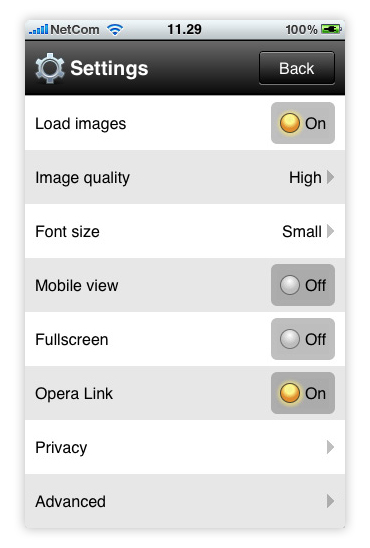
Load images
Disable this to prevent loading images. Images are however already compressed before loading on your phone, so for the best experience leave it on.

-
Image quality
Low Medium or High, this setting tells the server how much you want to compress your images before they land on your handset! The lower the quality, the lower the bandwidth and faster the browser!
-
Font size
Small, Medium or Large. Changing this allows you to adjust the font size to either gain more screen estate or make the text easier to read.
-
Mobile view
Mobile view re-renders the page you are browsing making it optimal for handsets. This causes some sites to look unfamiliar, so if you want to see the full site you might want to keep this off, however if you want a fast mobile-friendly experience go ahead and enable mobile view!
-
Fullscreen
Hide away the menu, address bar and Opera Mini header until you need it! Enabling fullscreen mode and press the home-button on a iPhone or menu on Android to make the menu pop-up when needed!
-
Opera Link
Enable Opera Link to synchronize your speed dial, bookmarks and notes across your other Opera Powered devices. For more on how this works check out Opera Link or the latest guide on Choose Opera!
-
Privacy
The Privacy settings include options to clear and accept cookies, stored passwords and your browser history. This is also where you enable or disable the Password Manager. The Password manager speeds up your browsing by storing passwords on your phone so you don't have to re-type them each time you go to your favorite sites!
-
Advanced
If you need to change the protocol Opera uses or want to run a network test this is the place to go. You can also enable or disable Start page links, this let's you turn off some system notifications.

Happy browsing with Opera Mini 5!
About this article
| Published in | Choose Opera |
|---|---|
| Date | April 13, 2010 |
| Author | Aleksander Aas |
| Tags | tips and tricks, opera mini, iphone, apple |
| Original | Internet Archive |
MartinTuesday, April 13, 2010 1:41:50 PM
HyaeneLeipzigTuesday, April 13, 2010 1:42:22 PM
Aleksander AasTuesday, April 13, 2010 1:43:32 PM
Originally posted by xyborg:
Thanks! It's the same settings for Android to, and I guess most other versions
Belthasar0Tuesday, April 13, 2010 2:31:03 PM
What might I be doing wrong?
AbhinavTuesday, April 13, 2010 2:32:48 PM
Aleksander AasTuesday, April 13, 2010 2:37:29 PM
Originally posted by Belthasar0:
Check out this guide:
http://my.opera.com/chooseopera/blog/2010/04/13/how-to-import-your-bookmarks-to-opera
Belthasar0Tuesday, April 13, 2010 2:43:48 PM
Johnny GameTuesday, April 13, 2010 2:57:17 PM
Rafael LuikTuesday, April 13, 2010 2:57:33 PM
TamilTuesday, April 13, 2010 3:15:43 PM
praetor87Tuesday, April 13, 2010 3:49:58 PM
Zeeshan AhmedTuesday, April 13, 2010 3:51:34 PM
netwolfTuesday, April 13, 2010 5:44:52 PM
Originally posted by Aleksander Aas:
Still doesn't work (as also confirmed in the blog posts).
d4rkn1ghtTuesday, April 13, 2010 6:55:52 PM
DeltaSyamTuesday, April 13, 2010 7:02:22 PM
Rafael LuikTuesday, April 13, 2010 7:14:23 PM
Originally posted by DeltaSyam:
(Select the text field if Opera integrated keyboard is enabled), hold/long-click w/ the cursor in the text field.
(maybe it's better to enable the Opera integrated keyboard for everything in the advanced settings or the clued text will replace the actual content of the field)
kabakovTuesday, April 13, 2010 7:21:26 PM
z@h3kTuesday, April 13, 2010 7:56:27 PM
Jeroen de VriesTuesday, April 13, 2010 8:33:40 PM
Charles SchlossTuesday, April 13, 2010 9:02:31 PM
MykuhlWednesday, April 14, 2010 1:55:47 AM
kabakovWednesday, April 14, 2010 12:34:27 PM
http://my.opera.com/community/forums/topic.dml?id=522941
Opera mini sync only bookmarks, which you have in Opera mini folder in Desktop Opera.
musatsalhatuWednesday, April 14, 2010 4:43:53 PM
netwolfWednesday, April 14, 2010 6:59:56 PM
Originally posted by kabakov:
Then the Link FAQ is wrong:
Rafael LuikWednesday, April 14, 2010 7:52:56 PM
Originally posted by netwolf:
So there isn't a "More Bookmarks" folder in your Opera Mini?
Kwagwazim ifeanyi henryWednesday, April 14, 2010 8:40:21 PM
Yuan RyuzakieThursday, April 15, 2010 1:42:58 AM
netwolfThursday, April 15, 2010 7:15:19 AM
Originally posted by Rafael Luik:
No, apparently not on the iPhone version.
The only folder I have is called Opera and contains a link to opera.com.
No bookmarks from desktop are synced.
And I don't want to deliberately create hundreds of duplicates by copying all my BMs to the Opera Mini folder.
Even if I did, it still wouldn't be a synchronization as I have to create a duplicate of every single BM I add to my desktop version in order to make it appear in OM as well.
Rafael LuikThursday, April 15, 2010 8:35:04 PM
I hope Opera Software fix it.
Yuan RyuzakieThursday, April 15, 2010 11:58:26 PM
Eddy kingFriday, April 16, 2010 2:29:39 PM
joel espSunday, April 18, 2010 11:28:59 AM
Jeroen de VriesMonday, April 19, 2010 7:08:47 PM
Eddy kingThursday, April 22, 2010 7:20:30 AM
Jeroen de VriesThursday, April 22, 2010 1:43:59 PM
Buko4kaThursday, April 29, 2010 5:49:50 PM
Originally posted by netwolf:
+1It was much better, when all the bookmarks from the desktop were available in Opera Mini (in OM 4, for example, there was a folder "More bookmarks"), and there was no need to create copies of them in special "Opera Mini" folder.
hexephantWednesday, May 5, 2010 4:07:42 AM
What are start page links? Actually, for that matter, what/where is the start page? Is it the speed dial page, and you just failed to use the correct name of the feature in the settings, or is it a different feature? I'm not seeing any difference when I change the setting.
Josiah JimbaTuesday, May 18, 2010 10:57:49 PM
Charles SchlossTuesday, May 18, 2010 11:02:30 PM
presslymaxxSaturday, October 16, 2010 8:04:02 PM
quentasilTuesday, December 7, 2010 9:01:10 PM
Rafael LuikWednesday, December 8, 2010 11:12:46 PM
Originally posted by quentasil:
That's because probably your phone has a little screen or tiny RAMmemory. What's the vendor / model?khmadhuTuesday, December 14, 2010 10:14:39 AM
I could not able to find the option in opera mobile ,
I am using nokia 5800 mobile
JACK D. BARNETTE IIIMonday, December 27, 2010 8:04:01 AM
c t skinnerThursday, December 30, 2010 10:58:14 PM
on Nokia 5530 Symbian s60 5th ed
facebook only gets tiny images,
settings does NOT change this
How can I get big pictures?
(othewise opera mini is a better browser than the default phone)
Alexandru IonescuTuesday, January 4, 2011 2:47:28 PM
Any help would be appreciated, thanks!
Rafael LuikWednesday, January 5, 2011 1:48:27 AM
Pawan AmarThursday, January 6, 2011 6:46:39 PM
coolestboyzSaturday, January 8, 2011 8:03:33 PM
JACK D. BARNETTE IIIFriday, January 14, 2011 10:23:53 PM