
Opera Tips & Tricks: change action for file types

Here's a useful tip for you. If you want a specific file type (PDF for example) to open with a specific application in Opera, follow this tutorial:
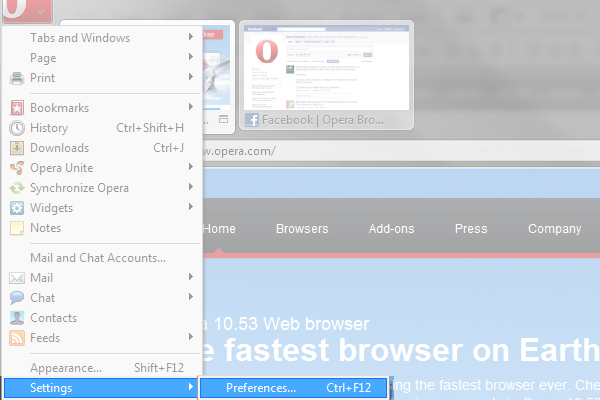 1Click on the "O" menu icon and choose "Settings" - "Preferences". Alternatively, press CTRL + F12.
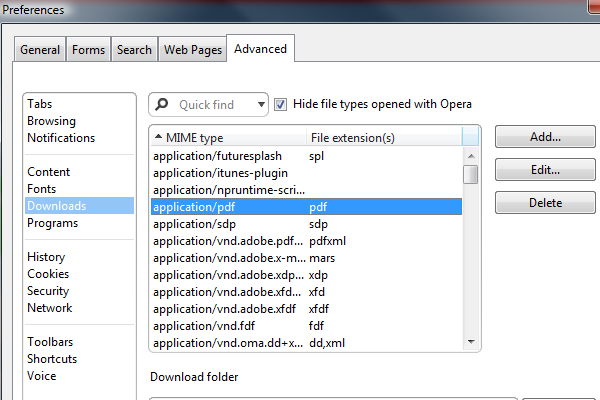 2Click on "Advanced" - "Downloads". Search for the file type you want to edit.
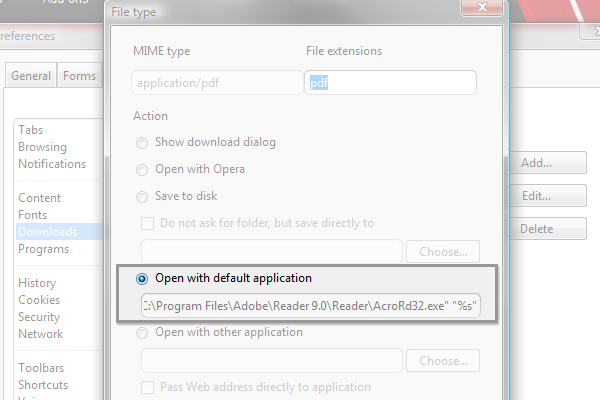 3Select "Open with default application" and click "OK". Profit!
Readers' comments 14
Left under the original article, as archived.
About this article
| Published in | Choose Opera |
|---|---|
| Date | May 4, 2010 |
| Author | Espen André Øverdahl |
| Tags | Opera Tips, file type |
| Original | Internet Archive |
TamilTuesday, May 4, 2010 11:35:13 AM
Kai OckendorfTuesday, May 4, 2010 11:45:28 AM
Mağruf ÇolakoğluTuesday, May 4, 2010 12:02:37 PM
Charles SchlossTuesday, May 4, 2010 1:41:57 PM
VarunTuesday, May 4, 2010 1:46:58 PM
How is that your Advanced options section has curved corners?
For me its straight 90 Degree corners. Is it the skin, Am using default sking Opera 10.53 Win 7 64bit.
Aleksander AasTuesday, May 4, 2010 3:13:53 PM
Edit:
Tried the default at home with Win7 Ultimate 64bit and I still have round corners. Could be Aero?
Rafael LuikTuesday, May 4, 2010 3:56:54 PM
Originally posted by Aleksander:
Nope, I use Win7 Ultimate 64-bit with Aero enabled and I don't have round corners.
Kai OckendorfTuesday, May 4, 2010 5:05:12 PM
Originally posted by Aleksander:
I use Z1-Glass too and i guess this tip here is a nice solution for the transparency issue with PDF files for this skin
d4rkn1ghtTuesday, May 4, 2010 8:06:43 PM
Crysta T. LaceyWednesday, May 5, 2010 11:29:50 PM
Crysta
webtaxMonday, May 10, 2010 9:27:45 PM
awesome feature of opera
issactjThursday, August 19, 2010 1:16:01 PM
Rafael LuikThursday, August 19, 2010 7:14:08 PM
Originally posted by issactj:
http://my.opera.com/community/help/profile/#changeusernameLassi A LiikkanenFriday, September 17, 2010 4:22:33 PM
- PDF viewer window (outside Opera) does not close automatically (I don't want it to)
- PDF docs remain easier to reach in history