
The next version of Opera, available now
Today we are releasing a brand-new version of Opera for you to try out. As the name suggests, Opera Next for Windows and Mac is a sneak preview of the next release of our desktop browser.
When it comes to making a completely new and improved web browser, there are a few indispensable elements such as: powerful technology, clean and modern design, and fresh new ideas.
But most important of all is your feedback, so please have a look at the next version of Opera and these new features:
Speed Dial
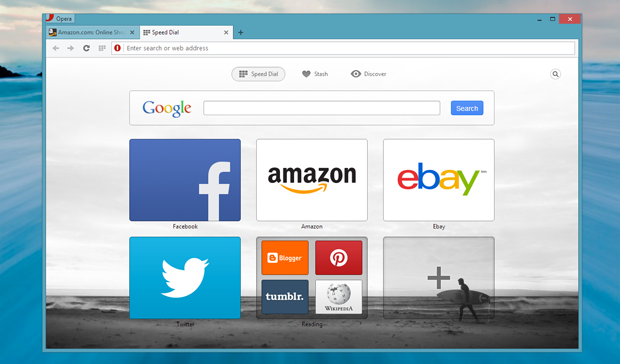 Lighter, brighter, and with the addition of a search box and folders to make it fun and easy to stay organized.
Stash
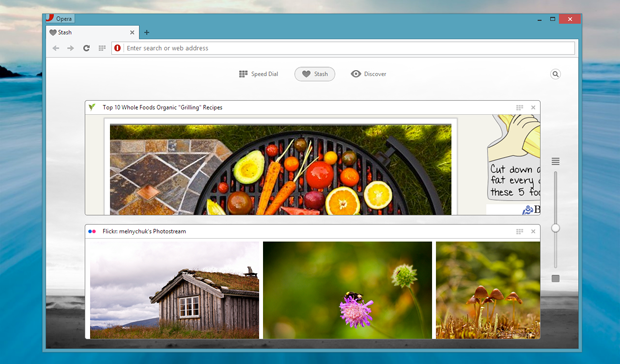 Think of it as your browser’s back pocket – a nifty way to store pages temporarily, like when you’re doing research or comparing online offers.
Discover
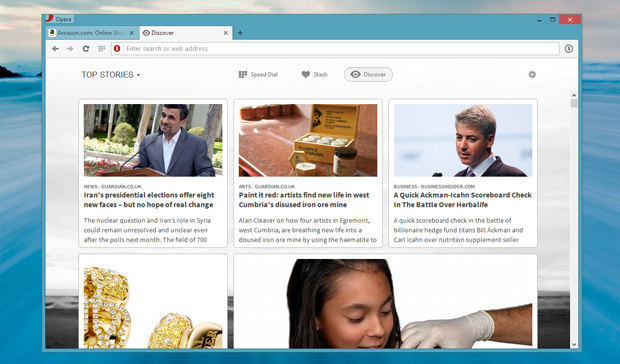 With 13 different content categories across more than 30 languages, you’ll be spoiled for choice when it comes to finding more news and entertainment online.
Combined address and search bar
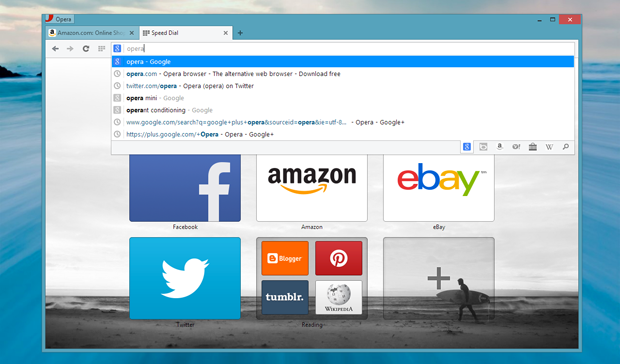 Search smarter, with an all-in-one window that guesses what you’re looking for as you type – and gives you a choice of search providers.
Opera Mail
On popular demand we have split the Opera Mail client from our desktop browser. The new Opera Mail can be found as a snapshot on the Opera Desktop Team blog.
Download Opera Next
Opera Next is as always free and available from www.opera.com/next. Please let us know what you think. You can submit comments or feedback right here!
About this article
| Published in | Choose Opera |
|---|---|
| Date | May 28, 2013 |
| Author | Anna Rohleder |
| Tags | opera next, speed dial, release, desktop, next, opera, stash, discover, mail |
| Original | Internet Archive |
Jorge EduardoTuesday, May 28, 2013 6:01:58 AM
inDigazzZTuesday, May 28, 2013 6:02:20 AM
Joshua PhelpsTuesday, May 28, 2013 6:06:30 AM
Tylor WTuesday, May 28, 2013 6:06:40 AM
Edit: It is using Chromium
DanielTuesday, May 28, 2013 6:10:03 AM
But please ease my nerves and tell us that Linux is in the pipeline?
Дмитрий НестерчукTuesday, May 28, 2013 6:15:50 AM
MistraTuesday, May 28, 2013 6:16:24 AM
Sanada YukimuraTuesday, May 28, 2013 6:19:25 AM
Samed AyanTuesday, May 28, 2013 6:22:45 AM
RzCoDerTuesday, May 28, 2013 6:29:38 AM
DeyanTuesday, May 28, 2013 6:31:19 AM
I wrote this post and poll in Opera forum years ago... and now "Speed Dial Stacking" feature is real... in both mobile and desktop
akdmnnTuesday, May 28, 2013 6:32:42 AM
There are no functionality besides opening the pages, even no syncronization with Opera Link. What is the reason of releasing this empty shell? Seems like you just needed to release something due to established deadline.
Martin HerichTuesday, May 28, 2013 6:44:30 AM
lexmichdezukTuesday, May 28, 2013 6:50:08 AM
What's the point in having folders in your SPEED dial... You use the bookmarks section for that...
I don't need stash, I don't need discover and I sure as hell don't need a huge search field RIGHT UNDERNEATH A SEARCH FIELD! Thats like having folders in your _SPEED_ dial...
Stop trying to reinvent rhe wheel, you already had an outstanding product. Now I have to start to get used to Firefox again...
inDigazzZTuesday, May 28, 2013 6:52:16 AM
Originally posted by akdmnn:
diego nunesTuesday, May 28, 2013 6:52:16 AM
- The "ESC" key is not exiting Full Screen mode.
- The Ctrl+L shortcut doesn't select the content of the address bar when it already have focus.
- The "Ctrl+Enter" shortcut for completing a web address (and the related "Shift+Enter" and "Ctrl+Shift+Enter" versions for opening the completed address on another tab/background tab) are not working.
. . Also, it would be nice to have some keyboard shortcut to swap those home "panes" (Speed Dial, Stash and Discover). Maybe a Ctrl+Arrow (Right or Left) to navigate between them?
. . Finally: there is this option for enabling "advanced keyboard shortcuts" and a "Learn more" link, but I couldn't find any info about what those shortcuts are and checking the option didn't seem to make any different n my shortcuts.
. . Other than that: great start with the new engine. Fast, working nicely and I still have my loved Mouse Gestures
Johan BorgTuesday, May 28, 2013 7:00:03 AM
Originally posted by dnunes:
Oops! Thanks for reporting, and good suggestions too, thanks!
Ignacio MTuesday, May 28, 2013 7:01:49 AM
im breaking up with opera =(
KasparsTuesday, May 28, 2013 7:06:32 AM
rascal0plTuesday, May 28, 2013 7:12:45 AM
Best functions of opera (customisation, shortcuts, open new tab by mouse roll, opera link etc) are gone now !
"Opera, what are you doing, opera stahp!"
I know, that speed is very important thing, but not for that cost !
stephenpbarkerTuesday, May 28, 2013 7:19:36 AM
Bojan StojanovicTuesday, May 28, 2013 7:26:40 AM
udaydeepTuesday, May 28, 2013 7:28:02 AM
But before I get to the bad things, here are the good things (I think) about this version :
The Discover feature is lovely, and so is the Speed dial button next to the refresh button. Feels and loads pages much faster (thankfully). The downloads page looks good too. Actually, the new page style of settings, download, help, history is pretty good in general. Also, love the folders in speed dial. But all these lovely features will be dearly missed by me, because :
Bad Things about this version:
Very less configuration options available! Hate the fact that almost all appearance related settings have been removed.
What I hated about Chrome is the now the same thing I hate about Opera 15, that the settings panel is just a few basic options. Really loved the Appearance->Toolbars option to configure each toolbar, make the progress bar as popup, etc. Can't configure the Mouse gestures. No way to change the size or number of speed dials. Heck, now I can't even go to the granular opera:config. ITS NOT OPERA ANYMORE, JUST AN OPERA LOOKING CHROME.
Absolutely despise this new uncustomizable (if that is a word?) direction Opera has taken. I love the new features and I really want to upgrade, but please somebody tell me that the configuration options were taken out just for the Opera Next version. Else, 12.15 it is then.
Bugs found : The From link in the Downloads page overflows the box if there is a long single word.
djulfTuesday, May 28, 2013 7:30:46 AM
Johan BorgTuesday, May 28, 2013 7:32:02 AM
Originally posted by blastbeat:
http://my.opera.com/desktopteam/blog/opera-next-15-0-released?startidx=0#comment108192992
KasparsTuesday, May 28, 2013 7:34:00 AM
Johan BorgTuesday, May 28, 2013 7:37:42 AM
Originally posted by rascal0pl:
Opera 15 Next is only our first version of a brand new product and some features like Opera Link simply took longer to finalise (it's most definitely coming back!), but we will improve it over time and take your feedback into consideration when doing so.metaller666Tuesday, May 28, 2013 7:42:08 AM
idiologicTuesday, May 28, 2013 7:46:38 AM
Originally posted by borg:
I'm glad to hear this because I am really missing Opera Sync, wand and the customization options. I'm excited about the upcoming changes and I really hope you guys get it right.
Ivailo MinkovTuesday, May 28, 2013 7:52:51 AM
No notes?!
no mouse gestures?!
Actually there are no setting at all no personalization whatsoever.....
You've also removed IRC..... wtf guys are you serious?!?!?!?
At my work place we are all(around 30 ppl) using opera because we needed all those things that you've removed. Shame on you guys.
Well....i guess we will be sticking with the old version here but be know that you've just dug your grave. As far as I'm concerned if this will be the final one... opera is dead
AlexanderTuesday, May 28, 2013 7:54:28 AM
select text is so terrible!
i cant include visual tabs!
new dragonfly - very very very bad!
and so many many other problems...
Sanada YukimuraTuesday, May 28, 2013 8:14:11 AM
chrome memory Hog --> solved
Well..
still need alot of works at this Opera Nightly build
some bugs at settings > restart button doesnt work
also ctrl+enter to auto complete www.example.com not works
diego nunesTuesday, May 28, 2013 8:23:46 AM
- 1) Open Opera Next (or a new window, whatever);
- 2) Open a tab on opera.com;
- 3) Open another tab on Google.com;
- 4) Go to the first tab (opera.com), delete the address from the address bar (leave it empty) and change the focus out of the bar;
- 5) Switch to the second tab;
- 6) Switch back to the first tab, click on the address bar (that should be empty) and press "esc" (so that it fills the current address back);
- 7) It will fill "google.com" (the old tab) rather than "opera.com" (the correct current tab's address).
. . This can be reproduced on a windows full of tabs as well, of course. It will always fill the address bar with the previous tab (the tab you came from).
. . Cheers.
-----
### Edit ###
. . Just found out that it is reproducible with empty tabs as well as multiple times if you have mutiple tabs with empty addresses. It will always "carry" the address from the last address-filled tab you were in.
ForsakenfxTuesday, May 28, 2013 8:39:29 AM
No Bookmark Manager
NO BOOKMARKS.
No Dragonfly (Which is the best web developer tool I've ever used)
No Speed Dial Hotkeys
No Tab Stacking
No Tab Pinning
I can't CTRL+W out of Web Inspector without closing the tab, I cannot CTRL+W the last window without closing Opera.
It's like ever single feature that made Opera what it is is missing, and that there is almost no real difference between Chrome and Opera. The speed improvements, and compatibility improvements might be nice but with every feature that made me stick with Opera even with the half-assed development these last few years I really have no reason to stay. I'll continue to keep an eye on things until the stable release, but until then I am sticking with the last *decent* version of Opera and possibly for good. Otherwise I will just switch entirely to Chrome and learn to deal with the lack of productivity that it offers.
God knows it would be better than this steaming pile of crap you're calling the next version of Opera.
Peter Rønning JespersenTuesday, May 28, 2013 8:40:27 AM
teresaejuniorTuesday, May 28, 2013 8:41:58 AM
Johan BorgTuesday, May 28, 2013 8:42:24 AM
Originally posted by dnunes:
Thanks, as expected in a Next release
TanelTuesday, May 28, 2013 8:48:33 AM
Why release it like that? Head over to the Desktop Team blog and see for yourself, there are literally a thousand comments asking for it.
To me, this release shows that Opera still has it. The Stash function is a neat solution to an age old problem, I no longer need to keep tens of tabs open to get back to them in the near future. Nice!
teresaejuniorTuesday, May 28, 2013 8:49:36 AM
Originally posted by borg:
Does it make much difference for you if we report bugs formally using the wizard or simply leave a comment on the blog? I understand that a bug tracker is more organized, but sometimes we don't have the time to fill in the formsJohan BorgTuesday, May 28, 2013 8:56:34 AM
Originally posted by teresaejunior:
We're very tired
Martinez09Tuesday, May 28, 2013 8:57:50 AM
CreechNBTuesday, May 28, 2013 8:57:59 AM
Of cause, many features from Opera 12 are still missing, but I think, you guys are already knowing this.
Thanks for the preview. Now take you're time and build a real Opera experience around it
MarmadukeTuesday, May 28, 2013 9:01:20 AM
denyerecTuesday, May 28, 2013 9:05:45 AM
No integrated mail, no dragonfly, no RSS, no side-tabs, no IRC...
You've taken out the main reasons to use Opera in the first place!
Without mail and IRC, it's pointless to use Opera - May as well use Chrome which will have faster release cycles and more extensions. The dev tools are now equally bad, so no loss there either.
The community needs a roadmap, and fast.
KasparsTuesday, May 28, 2013 9:06:55 AM
Originally posted by denyerec:
cant agree moreteresaejuniorTuesday, May 28, 2013 9:07:39 AM
Originally posted by borg:
WOW, very tiring, and maddening considering all angry rants to be filteredClashCityRockerTuesday, May 28, 2013 9:26:29 AM
Not having a RSS Panel however for me is my biggest problem from a usability point of view. I can adapt to most of the other changes.
Keen to see how easy it is for extensions to be ported from Chrome to Opera.
I think we also need a clear road map of what is being worked on, and what we should say our goodbyes to.
Johan BorgTuesday, May 28, 2013 9:36:39 AM
Originally posted by clashcityrocker:
Quite a few of them work with no modifications at all (!), it depends on the APIs used by the extension and we intend to support even more of those APIs later this year.
coldcorpseTuesday, May 28, 2013 9:41:57 AM
BTW, high-five for the integration of "read-it-later" aka Stash!
yuroonTuesday, May 28, 2013 10:12:55 AM