
Opera 14 beta for Android is out
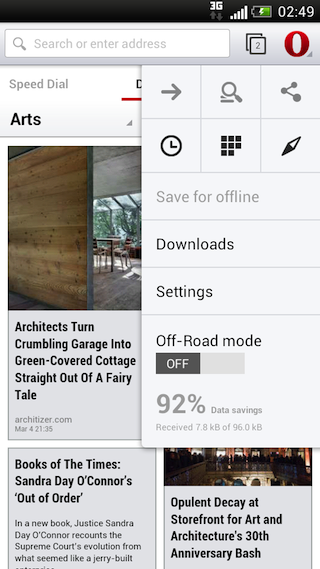
Yes, that's right: 14. We think that the engine switch from Presto to WebKit that we announced a few weeks ago is such a big step that we decided to skip the 13 number altogether, and go straight to 14! But there's more than just the engine to talk about: you'll also notice a total overhaul of the UI in native code, making it fit well with the latest Android design guidelines. Go get the beta from Google Play or point your browser to m.opera.com, and give it a spin!
Android 2.3 and up
Currently, we support Android 2.3 and higher. That's important, as 45% of Android users are still on Gingerbread — now they also can get top of the range features and performance!
At this point, we don't have an Opera 14 build ready for tablets yet: we're still working on various UI optimizations and this will be released later.
A whole new engine
This first beta release is based on AppleWebKit/537.22 and Chrome/25.0.1364.123 — we plan to follow a fast development cycle, so it's likely that the final Opera 14 product is based on an even more recent milestone.
The engine inside Opera is very closely in sync with the one included in Chrome Beta (which is also at AppleWebKit/537.22 and Chrome/25.0.1364.122 at the moment), but with some added standardsy goodness.
Opera 14 for Android has out-of-the-box support for:
input type=color- Microdata
- WebGL 3D context
- CSS3
@supports
Opera 14 for Android does not have support for:
- Custom search providers
- access to chrome://flags
We've also adjusted our UA string, so as to avoid old sniffing traps: it's similar in format as the Chrome UA string, with, for this release, OPR/14.0.1025.52315 appended at the end. Of course, you shouldn't be looking at this at all, and instead do feature detection, so forget we mentioned it.
New UI and features
The first thing you'll notice is the new Discover feature, which helps you find interesting online content. If you pan to the left, Speed Dial emerges, which now also contains all your bookmarks. You can combine bookmarks in one level-deep sets by dragging and dropping them on top of each other. And if you pan further to the left, you'll find an overview of your browsing History. These 3 views give you a good place to dive right into browsing, or you can of course query for sites from the redesigned combined address+search bar.
The red O button has moved to the top right of the screen, just like in other Android applications, and it toggles a menu with advanced options, such as Sharing, Find in Page, Downloads, Settings, and more.
However, the one special highlight here is Off-Road mode: when toggled on, pages are loaded via the Opera Mini servers, thereby reducing bandwidth and data cost. We thought: Yo dawg, we heard you like browsing, so we put a browser in your browser!. So, no more need to switch browser to get Opera Mini features: you get it all in one package.
Of course, there are many more details to talk about — the plus button, private tabs, browser.js — but we leave those up to you to discover. Enjoy, and let us know what you think!
About this article
| Published in | ODIN blog |
|---|---|
| Date | March 5, 2013 |
| Author | Andreas Bovens |
| Tags | webkit, browsers, Opera, mobile, android |
| Original | Internet Archive |
sirnh1Tuesday, March 5, 2013 8:39:16 AM
* Browser installed itself in "Dutch", but I want to have it in English. But I can't find a way to change the language?
* Any chance of getting an option like "don't use off-road while using wifi"?
* Is support for the "Custom search providers" still coming? Because I really want my custom youtube search provider
* Opera link doesn't download my favorites, but only opens a webview (not usefull at all)
* When I'm typing something in a textbox or textarea (like when I'm editing this comment) and click on the 'back' button on my phone (NOT the back button in the browser), opera is reloading the previous page, while it should just leave the textbox and focus back on the current page... (like all other apps do).
* I don't have a 'back'-button in my browser? (or at least I don't see it, what good is that 'forward' button, when I don't have a 'back' button?
* Sometimes I find opera loading on a page, that I didn't ask for. I was (trying to go to the myopera forums, but suddenly ended up on
http://www.opera.com/help/mini/guide )
* When going to http://my.opera.com/ and getting the mobile version and 'clicking' on the 'Community' button, the community page loads. The submenu 'News, blogs, etc...' shows for like only 2 or 3 seconds.
* How do I turn off the 'google suggestions'?
Final edit:
" it's similar in format as the Chrome UA string, with, for this release, OPR/14.0.1025.52315 appended at the end."
Won't that mean that opera will show up as 'chrome' in pretty much ALL statistics? (Meaning opera's marketshare will eventually be reported as 0%?)
AndreaTuesday, March 5, 2013 9:08:20 AM
AuxTuesday, March 5, 2013 9:31:38 AM
Then I tried opening opera:config, error page was shown and after that all pages were working OK.
Martin KadlecTuesday, March 5, 2013 10:14:54 AM
Does this mean that once Opera Link is working I'll have all my hundreds of bookmarks on my speed dial?
Update: I can't get to the main UI, it always crashes on the "Are you ready" page with start button after a while. I sent two crash reports
ouzowtfTuesday, March 5, 2013 10:33:00 AM
- Opera button is too big and uses too much space which should be used by the address bar
- as the "Discover"-feature seem to be some kind of rss-feed, I would like to set for myself what feeds from what pages I want to see
- the menu shows me, that there were 97% traffic savings, but offroad-mode was not even once activated
- like sirnh1 said there should be the option "don't use off-road while using wifi" again
- on desktop pages there is no word wrap anymore!!!
- when address bar is highlighted, the protocol should be shown too, so that it could be copied
- when I'm on the speed dial page and push the back button, Opera should minimize/close itself (regardless if I used the tab for surfing before!)
- the "new tab" button looks out of place and has the speed dial logo instead of a "+"-sign or anything
- when pasting an url in the adress bar I can not confirm it. In Opera mobile I could change the url, bacause the keyboard was shown. A "paste and go" would be even cooler.
dahulevogyreTuesday, March 5, 2013 10:46:03 AM
Coming soon to statistics near you :
Mozilla/5.0 (Windows NT 6.1; WOW64) AppleWebKit/537.17 (KHTML, like Gecko) Chrome/24.0.1312.60 Safari/537.17 OPR/14.0.1025.52315
Martin KadlecTuesday, March 5, 2013 10:48:42 AM
Originally posted by dahulevogyre:
Now we only need to add IE10.xx and we have all browsers in it
sirnh1Tuesday, March 5, 2013 11:00:39 AM
Originally posted by dahulevogyre:
The android version is even a bit longer as the name of the phone is also in there:
mozilla/5.0 (linux; android 4.0.4; HTC-Descire S Build/IMM76D) applewebkit/537.22 (khtml, like gecko) chrome/25.0.1364.123 mobile safari/537.22 opr/14.0.1025.52315
Erik HauboldTuesday, March 5, 2013 11:43:16 AM
m910qTuesday, March 5, 2013 11:52:17 AM
I found a page via Discover, and tried the "Save for offline" feature. It worked fine, but the thumbnail only loaded for the big icon, not the small preview-icon on the "Saved pages" folder.
Screenshot: https://dl.dropbox.com/u/1098960/o/beta.png
The only way to fix it, was to kill the Opera process and open it again.
2.
The Download screen is loaded in the tab, so when I close it (by pressing Back), it has to reload the page I was previously on.
So if I want to save data, I would have to open a new tab, just to go to the Download screen.
NimeshTuesday, March 5, 2013 2:25:27 PM
Originally posted by 4ndrea:
Yes, but this does not look like beta. It should be set as Preview/Alpha/labs build as lot of finishing would have to be done.
ahoj1234Tuesday, March 5, 2013 3:08:02 PM
- Using desktop UA string with this beta version and off-road together cause that page are loaded as mobile content => don't respect desktop UA. (changed UA - to desktop - works OK without off-road)
Originally posted by sirnh1:
http://www.zive.cz/uploadedfiles/586626417.png
It sounds like you are right
Chrome 25 on linux... that's what you get.
edit:
How to be fast in switching back? (Opera mini have a simply button) I can't find here any option to switch back at all... I tried "slide to left" or "slide to right" etc... but nothing happened.
akjirTuesday, March 5, 2013 3:14:49 PM
JanghouTuesday, March 5, 2013 3:53:06 PM
Major issue:
A lot of times the keyboard (Swype)is not shown when editing the addressbar, just an darkgrey overlay over the page. It works OK when opening a new tab.
Ran Sunspider:
1.29 as fast: from 1453 ms to 1130ms
Opera 14 beta: 1130
Opera 12: 1453
Firefox: 1368
Chrome: 1512
Stock: 1594
Not bad
Mozilla/5.0 (Linux; Android 4.1.2; GT-N7000 Build/JZO54K) AppleWebKit/537.22 (KHTML, like Gecko) Chrome/25.0.1364.123 Mobile Safari/537.22 OPR/14.0.1025.52315
MossManTuesday, March 5, 2013 4:31:39 PM
First impressions:
- White. So much white. I hate white UI - restless on the eyes (same opinion about the current desktop UI, as it happens - always preferred the Windows Classic look which matched my calm blue default colours).
- The bar is too thick... lots of wasted pixel padding and an over-large "O" taking up precious space. At the same time, the address bar is too short to be useful (e.g. at the moment I only see [https://link.opera.com/s] - so different pages in the same domain will never be distinguished).
- Link doesn't do anything useful yet... just accesses the MyOpera Link page but you have to go through settings(!?). Navigating those bookmarks in the Webkit browser is horrible. Local bookmarks seem to be intentionally absent from the actual browser UI! Weird...
- The speed dial thumbnail created from BBC news is a white square with grey newspaper text on it - how am I supposed to identify BBC from that?
- Discover... no thank you.
- No desktop mode in
- Messy and unintuitive interface, IMO. I know I'll get used to it but I found myself randomly pressing things 'cause I wasn't sure how it would respond and had to figure out certain functions multiple times. Was surprised to find gestures (swiping) didn't do anything (expected left and right to be back and forward, for example).
So far... nothing impressive, although the zooming seems quite smooth.
ouzowtfTuesday, March 5, 2013 4:58:07 PM
That was the best feature for me the other browsers did not have!
Also the native copy, paste, select all options for text are not available. The Opera options for this are hidden when I select too much text
ahoj1234Tuesday, March 5, 2013 7:20:26 PM
Opera 14 for Android does not have support for: Custom search providers - seems like a big problem since we have a plenty services witch we want to set.
access to chrome://flags - Please, really, please don't make this for desktop, android or whatever... rename it to "opera:config" "opera:..." etc... I know that redesign "Opera's under the hood" need some time and has to be updated but... It matters
BranoTuesday, March 5, 2013 8:18:08 PM
DanielTuesday, March 5, 2013 9:46:48 PM
Please fix that, especially textwrapping is very important for mobile users.
Plus, on my device (sony xperia sola), scrolling appears to be not as good as in opera mobile 12. No exit-button.
However, please remember that there are persons whose phones only have 512 MBs of RAM. Opera Mobile 12 does not need that much of RAM like Chrome/Firefox.
Moreover... Remove Chrome and Apple out of the UserAgent-String. These Companies have no place there...
What i forgot: no proper text-marking, why are paddings/margins marked aswell? Makes no sense for me.
maxefoxTuesday, March 5, 2013 11:46:35 PM
Mobile 12.1
Hack My BrainWednesday, March 6, 2013 1:30:38 AM
And Presto-based Opera Mobile supports URL filter mechanism, which greatly improves loading speed.
What made Opera distinguished from Chrome on Android are not only apparent features or UI, but also these capable things deep inside, which are important to power users.
Hope WebKit-based Opera will be at least as powerful as the Presto one.
Hack My BrainWednesday, March 6, 2013 1:56:21 AM
1) Frequently used "forward" action button or something would be better placed on handy toolbar.
2) Now switching to another certain tab needs 2 taps on its thumbnail. 1 would be enough.
3) Chrome-like designed searchbar / addressbar integration is hateful. Sorry for this adjective, and for this so-called fashion, which is more and more popular. It makes page address information visually overrode by searched keywords. Sometimes this behavior of operation is annoying.
freenarativeWednesday, March 6, 2013 3:03:30 AM
bjhamltnWednesday, March 6, 2013 3:21:32 AM
Even though it is not a part of the HTML5 spec it really enhanced the browsing experience for websites which took advantage of target-densitydpi where supported.
Erik HauboldWednesday, March 6, 2013 3:58:31 AM
- the new ui looks good, takes less space, ... but some handy gestures would be nice and would help opera differentiate from others
- the tabswitcher also looks better, but as already mentioned:
> i now have to tab 2 times to get to my tab
> i can't use any (more or less) gestures to close tabs (like the android app switcher)
> i haven't found a comfortable way to open a new tab: either i have to move far across the screen or use a second hand, both takes up lots of time and doesn't feel good. maybe some double-tap to open new tab within the tab-switcher would be nice.
- no urlfilter.ini, this was quite a killer feature of opera mobile.
- performance is good, but could be better. the most problematic part is when rotating from portrait to landscape on some sites. opera takes a while to rescale the content.
- some option to speed up those internal animations (open tab, open tab switcher ...) would be handy. url-bar doesn't react directly after double-tapping a tab.
- experienced some crashes after activating offroad-mode. also an enable-when-not-on-wifi option would be great, had this one always enabled on opera mobile 12.1
- the new speed-dial is nice, but please let us configure our own feed's in the discover mode. i ran into this problem: i don't want "computerbild" as a source, as they are just junk in my eyes, but i want to get the engadet us feed, which isn't possible with german region. i could change the region, but then i wouldn't be able to get heise.de or zeit.de. so more customization would be nice (this was always a strength of opera)
- opera link integration is missing, but this could be because of the beta-state and maybe also because of the folder features not beeing present on desktop at the moment
- last but not least: how do i debug my pages in opera mobile now? apparently you killed the one-click remote debugging feature.
this is just a list which came to my mind today, hope there will be some advances in this areas before release so people really wouldn't know whether there is presto or webkit, as the featureset keeps the same and the usability improves with the new gui
sirnh1Wednesday, March 6, 2013 8:06:04 AM
Originally posted by Altarius:
I agree with that. I want several sites that are from different countries. And most of the sites in the 'discoveries' page aren't even interesting. I don't want sites like zita.be, goedgevoel.be, msn.com, to show up in there.
I have only the categories 'technology' and 'entertainment' enabled, but I sometimes still get articles from other categories. What good is the discovery thing if I can't have a say in what sites I want (and don't want) to show up?
MossManWednesday, March 6, 2013 10:56:09 AM
Originally posted by sirnh1:
Advertising... duh!
That's also why I'll never ever use it.
ouzowtfWednesday, March 6, 2013 5:10:38 PM
Hack My BrainThursday, March 7, 2013 2:02:20 AM
An Option for this, which can be presented to new users at the first-time startup, would be nice.
ahoj1234Thursday, March 7, 2013 5:33:30 AM
Originally posted by HackMyBrain:
+1 I don't write so stupid comments everyday but I have to nowMağruf ÇolakoğluThursday, March 7, 2013 7:55:53 AM
First Impression:
-There is no text wrapping feature. It is the most importatnt fearure for Opera than other. It should be added.
-In Turbo mode (Mini style) , it renders the page by Presto instead of Webkit. It should be fixed on Mini servers.(Pls try Facebook)
-Of course Opera Link should work. (I am sure it will be)
-I think fullcreen option should be added.
-Maybe Opera icon should be visible by a setting.
-Tabs are very nice but a bit hard to reach tab and move them. Maybe tabs move can be by hand on main screen such a mouse gesture from left-to-side or viceversa.
These are the features I want to add but generally it seems nice and usefull.
KleodyrThursday, March 7, 2013 1:56:53 PM
I remember there was a Windows emulator for Opera mini or Opera mobile, can you guys release that so that those still on the Android dark ages can at least see it?
Jan HaraldssonThursday, March 7, 2013 8:27:42 PM
PaninaManinaThursday, March 7, 2013 10:00:27 PM
They took EVERYTHING that made Opera Mobile be good and threw out, all in favor of an engine that is supposed and hypothetically "better."
Only the addition of private tabs, which should have already come more than one year, it is commendable.
RSDThursday, March 7, 2013 11:54:02 PM
I hope Opera devs can find a way to avoid this.
Edward MylesSunday, March 10, 2013 12:05:02 AM
LaurentSunday, March 10, 2013 8:30:35 AM
2 features I really wish I could find in the new versions of Opera on Mobiles/Tablets:
- Fast forward: love it on desktop, miss it so much on mobile. A swipe to the right should bring me to next page / image in gallery, a swipe to the left would bring me back
- Recognise RSS feeds on web pages and let me subscribe to the feed. No need to have a built in feed reader (although that was one of Opera Mini best features). Simply pass on the RSS feed link to a choice of installed external readers (Google reader or others)
Otherwise, fit to screen when zooming, as reported by others doesn't work so well anymore. I have other remarks and grievances but I'll wait and see for the browser to develop.
Cheers!
FIXATORSunday, March 10, 2013 2:26:24 PM
acidspoofSunday, March 10, 2013 6:07:52 PM
DanielMonday, March 11, 2013 9:10:07 PM
Originally posted by FIXATOR:
There is no non-Apple product with a Retina-screen. It's just a name given by Apple.
QuHnoTuesday, March 12, 2013 6:08:35 AM
Originally posted by DD64:
Replace "Retina"-screen with "displays that have a higher resolution than our eyes can resolve at the given viewing distance"-screen and almost all of the higher quality smartphones or tablets qualify for that.
f4ncyTuesday, March 12, 2013 8:22:41 PM
1.The new UI certainly looks nice, but it is completely inadequate for one handed use. Tab switch and menu on top may work on a 3.5 inch device. On a modern 4.5+ inch phone it’s a just a pain to reach out to the top of the screen every time you want to switch tabs. Just thinking about it makes my thumb hurt…
2.The lack of true Bookmark function. The SpeedDial is not sufficient for my needs. Just try to imagine it with 100+ bookmarks. One folder level is simply not enough.
3.The address bar takes way to much space. Especially in widescreen mode it takes a good chunk of the display. There should be an option to toggle its visibility. Just show it when pressing the hardware menu button or something similar. In addition there should be a true fullscreen mode available.
Those points may be few, but every single one is a major flaw.
JimWednesday, March 13, 2013 8:03:49 AM
And no bookmarklets, which I use often.
ИванWednesday, March 13, 2013 9:01:50 PM
Kokila1Friday, March 15, 2013 9:16:44 PM
teou6Saturday, March 16, 2013 11:15:53 AM
Sorry for the offtopic, but i just don't like when business$$$ kills innovations and customer satisfaction.
As for the mobile browser, it's utter failiure!! Tested on Android 2.3.7 with arm v6 and on Android 4.0.4 with arm v7 1ghz cpu.
Interface is bullshit. A lot of Marketing i see - renaming saved files to offline files, proxy to offroad... i see, very important new features. Unification of bookmarks and speeddial... - did you tested this with 200 bokkmarks? I bet not. Opera link - practically killed. RSS - killed, but replaced with news from 10 sites, and obviously i cannot add more. Default zoom - killed. Tab switching - with 3 instead of 2 clicks. The only new thing is the private browsing... which Firefox Mobile already has for about 1-2 years. By the way it also has widgets/add-ons/extentions, which obviously you don't want to port from the desktop version.
Under the hood: webkit. Laggy zoom. Lacking text reflowing in one column, which is the most important thing for small screens, as stated above in other comments. opera:config is dead, but chrome://chrome-urls is not yet born. More mem and cpu usage. Generally, bullshit again. As if Firefox and Chrome and Android's own browser does not exist and there in no competition at all in mobile browser market, in smartphone dept. at least...
So obviously i cannot use this anymore on my mobile devices.
Actually it's not even a proper beta vesion by definition, it's more like alpha. A beta is supposed to be feature complete, so it only gets bugfixes. Here, essential features are missing.
But that is what hapens when IT company puts in the lead Financial and Marketing Dept. instead of Developers. You just get a big Marketing shit instead of real browser.
teou6Sunday, March 17, 2013 1:24:34 PM
http://postimage.org/image/qzuvbn1zt/
Now seriously, are we going to see something like real beta of real webbrowser in the upcoming 1-2 months. I mean, i wonder if i should unninstall this junk right now and forget about it, or wait for 1-2 more updates?
JimSunday, March 17, 2013 8:49:14 PM
NimeshMonday, March 18, 2013 5:29:11 PM
Originally posted by toyotabedzrock:
+1
I was expecting a blog post after last weeks update
BTW last week's update was good, removed the nuisance of multiple taps for changing tabs
NimeshMonday, March 18, 2013 5:32:32 PM
Originally posted by teou6:
I noticed that the RAM usage is slightly more (only the main process) compared to Opera Mobile, but since this is a beta and the shift to Webkit I think this should be okay