
Browser layout map
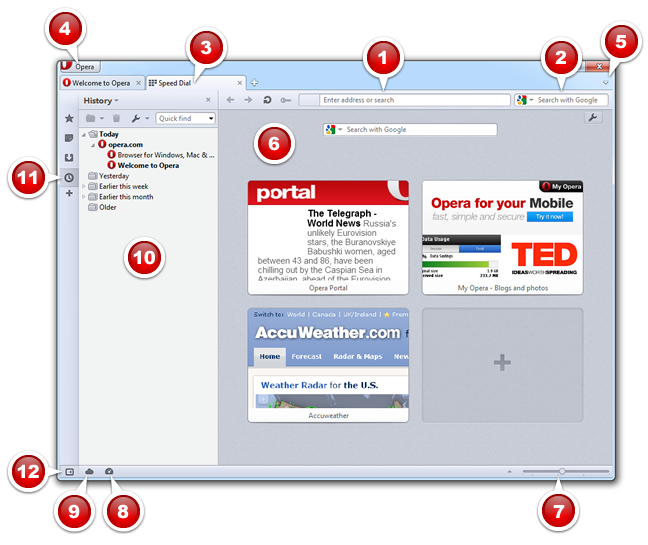
The default browser layout consists of, starting from the top, left: The main menu and the tab bar. Below that is the address bar, then the display window. A status bar runs along the bottom of the browser. Panels display at the left, when toggled.
- Address field
- Search field
- Tab bar
- Main menu
- Closed Tabs
- Display window for web content
- Zoom slider, fit to screen width, and control images
- Opera Turbo icon
- Opera Link icon
- Panel
- Panel selectors
- Panels button (to toggle panels)
From the help of Opera for computers 12.10, archived on September 18, 2012. See the original page.
Opera for computers
- ActiveX and VBScript support in Opera
- Advertising Preferences
- Auto-update
- Automatic redirection
- Backing up Opera
- BitTorrent
- Bookmarks
- Browser identity
- Browser layout map
- Browsing
- Cache
- Camera settings
- Chat
- Content
- Content blocking
- Cookies
- Custom toolbars
- Delete private data
- Developer tools
- Dialogs
- Display modes
- Do not track
- Download and install Opera
- Downloads
- Dragonfly
- Email and news
- Error console
- Error page
- Exit actions
- Extensions
- Feeds
- File Types
- Fit to width
- Fonts
- Forms
- Fraud and Malware Protection
- Full screen mode
- General preferences
- Geolocation
- Glossary
- History
- Home page
- Images
- Import or export data
- Java
- JavaScript
- Keyboard shortcuts
- Kiosk mode
- Language
- Languages
- Main Menu
- Menus
- Mouse gestures
- Multimedia
- Network
- Notes
- Notifications
- Older versions of Opera
- Opera Link
- Opera Next
- Opera Turbo
- Opera Unite
- Opera Widgets
- Page icons
- Page loading
- Page style
- Panels
- Personal Information
- Plug-ins
- Pop-ups
- Preferences
- Privacy
- Private browsing
- Programs and paths
- Referrer information
- Report a site problem
- Save data for online forms
- Save passwords
- Save sets of tabs
- Scrolling
- Searching in Opera
- Security
- Security certificates
- Security protocols
- Server settings
- Set Opera as the default browser
- Share menu
- Shortcuts
- Show page size
- Site preferences
- Skins
- Sound
- Sounds
- Source Viewer
- Speed Dial
- Spell checker
- Start and exit
- Start up tabs
- Storage
- Style modes
- Tabs
- Themes
- Toolbars
- Tooltips
- Trusted website list
- Use other programs for certain actions
- Using M2
- Using the Hotlist
- Using the mouse
- Using voice
- Voice preferences
- Webpage preferences
- Welcome to Opera
- When Opera crashes
- Windows
- Work offline
- Zoom